

What is Redirect Loop?
Definition
A redirect loop occurs when following a URL's redirects leads back to itself or to an address already visited, so no response with status 200 is ever reached. Browsers give up after a set number of hops with a 'too many redirects' error, and search engines cannot crawl the page. Loops usually come from conflicting rules across the server, CDN, application and CMS.
Also known as: ERR_TOO_MANY_REDIRECTS, too many redirects, infinite redirect, redirect cycle
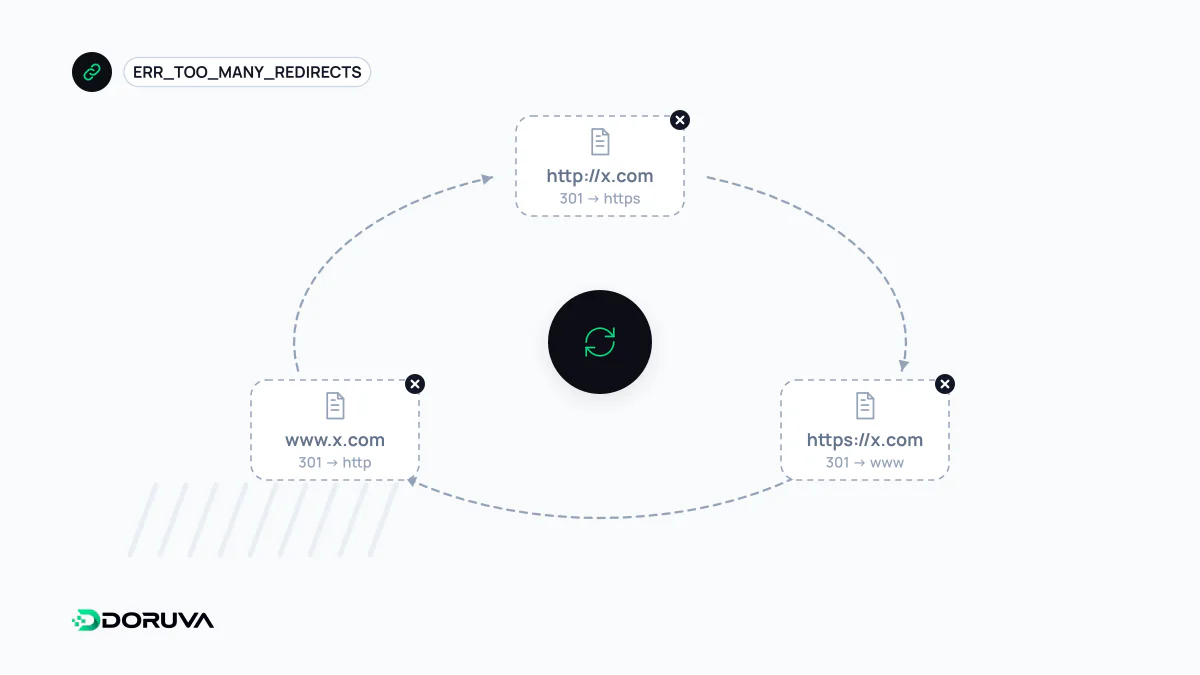
How a loop shows itself
To a visitor, a loop is an error page. Chrome reports that the page "redirected you too many times" with ERR_TOO_MANY_REDIRECTS; Firefox says "The page isn't redirecting properly". curl stops with curl: (47) Maximum (10) redirects followed once it exceeds the hop limit you allowed. On Google's side, affected URLs appear under "Redirect error" in Search Console's Page indexing report, where a redirect loop is one of the listed causes.
The difference from a redirect chain is that there is no end. A chain is slow but delivers the page; a loop never does, so for users and crawlers alike it is equivalent to an outage.
Usual suspects
- HTTPS conflict between CDN and origin: the CDN receives HTTPS from the visitor but talks to the origin over plain HTTP (Cloudflare's Flexible encryption mode is the well-known example). The origin redirects every HTTP request to HTTPS, the CDN fetches it over HTTP again, and round it goes.
- Wrong protocol detection behind a proxy: TLS terminates at a reverse proxy, the application ignores
X-Forwarded-Proto, believes every request is HTTP and keeps sending it back to HTTPS. - Host settings that disagree: the server sends
wwwto the bare domain while the CMS "site address" setting sends it back. - Trailing-slash rules: the web server adds the slash and the application strips it.
- Sessions and cookies: the login page itself requires a session, or the cookie is set for the wrong domain and never stored, so
/dashboardsends you to/login, a successful login sends you back, and the session is never seen. - Language or country redirects: two rules keyed on a cookie or the
Accept-Languageheader keep triggering each other.
Isolating the loop with curl
Start by seeing which addresses the loop cycles between. A low hop limit keeps the output readable:
$ curl -sIL --max-redirs 4 https://example.com/ | grep -iE '^(HTTP|location)'
HTTP/2 301
location: http://example.com/
HTTP/1.1 301 Moved Permanently
Location: https://example.com/
HTTP/2 301
location: http://example.com/
...
The ping-pong between HTTPS and HTTP is obvious here. The next question is which layer issues which redirect. Querying the origin directly, bypassing the CDN, separates them: curl -sI --resolve example.com:443:203.0.113.10 https://example.com/ sends the request to the IP you specify instead of the one DNS returns. The server header and CDN-specific response headers also give away where a redirect came from. For session-related loops, -c cookies.txt -b cookies.txt stores and replays cookies so curl follows the same path the browser does.
The lasting fix: one owner per rule
Loops stop for good when each normalisation (protocol, host, trailing slash) happens in exactly one layer. If the CDN enforces HTTPS, remove the same rule from the origin, or have the CDN connect to the origin over HTTPS (Full or Full (strict) mode on Cloudflare). Tell the application behind a proxy to trust the X-Forwarded-Proto header it receives. Make the CMS site-address setting match the canonical host configured on the server.
Test the fix in a private window or with curl. Because browsers may cache 301 redirects, a normal window can keep showing the old loop for a while after the server side is fixed. For CDN-side causes, Cloudflare's troubleshooting guide is a good reference.