

What is Cloudflare?
Definition
Cloudflare is a US-based company that operates a global network acting as a reverse proxy in front of websites and applications, providing services such as DNS, CDN caching, DDoS mitigation, a web application firewall (WAF), bot management and serverless compute (Workers). Once a domain's nameservers point to Cloudflare, traffic to proxied records passes through Cloudflare's network before reaching the origin server.
Also known as: Cloudflare CDN, Cloudflare DNS, CF
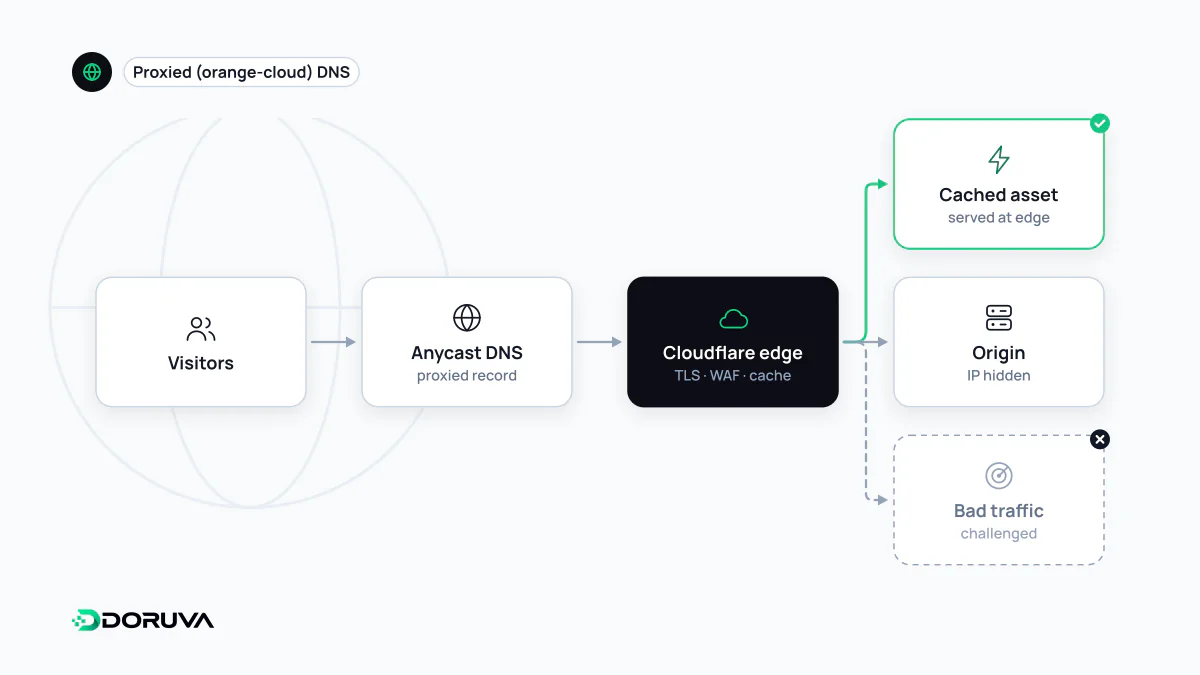
A network that sits in the request path
Onboarding usually means switching the domain's nameservers to Cloudflare's, which makes Cloudflare the authoritative DNS provider. Each record is then set to one of two modes:
- Proxied (orange cloud). Lookups return Cloudflare anycast addresses instead of your server's IP. HTTP and HTTPS traffic lands at a nearby Cloudflare data centre, where caching, security rules and TLS are applied, and only then, if needed, is forwarded to your origin. In this mode Cloudflare behaves as a reverse proxy.
- DNS-only (grey cloud). The record is published as-is and traffic never touches Cloudflare, so none of the features below apply. Non-HTTP services such as mail hosts are configured this way.
Main service areas
| Area | What it does |
|---|---|
| DNS | Authoritative DNS hosting, with provider features such as CNAME flattening at the apex. |
| CDN and caching | Serves static and cacheable responses from servers close to the visitor. |
| DDoS mitigation | According to its documentation, automatically mitigates network-layer (L3/L4) and application-layer (L7) attacks on all plans. |
| WAF and rules | Blocks, rate-limits or challenges requests based on signatures, IPs, countries or custom expressions. |
| Bot management and Turnstile | Classifies automated traffic; Turnstile is a CAPTCHA alternative that also works on sites not proxied through Cloudflare. |
| Workers | A serverless platform for running code at the edge. |
The catalogue goes well beyond this and changes often, covering Zero Trust access, storage and domain registration among others.
Side effects of proxying
- The real client IP. Connections to your server now come from Cloudflare addresses. The visitor's IP arrives in the
CF-Connecting-IPheader; unless your logging, rate limiting and form protection read it, every visitor appears to come from a handful of IPs. - SSL mode. In “Flexible” mode, the browser-to-Cloudflare leg is encrypted but Cloudflare-to-origin is plain HTTP. Cloudflare advises against it for applications handling sensitive data, and if the origin redirects HTTP to HTTPS it produces a redirect loop. With a valid certificate on the origin, “Full (strict)” is the sound choice.
- Origin exposure. Proxying helps hide the server's address, but an unproxied subdomain or mail sent directly from the server can reveal it. Allowing only Cloudflare's IP ranges at the origin firewall reduces the risk.
Bot settings and crawlers
Bot features catch wanted automation as well as unwanted. Verified bots, such as major search engine crawlers, have historically been excluded in default configurations, while AI crawlers can be blocked or allowed separately depending on whether they crawl for training, search or agent use. Cloudflare's documentation announced changed defaults for new domains from 15 September 2026, so check what your own zone is actually set to. If you want a site to appear in AI-generated answers, check these dashboard settings alongside robots.txt; bot accessibility covers the wider picture.
Weighing the trade-offs
Putting DNS, caching and security with one provider simplifies operations, but it also concentrates risk: an outage or a bad rule at that layer takes the whole site with it. Large Cloudflare incidents have made many unrelated sites unreachable at once in the past. On important projects, keep a change log of dashboard edits, trial new rules in log-only mode first, and keep an export of the DNS zone.