

What is Bot Accessibility?
Definition
Bot accessibility is whether search engine and AI bots can actually reach a site's pages and read their content. Beyond robots.txt permissions, it covers firewall and bot-protection blocks, HTTP status codes, rate limiting, and whether content only appears after JavaScript runs. A bot that robots.txt allows can still see nothing if it is stopped at any one of these layers.
Also known as: crawler accessibility, AI bot access, bot access, crawler access
Why a robots.txt allow is not enough
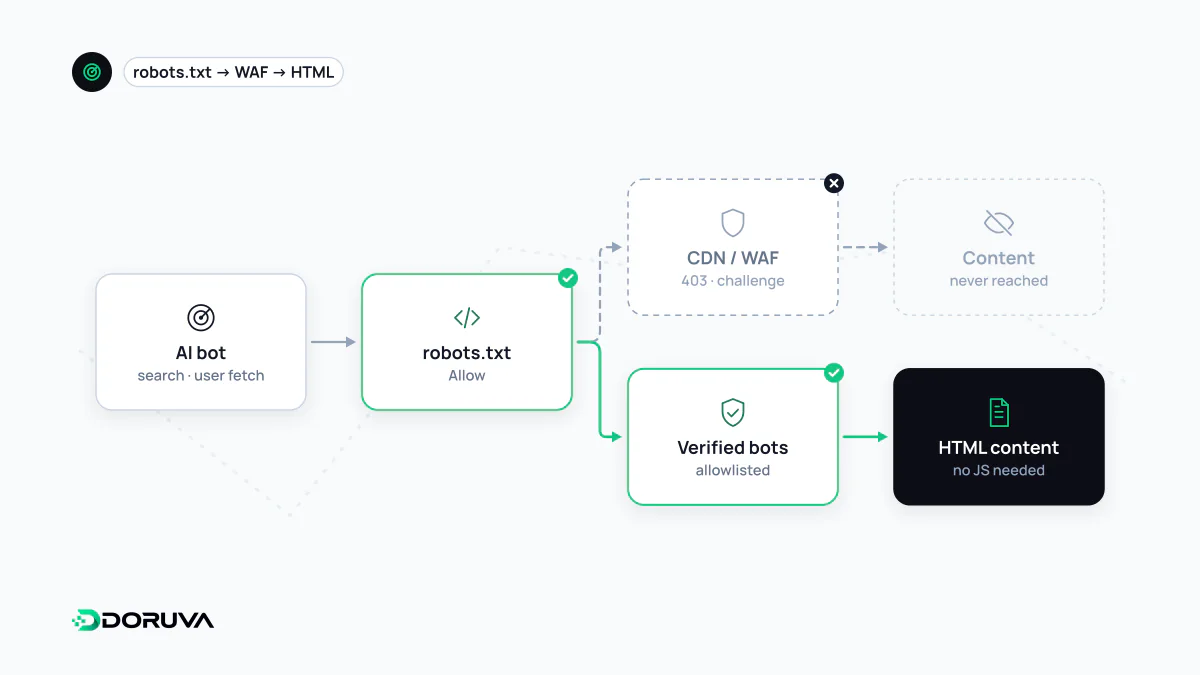
Whether a site is open to AI and search bots is often judged from robots.txt alone. But robots.txt is only a statement of permission. A bot's request passes through several layers before it reaches any content, and each one can stop it:
- robots.txt. The bot reads the group written for its name, or the
User-agent: *group, and works out which paths it may fetch. - CDN, firewall and bot protection. A WAF or bot-management rule can block the request before it reaches your server, or divert it to a challenge page.
- Rate limiting. A bot making many requests in a short time may receive 429 Too Many Requests.
- The server's response. If the page returns 403, a 5xx error or a redirect to a login page instead of 200, the bot gets no content.
- The HTML itself. Even with a 200, if the text only appears after JavaScript runs, a bot that does not execute JavaScript reads an empty shell.
- Directives.
noindex,nosnippetand similar directives limit how fetched content may be used.
Bot accessibility means the whole chain is open for the bots you actually want.
Common blockers and how they show up
| Blocker | What the bot gets | How you notice |
|---|---|---|
| Challenge page | An interstitial with a CAPTCHA or JavaScript check, often with a 403 or 503 | Bot requests in your logs receiving challenge responses instead of content |
| A CDN's "block AI bots" setting | 403 or a refused connection | Security dashboard settings; no successful visits even though robots.txt allows them |
| Rate limits | 429 responses | Status code distribution per bot in your logs |
| Country or IP blocks | 403 or timeouts | Comparing the bot's published IP ranges with blocked regions |
| JavaScript-only content | Empty or partial HTML | Comparing the raw HTML with the DOM rendered in a browser |
Challenge pages deserve special attention, because well-behaved bots do not try to get past them. Anthropic states explicitly that its bots respect anti-circumvention technologies and will not attempt to bypass CAPTCHAs. A measure meant to keep out abusive traffic can therefore quietly switch off your visibility in AI search as well. Perplexity's bot documentation likewise notes that sites behind a WAF may need to allow its bots explicitly, and recommends matching both the user agent and the published IP ranges.
Content that only exists after JavaScript
Google documents that Googlebot queues pages for rendering after crawling, which means it executes JavaScript. Apple says Applebot may render pages in a browser too. Many AI providers, however, do not document whether their bots run JavaScript at all. Rather than depend on undocumented behavior, the safe approach is to make sure important text is present in the initial HTML the server sends. The search-engine side of this is covered under JavaScript SEO.
Testing through a bot's eyes
A quick first check is to send a request with a documented bot user agent and inspect the status code and body. This example uses the string OpenAI publishes for ChatGPT-User:
curl -s -o page.html -w "%{http_code}
"   -A "Mozilla/5.0 AppleWebKit/537.36 (KHTML, like Gecko); compatible; ChatGPT-User/1.0; +https://openai.com/bot"   https://example.com/services/

grep -c "Our services" page.html
If the status is not 200, or the expected text is missing from the file, something is in the way. The test has a limit, though: the request comes from your IP address. Many security services also recognize known bots by IP range, so the real bot may be treated differently. For the full picture, check which status codes genuine bot requests receive in your server logs, a method covered under log file analysis.
Accessible does not mean open to everyone
The goal is not to let every bot in, but to make what each bot may do a deliberate decision. Blocking bots that collect content for model training is a legitimate choice; blocking search and user-request bots reduces the chance that your content is used as a source in AI answers. The distinction is laid out under AI crawler. Fake requests that merely claim a well-known bot's name can be filtered out with the IP lists providers publish. Doruva's GEO Checker reports what robots.txt allows for the major search, user-request and training bots, and flags bot challenge pages and JavaScript-only content.