

What is Rate Limiting?
Definition
Rate limiting caps how many requests a client may make within a time window, for example 60 requests per minute per IP address. When the limit is exceeded, the server rejects further requests, usually with a 429 Too Many Requests status and a Retry-After header saying how long to wait. It protects services against brute-force attempts and abuse, and stops any single client from degrading the system for everyone else.
Also known as: rate limit, throttling, request throttling, API rate limit
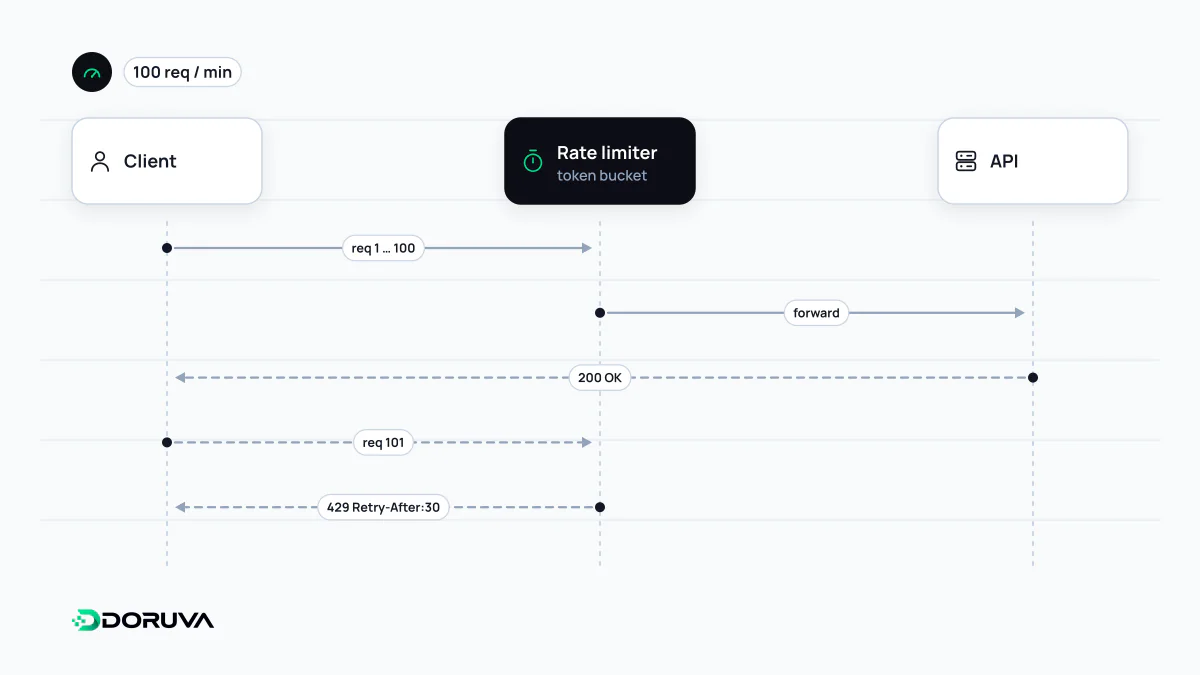
First decide what you are counting
Every rate limit has three parts: the key being counted, the allowance, and the time window. “60 requests per minute per IP” and “5,000 requests per hour per API key” are both rules of this shape, and the choice of key shapes the outcome:
- IP address is the only option for anonymous traffic, but hundreds of users behind an office network or a carrier's shared address (CGNAT) can look like one client. With IPv6, a single user may control a huge block of addresses, so count per prefix rather than per address.
- User or API key is the fairest measure for identified traffic and makes it easy to give paid plans higher limits.
- Endpoint matters because costs differ. Login, password reset and SMS sending deserve far tighter limits than listing products.
RFC 6585, which defines status 429, deliberately leaves open how a server identifies the user and how it counts requests. Those decisions are yours.
Counting algorithms
| Algorithm | How it works | Strength | Weakness |
|---|---|---|---|
| Fixed window | One counter per minute, reset when the minute ends | Trivial to build, little memory | Bursts at the boundary: 60 requests at 12:00:59 and 60 more at 12:01:00 |
| Sliding window log | Stores a timestamp per request and counts those in the last 60 seconds | Exact | Memory grows with traffic |
| Sliding window counter | Blends the previous and current window counters by weight | Nearly exact and cheap | An approximation |
| Token bucket | A bucket refills with tokens at a fixed rate; each request spends one | Allows short bursts while capping the average | Two parameters (capacity, refill rate) to tune |
| Leaky bucket | Requests queue and drain at a constant rate | Smooth, predictable load on the backend | Bursts turn into latency for the user |
A token bucket with capacity 20 and a refill of 5 per second will happily absorb the 20 parallel requests a page fires on load, yet never sustain more than 5 per second over time. That balance is why it is the most common choice for APIs.
Rate limiting versus throttling
The terms are often used interchangeably, but the emphasis differs. Rate limiting rejects requests over the limit. Throttling slows traffic down by delaying or queueing requests, or by degrading the response; a leaky bucket is a throttling technique in this sense. Quotas are a third idea: a long-period total such as “100,000 requests per month” that governs billing and plan tiers independently of the per-second rate.
Responding when the limit is hit
HTTP/1.1 429 Too Many Requests
Retry-After: 30
Content-Type: application/json

{"error": "rate_limited", "message": "Per-minute request limit exceeded."}
A 429 Too Many Requests response can carry Retry-After as a number of seconds or an HTTP date. Many APIs also expose remaining allowance through custom headers such as X-RateLimit-Remaining. An IETF draft defining standard RateLimit and RateLimit-Policy headers is in progress but, as of October 2026, is not yet an RFC. Well-behaved clients honour Retry-After and back off exponentially with random jitter, so that thousands of clients do not all retry in the same second.
There is an SEO angle too. Google's crawlers treat 429 as a sign that the server is overloaded and temporarily slow their crawling, and if errors persist, already indexed URLs can eventually drop out. An overly aggressive rule that catches Googlebot can therefore become a search visibility problem.
Where to enforce limits
The layers complement each other. A CDN or web application firewall sheds crude floods before they reach your servers; a reverse proxy such as nginx can apply per-IP limits with its limit_req module, which uses the leaky bucket method; rules that depend on users and plans belong in the application. When the app runs on several instances, keep counters in a shared store, typically Redis, or each instance only sees part of the traffic. Rate limiting is effective at slowing brute-force attacks, but on its own it is no answer to a large DDoS attack, which has to be absorbed at the network edge.