

What is SSRF (Server-Side Request Forgery)?
Definition
SSRF (Server-Side Request Forgery) is a vulnerability in which an application fetches a user-supplied URL without proper validation, letting an attacker turn the server into a proxy that sends requests on their behalf. Because the server sits inside the network, it can reach admin interfaces, databases or a cloud metadata service that are invisible from the internet, which can lead to data exposure and stolen credentials.
Also known as: Server-Side Request Forgery, server side request forgery, CWE-918
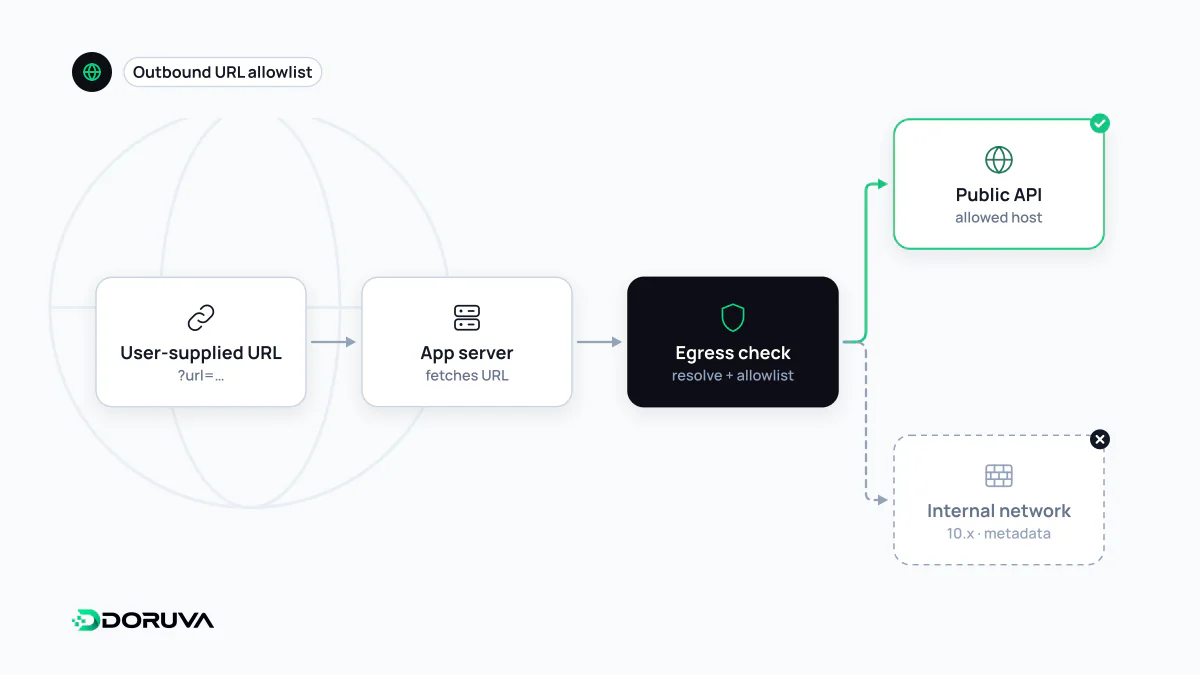
Features that fetch URLs for the user
A surprising number of features make the server request an address that a user typed in: link previews in chat apps, “import image from URL” fields, HTML-to-PDF services, user-configured webhook destinations, and site audit tools that crawl whatever domain you give them. In every case the request leaves from the application's server, not from the user's browser.
That server usually lives on a network the public cannot see. It can talk to an admin console bound to localhost, an unauthenticated Redis or Elasticsearch node on the private network, or the cloud provider's metadata service at 169.254.169.254. If the destination is not validated, an attacker can use the server as a stepping stone to reach resources they could never touch directly. The metadata service is the classic prize, because in some configurations it hands out the temporary cloud credentials assigned to the machine.
Not the same as CSRF
The names are close, but the victims differ. In CSRF the attacker tricks a logged-in user's browser into sending a request with that user's cookies. In SSRF the attacker tricks the server itself, and the forged request carries all of the server's network position and privileges. The OWASP Top 10 2021 listed SSRF as its own category (A10); the 2025 edition folds it into Broken Access Control (A01) as CWE-918. The label moved; the risk did not.
The vulnerable pattern and a safer starting point
// Risky: the user-supplied address is fetched as-is
const res = await fetch(req.query.url);

// Safer: parse the URL and check it against an allowlist first
const target = new URL(req.query.url);
if (target.protocol !== "https:") throw new Error("HTTPS only");
if (!ALLOWED_HOSTS.has(target.hostname)) throw new Error("Host not allowed");
const res = await fetch(target, { redirect: "error", signal: AbortSignal.timeout(5000) });
The second block is a start rather than a complete fix. Robust protection layers several controls:
- Allowlist known destinations. When the set of legitimate targets is known, permit only those. Denylists of “bad” addresses look attractive but are easy to get wrong because IP addresses have many textual forms and URL parsers disagree on edge cases; OWASP's guidance is to prefer allowlists.
- Validate the resolved IP, not just the name. Tools that must accept arbitrary public URLs should resolve the hostname through DNS, check every A and AAAA record, reject private, loopback and link-local ranges, and then connect to the IP they actually checked. Otherwise a name can look harmless during validation and point inside the network a moment later.
- Do not follow redirects blindly. Validating the first URL is pointless if the HTTP client then follows a redirect anywhere. If redirects are needed, every hop goes through the same checks.
- Bound the request. Timeouts, a response size cap, and only
http/httpsschemes. Avoid echoing the raw response back to the user, which limits what can leak.
Defence at the network layer
Application checks can be bypassed by a single bug, so the network should back them up. Running the URL-fetching code as a separate service and restricting that service's outbound traffic with firewall rules that block internal ranges limits the blast radius considerably. In the cloud, require the session-token version of the metadata service (IMDSv2 on AWS) and apply the principle of least privilege to the machine's role, so that even a successful SSRF yields as little as possible.
Finding it before someone else does
Start with an inventory: every place where the application accepts a URL, hostname or IP address from a user, including import forms, integration settings, webhook configuration, image processing libraries, and XML or SVG parsers that can fetch external resources. In production, alert on unexpected connections from application servers to private ranges or the metadata address. An authorised penetration test should target these features specifically.