

What is Business Process Automation?
Definition
Business process automation (BPA) is the use of software to carry out repetitive, rule-based business tasks with little or no human intervention. Automated workflows are started by triggers such as a new order or form submission and handle steps like data entry, approvals, notifications, document generation and moving data between systems. Connecting tools such as CRMs, ERPs and e-commerce platforms through APIs, known as system integration, is a core part of it.
Also known as: BPA, workflow automation, system integration, process automation
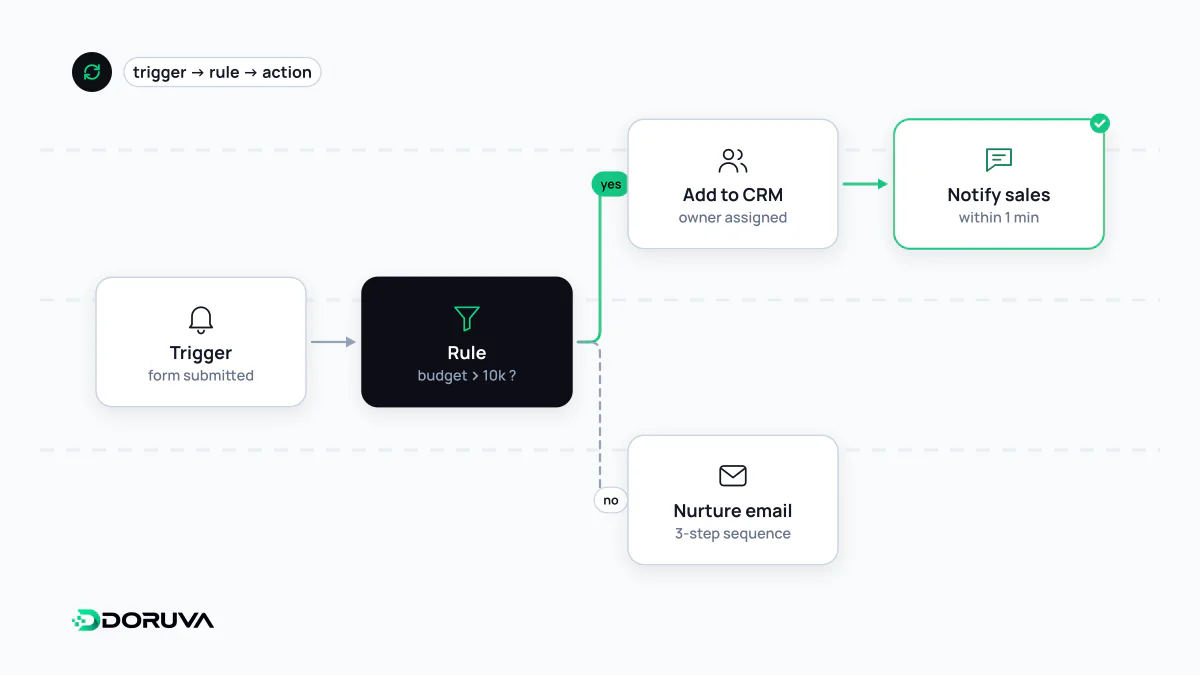
The building blocks of a workflow
Automation turns “the computer should just do this” into a concrete workflow. Almost every workflow has three parts:
- Trigger: the event that starts it, such as a form submission, a paid order, a scheduled time or stock falling below a threshold. When the event happens in another system, the news usually arrives as a webhook.
- Rules: decision steps like “if the amount is over 10,000, route it to a manager for approval; otherwise process it directly”.
- Actions: creating records, sending emails or notifications, generating documents, writing data to another system.
Simple flows can be assembled without code in tools such as Zapier, Make or n8n. Flows with complex rules, high volume or sensitive data usually end up in code, where they can be tested, versioned and monitored properly.
System integration: the backbone of automation
In many companies the real time sink is not inside any single task but between systems: orders from the online store are retyped into accounting software, customer details are copied from the CRM into the ERP, stock levels are moved from one spreadsheet to another. System integration connects these tools through APIs so that nobody has to carry data across by hand. A typical flow:
- The e-commerce platform sends an “order paid” event via webhook.
- The integration service verifies it and fetches the full order from the platform's REST API.
- The customer is created in the CRM, or updated if they already exist.
- A sales record is opened in the ERP, stock is reduced and an invoice is issued.
- If any step fails, it is retried; if it keeps failing, the responsible person is notified.
When most of the tools involved are SaaS products, the scope and rate limits of their APIs set the boundaries of what the integration can do. Verify early, system by system, which data you are actually allowed to read and write.
What to automate first
Automating everything is neither possible nor worthwhile. Good candidates tend to share most of these traits:
- High frequency: a task done dozens of times a day beats one done once a week.
- Clear, stable rules: if the decisions can be written down, they can be automated; tasks that need fresh judgement every time are hard.
- Digital, structured input: form fields, API data, spreadsheets. Scanned paper documents need an extra extraction step.
- Costly errors: when a typo in manual data entry ripples into invoices or stock levels, automation pays off quickly.
Before building anything, write the current process down step by step, measure who spends how much time where, and start with the single most repetitive flow. What you learn from that first workflow makes scoping the next ones far more realistic.
Pitfalls to avoid
- Automating a broken process: redundant approvals and duplicate checks do not disappear when automated; they just run faster. Simplify first.
- Ignoring failure paths: if an unresponsive API, incomplete data or the same event arriving twice is not designed for, the automation will quietly produce wrong results.
- Skipping monitoring: log every run and make failures visible. An automation nobody watches will not be missed when it stops.
- Single-person knowledge: document how each flow works so it stays understandable after the person who built it moves on.
Integrations that span several systems and go beyond what off-the-shelf tools can handle fall within Doruva's custom software service.