

What is Cron Job?
Definition
A cron job is a command that the cron scheduler on Unix-like systems runs automatically at fixed times or intervals. Schedules are written in a crontab file using five fields: minute, hour, day of month, month and day of week, followed by the command. Nightly backups, report generation, cache warming and cleanup of old records are typical uses.
Also known as: cron, crontab, scheduled task, scheduler, cron schedule
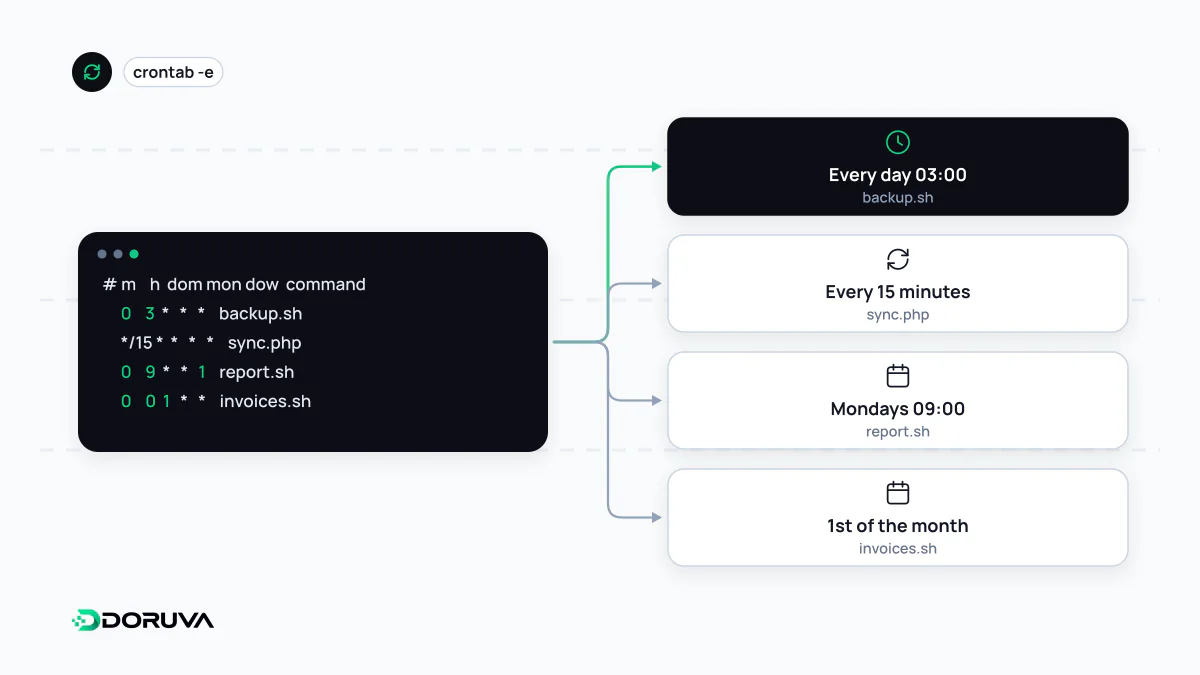
Reading a crontab line
Cron is a daemon that wakes up every minute, checks the crontab files and runs whatever is due. Users edit their own table with crontab -e. Each line has five time fields followed by a command:
| Field | Allowed values |
|---|---|
| Minute | 0–59 |
| Hour | 0–23 |
| Day of month | 1–31 |
| Month | 1–12 or jan, feb… |
| Day of week | 0–7 (0 and 7 are Sunday) or mon, tue… |
# min hour dom mon dow  command
30    3    *   *   *    /usr/local/bin/run-backup.sh
*/15  *    *   *   *    /usr/bin/node /srv/app/scripts/rebuild-sitemap.js
0     9    *   *   1-5  /srv/app/bin/daily-report
0     0    1   *   *    /srv/app/bin/monthly-invoices
The first line takes a backup at 03:30 every night; the second runs every 15 minutes; the third at 09:00 on weekdays; the fourth at midnight on the first of each month. An asterisk means every value, */15 means every fifteenth, 1-5 is a range and 1,15 a list. Most implementations also accept shortcuts such as @daily, @hourly and @reboot, which runs once at startup.
One rule surprises almost everyone: when both day of month and day of week are restricted, cron combines them with OR, not AND. 0 4 1,15 * 5 runs on the 1st and 15th and also every Friday, not only when the 1st or 15th happens to be a Friday.
Timezone and daylight saving traps
Cron reads schedules in the server's local timezone. Cloud machines and VPS instances are often set to UTC, so a job you meant to run at 3 a.m. in Istanbul or New York actually runs at 3 a.m. UTC, hours away from what you intended.
Daylight saving time adds a second trap. The crontab(5) manual notes that times which do not exist on the night clocks spring forward never match, so those jobs are skipped, while times that occur twice when clocks fall back can run jobs twice. A billing job scheduled at 02:30 local time in a DST zone will miss one night a year and may double up on another.
- Keeping servers on UTC and writing schedules in UTC causes the fewest surprises.
- Some implementations, such as cronie, accept a
CRON_TZvariable in the crontab to set the schedule's timezone. Not all do, so check before relying on it. - Kubernetes CronJobs take a
.spec.timeZonefield, stable since v1.27; without it, schedules follow the controller manager's local timezone.
Jobs that fail without anyone noticing
Cron starts a command and forgets about it. A job can fail every night for months before someone asks why the report is stale. The usual culprits:
- A bare environment. Cron does not load your shell profile;
PATHis minimal and environment variables are missing. Use absolute paths and set what the script needs inside it. - Lost output. Output goes to local mail or nowhere. Redirect stdout and stderr to a file, or ship them to central logging.
- Never running at all. If the server is down or the daemon stopped, there is not even an error. Have the job ping a monitoring endpoint when it finishes (a heartbeat or dead man's switch) and alert when the ping does not arrive.
Overlapping runs and multiple servers
A job scheduled every five minutes that one day takes seven will start a second copy before the first finishes, and both may process the same records. On Linux, flock prevents that with one extra word:
*/5 * * * * flock -n /tmp/sync.lock /srv/app/bin/sync >> /var/log/sync.log 2>&1When an application runs on several servers, each server's crontab fires the same job independently. Assign scheduled work to a single host, take a distributed lock, or hand scheduling over to the repeatable-job feature of a job queue. Whatever you choose, a duplicate run should be harmless, which means writing the job to be idempotent.