

What is Kubernetes?
Definition
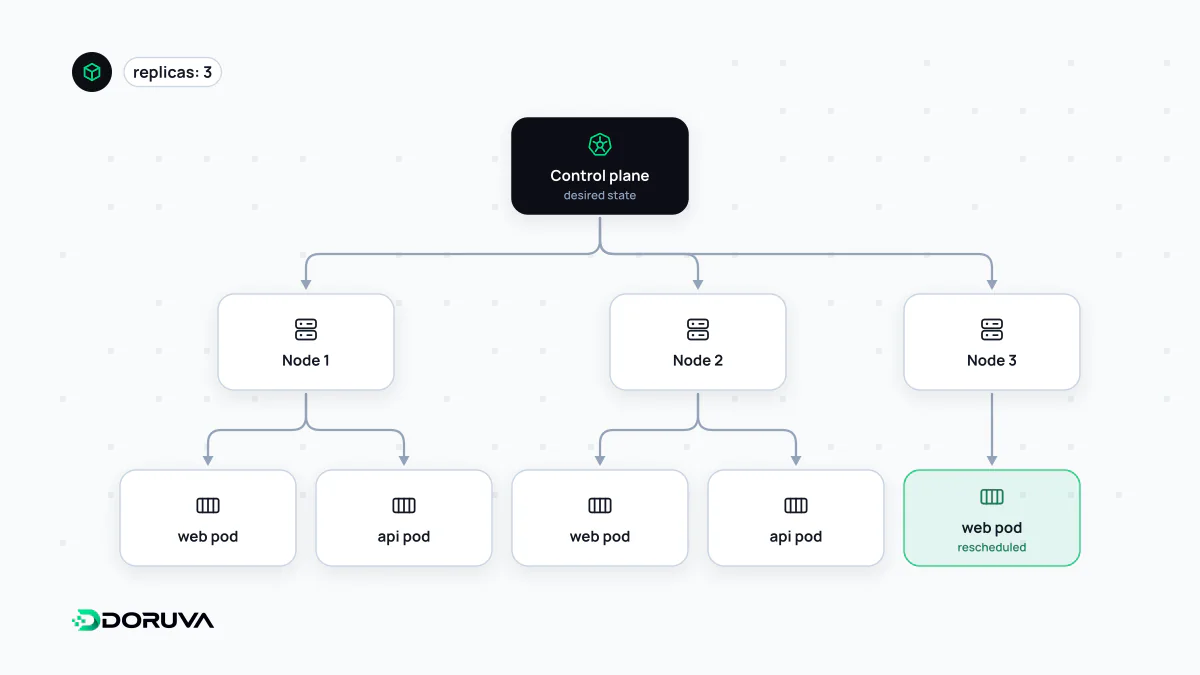
Kubernetes (K8s) is an open-source orchestration platform that deploys, scales and keeps alive containerised applications across a cluster of machines. You declare the desired state, such as which image to run, how many replicas and with what resources, and Kubernetes continuously compares reality against that declaration, restarting failed containers, rescheduling work from failed nodes and routing traffic only to healthy instances.
Also known as: K8s, kube, container orchestration
The problem orchestration solves
A handful of containers on one server is a job for Docker Compose. The hard questions start when containers are spread across dozens of machines. Which node should a new replica land on? Where do the workloads go when a server dies? How do you ship a new version without users noticing? Kubernetes is the platform that answers those questions. It grew out of Google's experience running containers internally and is now maintained as an open-source project under the Cloud Native Computing Foundation.
Desired state and the control loop
You don't tell Kubernetes what to do step by step; you describe what should be true. "Run three replicas of this image, each limited to 512 MB of memory." That description is submitted to the cluster as YAML. Controllers then compare the actual state with it, over and over, and act on any difference. A crashed container is replaced. A node that disappears has its workloads scheduled elsewhere. This continuous reconciliation is what people mean when they call Kubernetes self-healing.
Pods, Deployments and Services
- Pod — the smallest deployable unit. A Pod holds one or more containers that share networking and storage; most Pods contain just one. Pods are disposable: they get deleted and recreated, often with a new IP address.
- Deployment — you rarely create Pods yourself. A Deployment records how many replicas you want and which image to use, and when the image changes it replaces old Pods with new ones as a rolling update by default.
- Service — puts a stable name and address in front of a changing set of Pods. Other workloads call the Service, which forwards traffic to whichever Pods are currently healthy.
Around these core objects sit ConfigMaps for configuration, Secrets for credentials, and Ingress or the Gateway API for routing HTTP traffic in from outside the cluster.
A minimal manifest
apiVersion: apps/v1
kind: Deployment
metadata:
  name: web
spec:
  replicas: 3
  selector:
    matchLabels:
      app: web
  template:
    metadata:
      labels:
        app: web
    spec:
      containers:
        - name: web
          image: registry.example.com/web:1.4.0
          ports:
            - containerPort: 3000
          readinessProbe:
            httpGet:
              path: /health
              port: 3000
---
apiVersion: v1
kind: Service
metadata:
  name: web
spec:
  selector:
    app: web
  ports:
    - port: 80
      targetPort: 3000
Applying this with kubectl apply -f web.yaml starts three Pods. The readinessProbe keeps traffic away from any Pod whose /health endpoint isn't answering successfully. Bump the tag to 1.4.1, apply again, and the Deployment retires old Pods as new ones become ready.
When Kubernetes is overkill
All that power comes with real operational weight: regular cluster upgrades, network plugins, RBAC, log and metrics pipelines, certificate management, and people who understand all of it. Managed offerings from AWS, Google Cloud and Azure take over the control plane, but configuring, securing and monitoring your workloads is still your job.
For one web application and a database whose traffic fits on a single server, that overhead usually outweighs the benefit. A VPS running Compose, a PaaS or a serverless platform will be simpler to run. Kubernetes starts paying for itself when many services, several teams and variable traffic come together, typically in a microservices architecture where scalability and high availability are concrete requirements rather than aspirations, and where observability tooling is already part of the culture.