

What is Docker (Containers)?
Definition
Docker is a platform for packaging an application together with its dependencies into isolated, portable units called containers, and for running them. A Dockerfile describes how to build an image; a container is a running instance of that image. Because containers share the host operating system's kernel instead of booting a full guest OS, they are far lighter than virtual machines.
Also known as: Container, Docker container, Containerization, Docker image
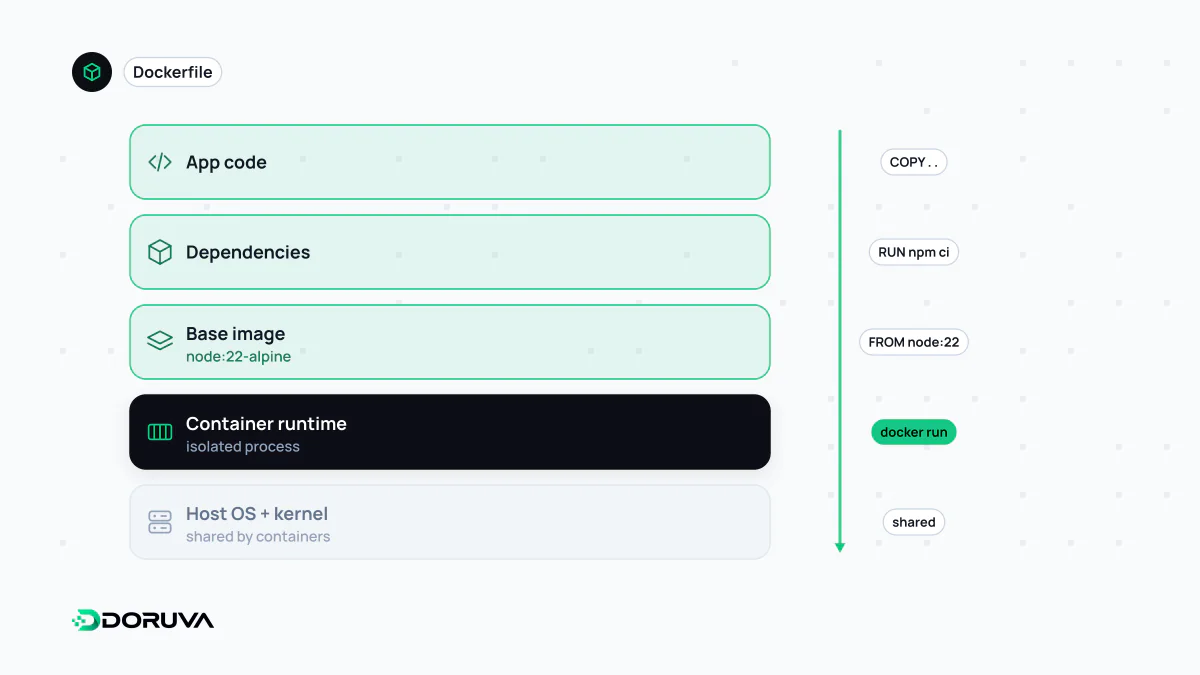
Containers are bigger than Docker
A container bundles an application with everything it needs to run — runtime, libraries, configuration — and isolates it from the rest of the system. On Linux, that isolation comes from two kernel features: namespaces, which give a process its own view of processes, network and file system, and cgroups, which cap CPU and memory use. Docker made these capabilities approachable with simple tooling, which is why "Docker" and "container" are often used interchangeably. Today the image format and runtime are standardised by the Open Container Initiative (OCI), so an image built with Docker also runs on Podman, containerd or Kubernetes.
The practical payoff is the end of "it works on my machine": the same image runs on a developer laptop, in CI and in production. The Docker overview in the official docs describes the architecture in more depth.
Images vs containers
| Image | Container | |
|---|---|---|
| What it is | A read-only, layered package of the app and its dependencies | A running instance of an image |
| Mutable? | No — a change means a new image version | Has a thin, temporary writable layer on top |
| Where it lives | In a registry | On a host, where it is started, stopped and removed |
If you write code, think class and object: the image is the class, each container an instance. One image can run as dozens of containers at once.
A practical Dockerfile
FROM node:24-alpine
WORKDIR /app

# Dependency manifests first so this layer stays cached when only code changes
COPY package*.json ./
RUN npm ci --omit=dev

COPY . .
ENV NODE_ENV=production
USER node
EXPOSE 3000
CMD ["node", "server.js"]docker build -t orders-api:1.4.0 .
docker run -d -p 3000:3000 --name orders-api orders-api:1.4.0Each instruction produces a layer, and Docker reuses unchanged layers from cache. Copying package.json before the rest of the source means a code-only change does not trigger a full dependency reinstall.
Containers vs virtual machines
| Container | Virtual machine | |
|---|---|---|
| What is virtualised | The operating system; the host kernel is shared | Hardware; each VM boots its own OS |
| Start-up | Typically seconds or less | Typically longer — an OS has to boot |
| Size | Usually megabytes | Usually gigabytes |
| Isolation | Lighter; kernel is shared | A stronger security boundary |
They are complementary rather than competing: in the cloud, containers usually run inside VMs. On macOS and Windows, Docker Desktop itself runs Linux containers inside a lightweight VM.
Common mistakes
- Keeping persistent data inside the container: the writable layer disappears with the container. Use volumes for database files and uploads.
- Baking secrets into the image: copying a
.envfile or setting a password withENVwrites it into an image layer for good. Inject secrets at runtime. - Shipping everything as
latest: you lose track of what is running and rollbacks become guesswork. Tag with a version or commit SHA. - Running as root and bloated images: a
USERinstruction, a.dockerignorefile and multi-stage builds improve both security and size.
Docker Compose describes several containers that run together; orchestrators such as Kubernetes manage them across many machines. That combination is why containers are a standard building block of microservices and of CI/CD pipelines.