

What is Environment Variable?
Definition
An environment variable is a named value that the operating system passes to a running process, which the application reads instead of relying on constants written into its code. Settings that differ between deployments, such as a database URL, an API key, a mail server or the name of the current environment, are supplied this way. The same code then runs unchanged in development, staging and production, and secrets stay out of source code.
Also known as: env var, environment variables, .env file, process.env, dotenv
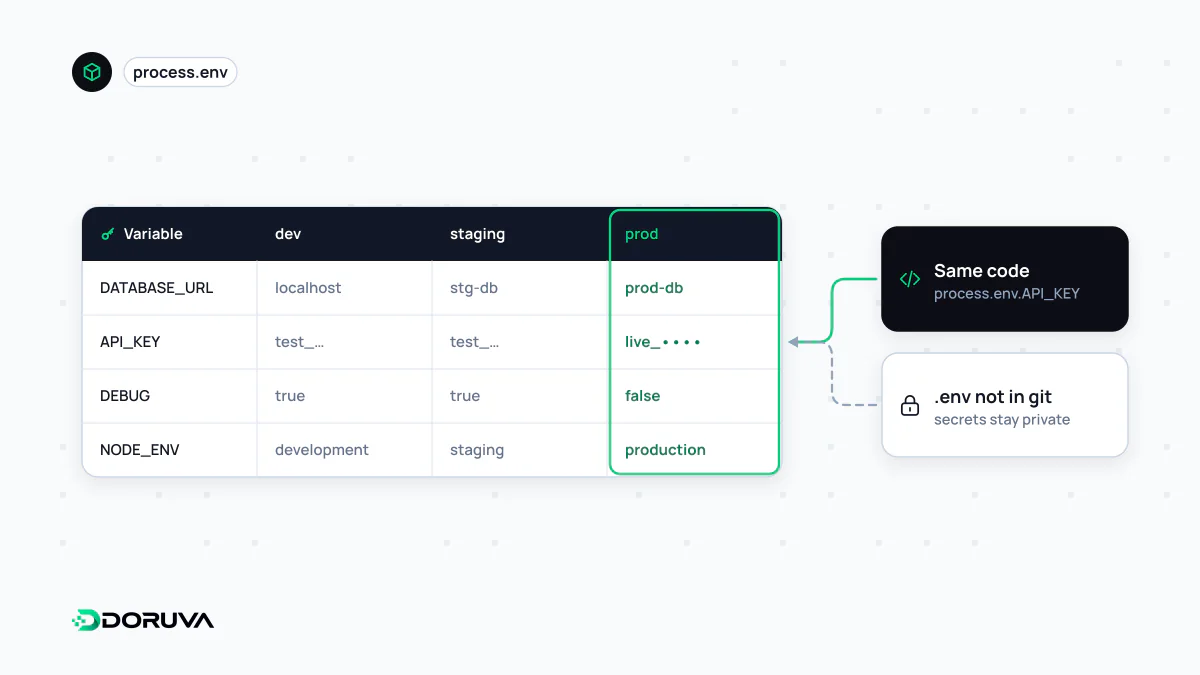
Separating config from code
The same application connects to a local database on a developer's laptop, a test database in the staging environment and the real one in production. Hard-coding those addresses means a different build per environment. The Twelve-Factor App methodology therefore recommends storing everything that varies between deploys in environment variables, with a simple litmus test: could the codebase be open-sourced right now without exposing any credentials?
Not every setting belongs there. Things that stay the same everywhere, such as routing rules or business logic, remain in code; environment variables are for deploy-specific values.
Setting and reading them
Variables can come from the shell, a service definition (systemd, Docker or Docker Compose), a hosting dashboard, or the secret settings of a CI/CD system. During development a .env file is the usual convenience:
# .env  (never committed)
DATABASE_URL=postgres://app:***@localhost:5432/shop
SMTP_HOST=smtp.example.com
APP_ENV=development// server.js
const dbUrl = process.env.DATABASE_URL;
if (!dbUrl) {
throw new Error("DATABASE_URL is not set");
}Since version 20.6, Node.js can load that file without any extra package: node --env-file=.env server.js. If a name is defined both in the real environment and in the file, the Node.js docs state that the environment wins, which stops a forgotten .env file from overriding values configured on the server.
Are they safe enough for secrets?
An environment variable is far better than a password in source code, but it is not secure by default:
- It is inherited by every child process the application starts.
- It can end up in logs through error reporting tools, debug pages or a careless
console.log(process.env). - Other processes running as the same user, or as root, can read it.
- CI output can print it by accident.
Practical rules: add .env files to .gitignore and commit only a .env.example with empty values; use a different API key per environment; and move to a secrets management service once you need rotation, access auditing or sharing across a team.
Variables that end up in the browser
Front-end build tools treat environment variables differently. In Next.js, variables are server-only by default; anything prefixed with NEXT_PUBLIC_ is inlined into the JavaScript bundle as a literal value during next build. Two consequences follow:
- Every
NEXT_PUBLIC_value is visible to anyone who opens the site's source. A secret must never carry that prefix. - The value is frozen at build time. Promote the same Docker image to another environment and those variables still hold the values from where it was built.
Mistakes that bite
- Running with a missing variable: validate required variables at startup and fail immediately, rather than discovering the gap hours later when the first email fails to send.
- Assuming types: environment variables are always strings, and in JavaScript the string
"false"is truthy. - Invisible characters: a trailing space or newline pasted into a dashboard is a classic cause of “wrong password” errors.
- Forgetting to restart: a running process does not pick up changed values on its own.