

What is Secrets Management?
Definition
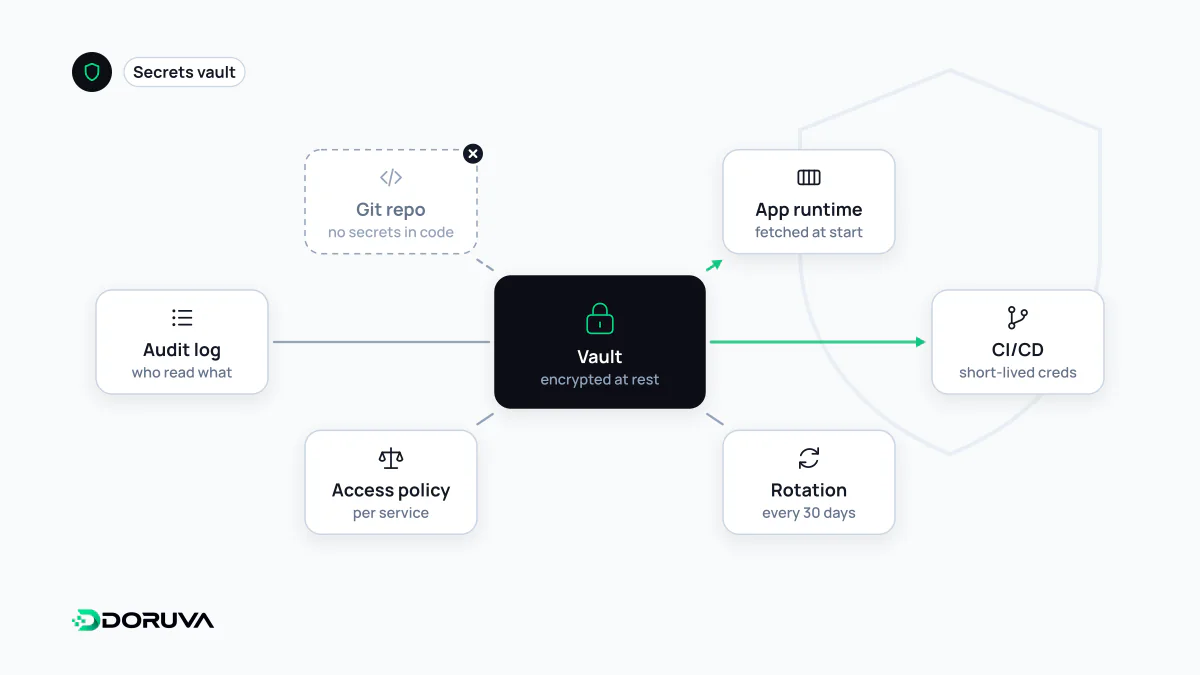
Secrets management is the practice of storing sensitive values such as passwords, API keys, database credentials, encryption keys and tokens securely, delivering them only to the systems that need them, rotating them regularly and auditing who accessed them. Its first rule is that secrets never appear in plain text in source code, Git repositories or log files.
Also known as: secret management, credential management, secrets vault, secrets manager
What counts as a secret
A practical test: if knowing a value lets someone reach a system they should not reach, or act on someone else's behalf, it is a secret. In a typical web project that includes:
- database usernames, passwords and connection strings
- API keys for payment, shipping, email or SMS providers
- OAuth client secrets and JWT signing keys
- TLS private keys and SSH keys
- signing secrets used to verify incoming webhooks
The site name, default language or a feature flag are configuration, not secrets. Keeping both kinds of value in the same file, handled with the same casualness, is where many leaks begin.
How secrets usually leak
- Hard-coded in source: once committed, a key survives in Git history even if the next commit removes it, and it travels with every clone, fork and backup of the repository.
- Logs: dumping every request header while debugging also writes the
Authorizationheader into your logging pipeline, and from there into tools many people can read. - Files in the wrong place: a
.envfile committed to the repo, or left in the web root where anyone can download it. - Copy and paste: keys shared in chat, email or a support ticket.
- Build output: CI/CD steps that echo values into job logs, or server keys accidentally bundled into front-end JavaScript.
Out of the code: bad versus better
// Avoid: the key lives in the source
const client = new PaymentClient("live-secret-key-goes-here");

// Better: the value is supplied at runtime
const client = new PaymentClient(process.env.PAYMENT_SECRET_KEY);
The second line cleans up the code but does not finish the job, because how the value reaches the environment still matters. Environment variables are a common and convenient transport, yet OWASP points out that they are generally readable by other processes and can end up in logs or crash dumps. As projects grow, values are pulled from a central store instead.
Working with a central vault
Tools usually called secrets managers or vaults keep values encrypted at rest, let each service read only the secrets it needs, and record every access. That applies least privilege to credentials themselves: not every developer needs to know the production database password.
More mature setups go a step further and replace long-lived passwords with dynamic secrets: credentials generated on request that expire shortly afterwards. A leaked value is then only useful for as long as it lives.
Rotation, and the order of operations after a leak
Keys should be rotated on a schedule. To avoid downtime, allow an overlap where both the old and the new key are valid: roll out the new one, confirm every service uses it, then revoke the old one. When a leak is discovered, follow the sequence the OWASP Secrets Management Cheat Sheet recommends:
- Revoke the exposed value at the provider immediately.
- Rotate by issuing a new value, storing it in the vault and making sure services pick it up.
- Delete the value from repository history, logs and anywhere it was shared.
- Investigate access logs to see whether it was used while exposed.
The classic mistake is doing only step three. Rewriting Git history does not make a key safe again; assume someone copied it already. Pre-commit scanners and repository-side secret scanning help catch these mistakes before the code is ever shared.