SEO
Technical SEO Checklist 2026: 25 Critical Checks for Your Site
A technical SEO checklist confirms that your site can be crawled, that the right pages are indexed and that every page is fast, secure and mobile-friendly. This guide walks through 25 critical checks in six groups, explaining what to look at, how to check it and what to fix first.
By Mehmet ÇalışırPublished 11 min read
Contents
This checklist is for business owners launching a site, marketing teams preparing a redesign and agencies that audit client sites. Each check covers what to look at and why it matters. If you are new to the fundamentals, start with our guide to how search engine optimization works.
What is technical SEO, and why work from a checklist?
Technical SEO means preparing a website's infrastructure so that search engines can find, read, understand and quickly serve its pages. No matter how strong your content and links are, a page that Google cannot crawl or index will not show up in search results.
A checklist keeps this work out of anyone's memory. Most technical problems are silent: a forgotten noindex tag, a robots.txt rule left over from staging or a plugin generating thousands of duplicate URLs can erode traffic for weeks unnoticed. A regular checklist catches them while they are small.
We have grouped the 25 checks into six sections. The order is also the order we recommend working in: there is little point speeding up a page that never gets crawled.
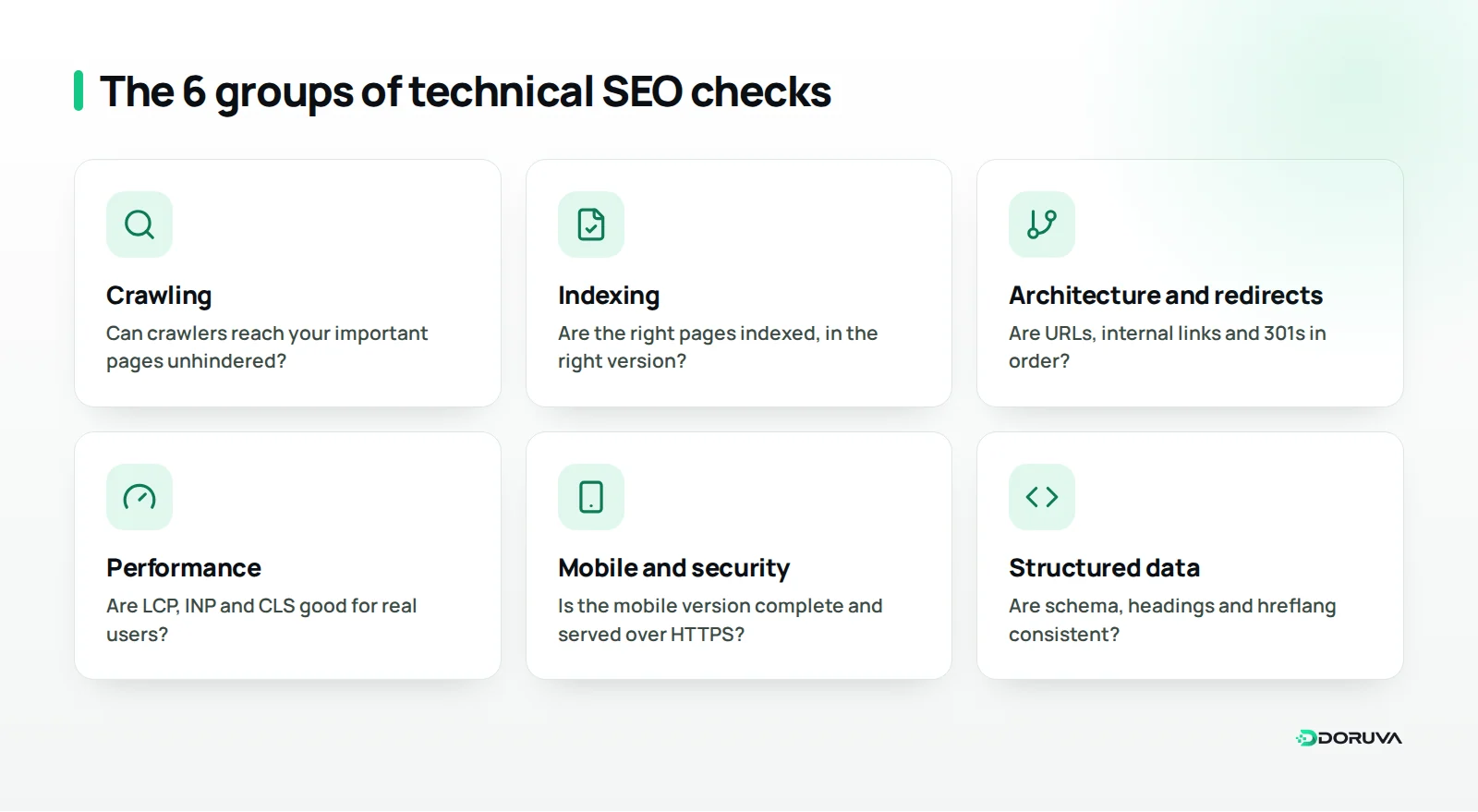
Crawling: can search engines reach your site? (Checks 1–5)
Crawl checks confirm that Googlebot and other crawlers can reach your important pages. A single mistake here makes every later check irrelevant.
1. Review your robots.txt file
The robots.txt file tells crawlers which paths you do not want crawled. Make sure it is not blocking important sections, or the CSS and JavaScript files a page needs to render. Keep in mind that robots.txt controls crawling, not indexing; Google's introduction to robots.txt spells out the difference. Decide deliberately which AI crawlers, such as GPTBot, you allow.
2. Create an XML sitemap and keep it current
Your sitemap should list only canonical URLs you want indexed that return a 200 status; no redirected, noindexed or deleted pages. Submit the sitemap in Search Console and reference it in robots.txt. A single sitemap file can hold up to 50,000 URLs or 50 MB uncompressed; larger sites should use a sitemap index.
3. Crawl for HTTP status codes
Crawl the whole site and list every page returning a 4xx or 5xx code. Persistent server errors make Google slow its crawl rate, so new content gets discovered later.
4. Check crawl depth and orphan pages
Important pages should be a few clicks from the homepage. Orphan pages, with no internal links pointing to them, are found only via the sitemap and usually perform poorly. Store product pages reachable only through on-site search are a typical case.
5. Make sure JavaScript-generated content is visible
If content or links appear only after JavaScript runs, use Search Console's URL Inspection tool to see what Google gets after rendering. For critical content and navigation, server-side rendering or static generation is the safer choice. Navigation should also use real <a href> elements rather than click handlers.
Indexing: are the right pages in Google? (Checks 6–10)
Indexing checks confirm that only the pages you want, in the right version, make it into Google's index. The goal is not to index everything but to point clearly at the pages that matter.
6. Audit noindex and X-Robots-Tag usage
List every page carrying noindex in a meta robots tag or HTTP header and confirm each is intentional. The classic post-launch mistake is a staging noindex that reached the live site. Also remember that noindex only works if the page is not blocked in robots.txt; otherwise Google never sees the tag.
7. Validate canonical tags
A canonical URL tells search engines which of several identical or near-identical pages is the primary version. Check that every page points either to itself or to the version it genuinely treats as the original, and that canonical targets return 200 with no redirect or noindex. Canonicals are a hint: if other signals contradict them, Google may pick another version.
8. Settle on one preferred version of the site
http and https, www and non-www, with and without a trailing slash: none of these variants should serve the same content at separate URLs. Choose your preferred version, permanently redirect the others to it, and use only that version in internal links.
9. Keep parameter and duplicate URLs under control
Filters, sorting, campaign tags and session parameters can spin out dozens of copies of one page. If every colour, size and price combination on a clothing store gets its own URL, crawlers waste effort on pages nobody searches for. Decide which combinations have search value and limit the rest with canonicals, noindex or different link handling.
10. Read the page indexing report in Search Console
The page indexing report in Search Console shows which pages are not indexed and why. Work through the groups: pages crawled but not indexed, pages treated as duplicates, and soft 404s. A soft 404 is a page that returns a 200 status even though it is empty or shows a message like "product not found"; it should return a real 404 or redirect somewhere useful.
Site architecture, internal links and redirects (Checks 11–14)
This group checks whether your site gives users and crawlers a sensible map: more internal links and shorter click paths to the pages that matter most.
11. Use readable, stable URLs
URLs should be short, lowercase, hyphen-separated and descriptive. For a coffee roaster, /coffee/ethiopia-yirgacheffe/ tells people and search engines far more than /product?id=4821. Avoid changing live URLs; every change creates another redirect to maintain.
12. Tidy up internal links and breadcrumbs
Category, service and content pages should link to each other with meaningful anchor text, and breadcrumbs show visitors and Google where a page sits. Make sure the pages that drive your business are the ones that stand out.
13. Clean up redirects and redirect chains
Use 301 for permanent moves and 302 for temporary ones. Collapse chains (A to B to C) into a single hop and remove loops. Point internal links straight at the final URL; it helps speed and crawl efficiency.
14. Fix broken links and offer a useful 404 page
Broken internal links lead visitors into dead ends and waste crawler effort, so fix them regularly. A 404 or 410 is correct for pages that are genuinely gone, as long as the 404 page helps people move on with a search box and links to main sections.
Performance and Core Web Vitals (Checks 15–19)
Performance checks confirm that pages load quickly, respond promptly and stay visually stable for real users. Google measures this with three metrics known as Core Web Vitals.
15. Track Core Web Vitals with field data
According to Google's definition on web.dev, the "good" thresholds are an LCP of 2.5 seconds or less, an INP of 200 milliseconds or less and a CLS of 0.1 or less, assessed at the 75th percentile of page visits. Track them with data from real users rather than one-off lab tests: the Core Web Vitals report in Search Console and the field data in PageSpeed Insights are good places to start.
16. Optimise your images
Serve images at their displayed size, use modern formats such as WebP or AVIF, and lazy-load images below the fold. Never lazy-load your largest image, usually the hero; load it with priority instead. Giving every image width and height attributes prevents layout shifts.
17. Reduce render-blocking resources and JavaScript weight
Defer or remove CSS and JavaScript the first view does not need. Unused plugins, stacked analytics tags and heavy chat widgets often cause sluggish interactions.
18. Check caching, compression and CDN settings
Set long browser cache lifetimes for static files and compress text-based files with Gzip or Brotli. If your visitors come from several regions, a content delivery network (CDN) cuts load times by serving files from servers close to each user.
19. Measure server response time (TTFB)
If the server is slow to send the first byte, front-end fixes can only do so much. Slow database queries, uncached dynamic pages and underpowered hosting are the usual causes.
Mobile usability and security (Checks 20–22)
This group confirms that your mobile version is complete and your connection secure. Under mobile-first indexing, Google predominantly crawls and indexes the mobile version of your pages.
20. Keep mobile and desktop content equivalent
Text hidden on mobile, missing structured data or different headings weaken what Google sees. Keep the same main content, metadata and structured data on both.
21. Test mobile usability
A viewport tag should be set, text should be readable without zooming, and buttons and links should be easy to tap. Full-screen pop-ups push people away, especially on phones. A quick test on a real phone over a slow connection often teaches more than any tool.
22. Implement HTTPS completely
A valid SSL/TLS certificate, a permanent redirect from http to https and no mixed content (http resources loaded on https pages) are the baseline. Automate certificate renewal. Security headers are not a direct ranking signal, but they protect your site and your visitors.
Structured data and page signals (Checks 23–25)
The final group helps search engines understand what each page is about and who is behind it, in classic results and AI-assisted answers alike.
23. Add structured data accurately and consistently
Use the Schema.org vocabulary to mark up types such as Organization, BreadcrumbList, Article, Product or LocalBusiness where they fit the content. Only mark up information that is actually visible on the page, and check for errors with Google's Rich Results Test. Valid markup does not guarantee a rich result; Google shows some result types only for certain kinds of sites.
24. Use unique title tags, meta descriptions and a clear heading structure
Every page needs its own title tag and meta description that summarise its content. Template errors that repeat one title across hundreds of pages show up instantly in a crawl. Use a single main heading (H1) per page, followed by subheadings in a logical order.
25. Set up hreflang correctly on multilingual sites
If your site serves several languages or countries, each language version should use hreflang to reference itself and every alternate, and those references must be reciprocal. Missing return links can surface the wrong language version in search. Where it makes sense, add an x-default value to name the fallback version.
Where should you start?
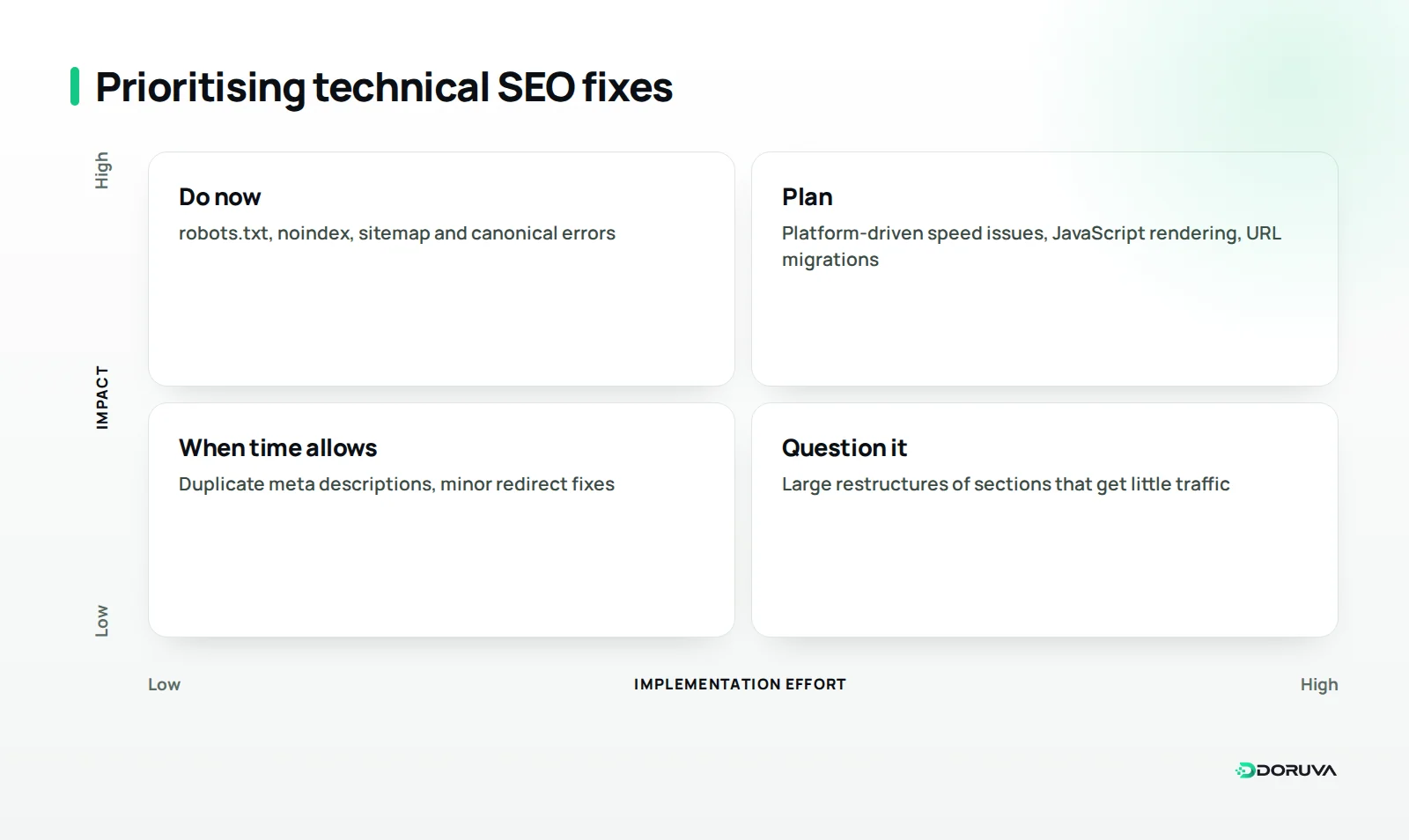
Start with whatever blocks traffic outright: crawling and indexing issues always come first. Then tackle high-impact, low-effort fixes and give infrastructure work its own timeline.
| Group | Checks | Where to check | Priority |
|---|---|---|---|
| Crawling | 1–5 | robots.txt, a site crawler, URL Inspection | Very high |
| Indexing | 6–10 | Search Console page indexing report | Very high |
| Architecture and redirects | 11–14 | A site crawler, internal link reports | High |
| Performance | 15–19 | Core Web Vitals report, PageSpeed Insights | High |
| Mobile and security | 20–22 | Real-device testing, browser console | Medium to high |
| Structured data and signals | 23–25 | Rich Results Test, a site crawler | Medium |
On a dental clinic's site, the first week might go entirely on robots.txt, noindex and sitemap checks, while speed problems tied to design and hosting take longer. Mark each check as "no issue", "fixed" or "scheduled" and treat the list as a living document.
How often should you run a technical SEO audit?
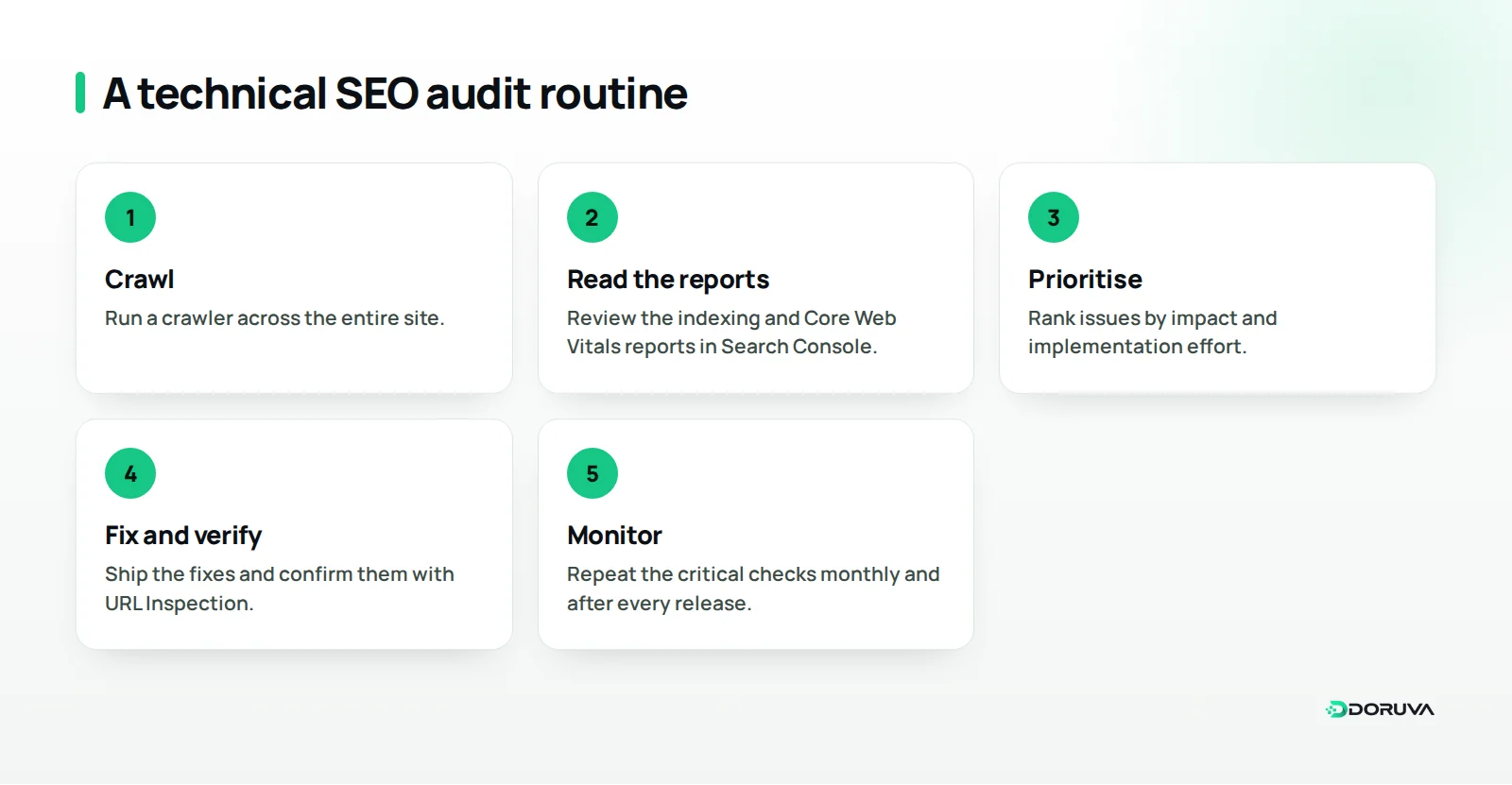
We recommend a full technical SEO audit at least once a year and after every major change, with the critical checks monitored monthly. A redesign, a domain or platform change or a new language version always calls for its own audit.
- After every release: confirm robots.txt, noindex, canonicals and the sitemap are exactly as expected.
- Monthly: review the indexing and Core Web Vitals reports in Search Console, plus new broken links and server errors.
- Quarterly: crawl the whole site and clean up redirect chains, orphan pages and duplicate URLs.
- Yearly, or with major changes: work through all 25 checks from start to finish.
For a quick first impression, run your site through our free SEO checker. Tools flag issues; judging which ones hurt your business takes context.
Summary and next steps
Technical SEO lays the groundwork for your content to be found, understood and delivered quickly. Remove crawling and indexing obstacles first, then improve architecture and performance, and finally strengthen your signals with structured data and hreflang. Once the technical foundation is in place, our article on what a website needs to be visible on Google covers the content and visibility side.
You can work through this list with your own team. If you would like help interpreting the results and prioritising fixes, Doruva's SEO service can support you from the technical audit through to implementation. If the problems stem from the platform itself and the site needs rebuilding, our web design team builds with performance and crawlability in mind from day one. To review your site together, get in touch with our SEO team.
Frequently Asked Questions
Which tools do I need for a technical SEO audit?
Google Search Console is free and the starting point for every audit. Add a site crawler and PageSpeed Insights and most sites are covered; on large sites, server log analysis adds valuable detail.
Can a page blocked by robots.txt still appear in Google?
Yes. Robots.txt only blocks crawling, so a URL that other sites link to can be indexed without its content being read. To keep a page out of search results, leave it crawlable and use noindex instead.
How soon will I see results after fixing technical issues?
There is no fixed timeframe, because Google has to recrawl the affected pages, which can take anywhere from days to weeks depending on the site's size and crawl frequency. For key pages, you can request indexing through the URL Inspection tool in Search Console.
Does a small business website need all 25 checks?
Most checks apply to every site, but some only matter in specific situations. Hreflang, for example, is only relevant to multilingual sites, and parameter handling mostly comes up on online stores with filters.
What is the difference between technical SEO and on-page SEO?
Technical SEO deals with the site's infrastructure: crawling, indexing, speed and security. On-page SEO focuses on each page's own content, such as copy, headings and keyword use, and the two work hand in hand.