Web Design
Redesigning Without Losing SEO Traffic: A 301 Redirect Guide
To keep SEO traffic through a website redesign, you need to inventory your old URLs and 301-redirect each one to its closest match on the new site. This guide shows how to build the redirect map, what to test on launch day and what to monitor afterwards.
By Mehmet ÇalışırPublished 10 min read
Contents
A new design, a new content management system or a new domain is exciting. Discovering a few weeks after launch that organic traffic has dropped is the most common disappointment in redesign projects. This guide is for business owners, marketing managers and project teams getting ready to rebuild a site. It covers which decisions need to be made when, and the mistakes we see most often, without drowning you in technical detail.
What is a 301 redirect, and why does it matter in a redesign?
A 301 redirect is the HTTP response that tells browsers and search engines a page has moved permanently to a new address. Visitors who open the old URL land on the new one automatically, and over time Google starts showing the new URL in search results in place of the old one.
The reason it matters is simple. Over the years, your old URLs have built up rankings, backlinks, bookmarks and shares. If those addresses hit an error page on the new site, all of that is wasted: Google gradually drops the old pages from its index, and the new pages have to earn trust from scratch. Well-built redirects carry that accumulated value over to the new addresses.
Any redesign that changes URLs is, technically, a site migration, and it deserves as much planning as the design itself. It needs to be part of the budget and scope from day one; we cover the other factors that shape a project's budget in our guide to what drives the cost of a business website.
When do URLs change during a redesign?
URLs usually change because of platform and structure decisions, not because of the design. If any of the following apply to your project, a redirect plan is non-negotiable:
- Changing content management system: moving from an off-the-shelf platform to a custom build, or the other way round, almost always changes URL patterns. Addresses like
/?p=123become readable ones, for example. - Restructuring the site: moving from
/our-services/implants.htmlto/services/dental-implants/, with new folders and naming. - Consolidating content: merging three near-identical blog posts into one stronger guide.
- Changing domain: a rebrand or a move to a different domain extension.
- Protocol and hostname changes: moving from HTTP to HTTPS, or from the
wwwversion to the non-wwwversion. - Language structure: moving content into language folders such as
/en/when the site becomes multilingual.
Even when URLs stay the same, heavily rewritten titles, content and internal links can affect rankings. “The addresses aren't changing” is never a reason to skip the SEO checks.
What is the difference between a 301, a 302 and a 410?
A 301 signals a permanent move, a 302 a temporary one, and a 410 that content has been removed deliberately and for good; for pages that move during a redesign, the right choice is almost always a 301. According to Google's documentation on redirects and Google Search, a permanent redirect is a strong signal that the target page should be shown in search results, while a temporary redirect is only a weak signal.
| Response | Meaning | When to use it | Effect on search engines |
|---|---|---|---|
| 301 (or 308) | Moved permanently | The page lives on at a new address | Strong signal that the new URL is canonical |
| 302 (or 307) | Temporarily elsewhere | Maintenance, short campaigns, tests | Weak signal; the old URL is expected to stay indexed |
| 404 | Not found | The page has no equivalent on the new site | The page drops out of the index over time |
| 410 | Gone | Content was removed on purpose and has no replacement | Similar to 404, but states clearly that removal was intentional |
How the redirect is implemented matters too. The most reliable option is an HTTP redirect at server or application level. Google can also process meta refresh and JavaScript redirects, but these are fallbacks for situations where a server-side redirect is not possible.
How do you build a redirect map?
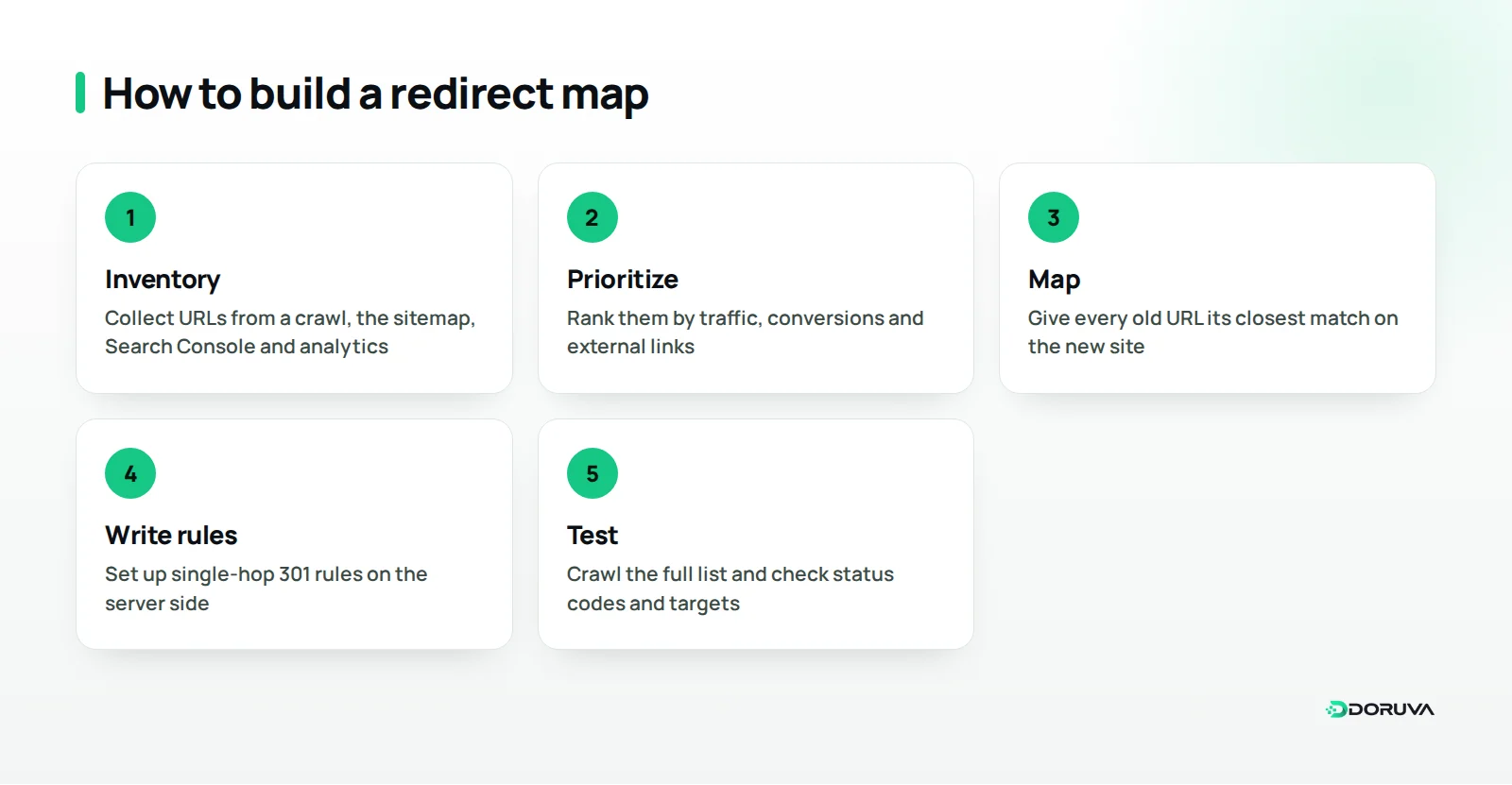
A redirect map is a spreadsheet that pairs every valuable URL on the old site with its target on the new one, and it is the single most important SEO document in a redesign. Start it as soon as the new site structure is settled, and finish and test it before the new site goes live.
1. Build an inventory of old URLs
Do not rely on a single source. Combine several:
- Crawl the old site end to end with a crawling tool.
- Download the current XML sitemap.
- Export pages with clicks and impressions from Search Console.
- Pull landing pages that received visits in the past year from your analytics tool.
- Identify pages with external links using Search Console's links report or a backlink tool.
- Remember PDF catalogs, important images and old campaign landing pages.
2. Choose a target for every URL
The rule is simple: every old page redirects to its closest content equivalent on the new site. The old “Dental Implants” page goes to the new “Dental Implants” page; the old “Company” page goes to the new “About us” page. Merged content redirects to the new guide it was folded into. For pages that genuinely have no equivalent and get neither traffic nor links, returning a 404 or 410 is more honest than redirecting to something unrelated.
3. Prioritize and test
Add a priority column based on traffic, conversions and links. On a site with hundreds of URLs, the redirects for the pages that bring the most traffic and conversions need to be flawless. Pattern rules, such as one rule that moves an entire folder to a new one, save time, but test every rule against real example URLs.
For a practical map, these columns are usually enough: old URL, new URL, status code (301, 404 or 410), priority, the page's traffic over the past year, number of external links, owner and test result. On a dental clinic's map, for example, the row for /our-services/implants.html would read /services/dental-implants/, 301, high priority. An expired campaign page with no equivalent would be marked 410. The spreadsheet should be the single source of truth for designers, developers and content owners, with every change recorded there rather than scattered across email threads and chat messages.
What are the most common redirect mistakes in a migration?
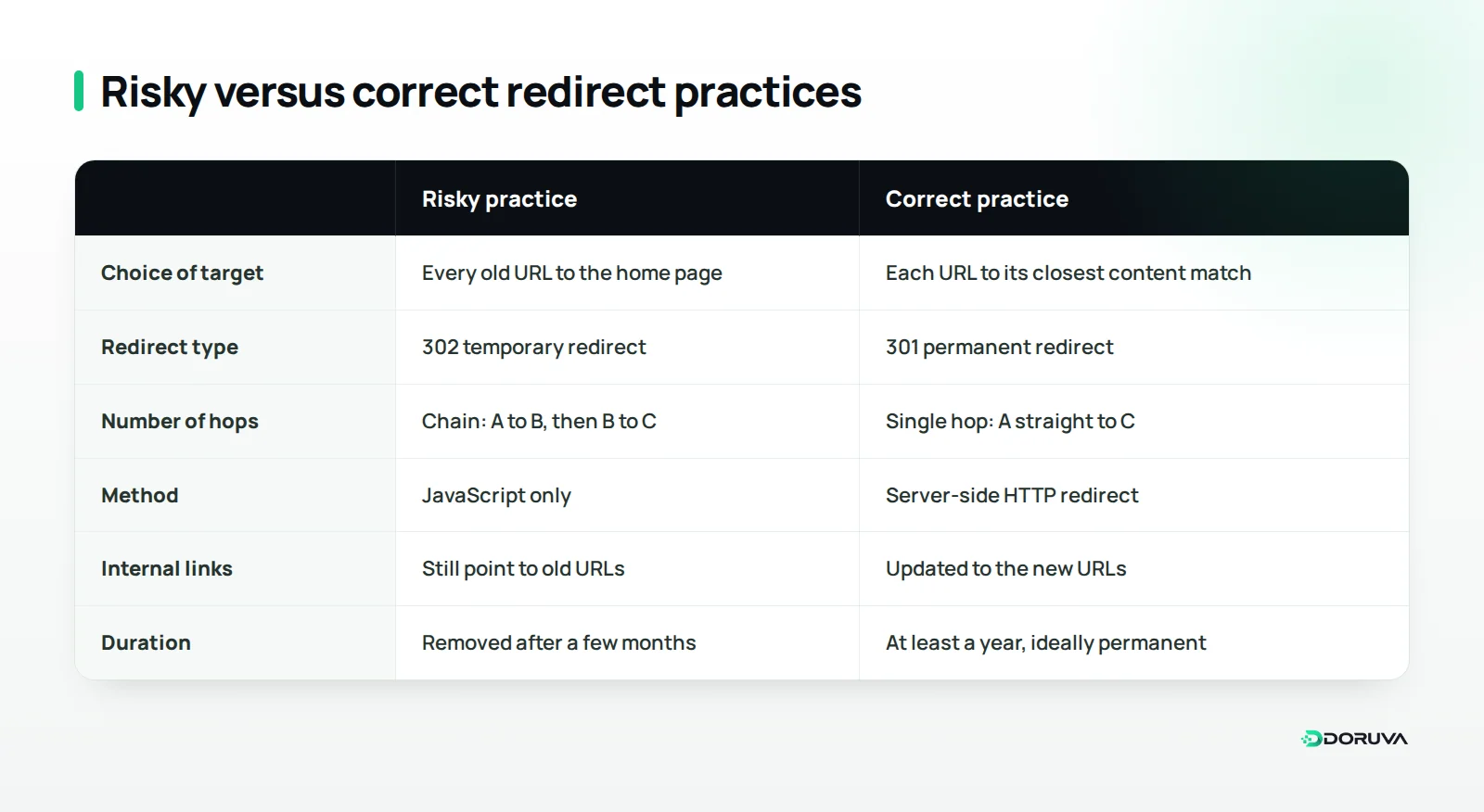
Most traffic losses come not from missing redirects but from redirects done badly. These are the mistakes we see most:
Redirecting everything to the home page
When mapping looks like a lot of work, sending every old address to the home page is tempting. Visitors cannot find what they came for, and Google often treats mass redirects like this as a soft 404, which means the old page's value is not passed on.
Redirect chains and loops
When an old URL goes to an intermediate address and then on to another, you get a redirect chain. Chains slow down page loads and make crawling harder. Update redirects left over from earlier redesigns too, so every old address goes straight to its final destination. If two addresses redirect to each other, the page never loads at all; loops like this must be caught during testing.
Using temporary redirects for a permanent move
Some platforms and plugins default to 302. Using a 302 for a permanent move tells Google the old address is still the real one. Use a crawling tool to confirm that your redirect rules actually return a 301.
Not updating internal links
Redirects catch old addresses, but the new site's navigation, in-text links, canonical tags and sitemap should all point directly to the new URLs. Redirects are for external links and old bookmarks; your own links should never depend on them.
Forgetting images, PDFs and parameterized URLs
Redirect plans often cover pages only. Yet product photos that get traffic from image search, PDF catalogs that other sites link to and parameterized URLs used in campaigns all carry value too. Add their new addresses to the map, and test that campaign parameters survive the redirect.
What should you check on launch day?
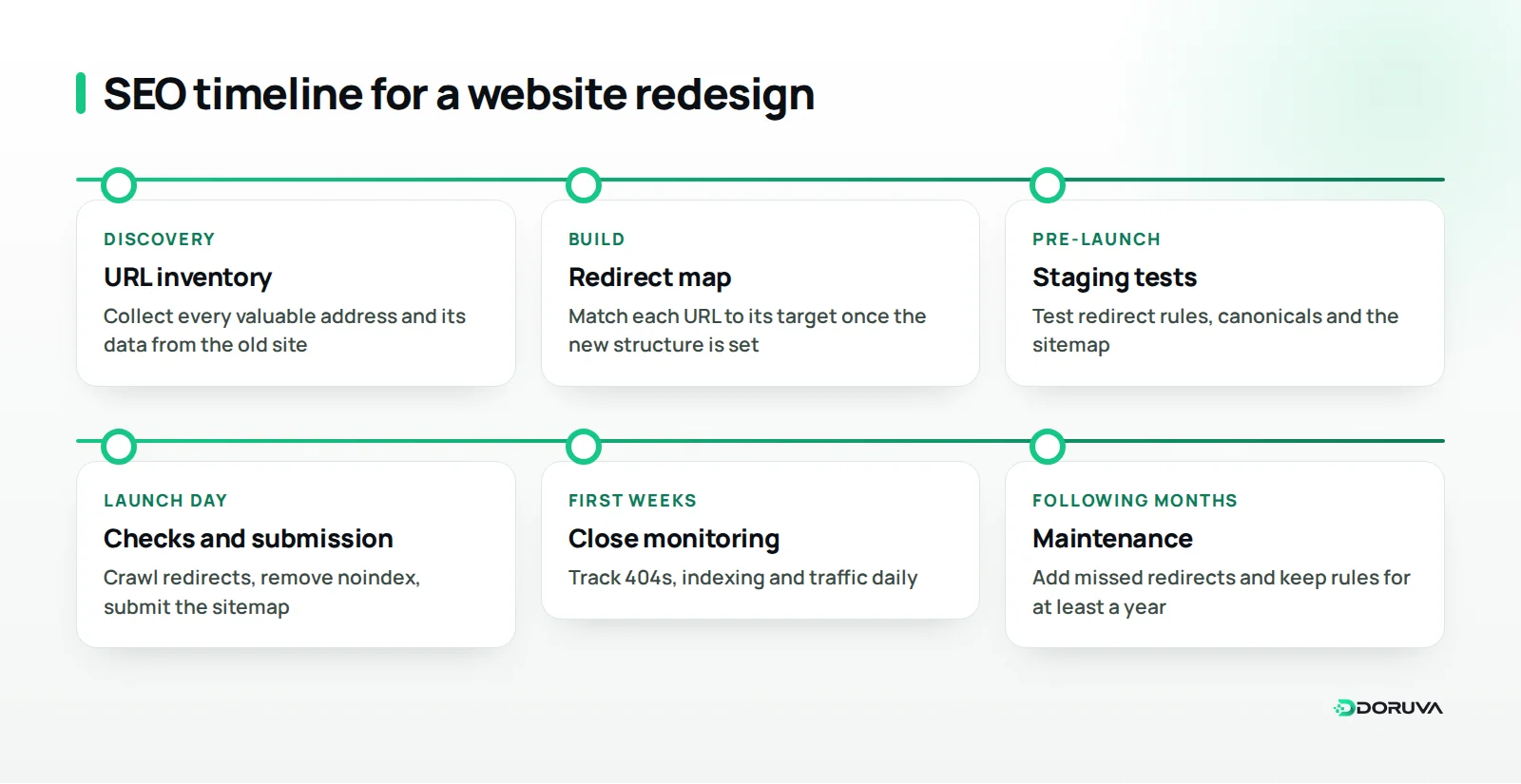
Launch day is when you confirm that the redirect map actually works and that the new site is open to search engines. If you can, launch on a low-traffic day, at a time when the team is available.
- Test every old URL in the map with a crawling tool: each should reach the correct target in a single 301 hop, and the target should return a 200.
- Check that
noindextags and robots.txt blocks used on the staging site have been removed. - Confirm the new XML sitemap contains only new URLs you want indexed, and submit it in Search Console.
- Make sure canonical tags point to the new addresses.
- Test that analytics and conversion tracking work on the new site.
- If the domain is changing, verify both domains in Search Console and use the Change of Address tool.
- On multilingual sites, check that hreflang tags have been updated with the new URLs.
Many of these checks are part of the site's overall technical health. For a fuller pass, run our technical SEO checklist twice: once before launch and once after.
How should you monitor traffic after launch?
In the weeks after launch, the goal is to spot problems before users and rankings do. Google's guide to site moves with URL changes notes that rankings can fluctuate temporarily during a move, and recommends keeping redirects in place for as long as possible, generally at least one year.
- Search Console page indexing report: watch for new 404s, redirect errors and new pages that are not being indexed.
- Performance comparison: compare clicks and impressions for key pages against the pre-launch period, and work out whether a drop is site-wide or concentrated in one page template.
- Server logs and 404 lists: find addresses that were missed in the map but still get visits, and add them.
- Conversions: confirm that forms, phone clicks and sales are fully tracked on the new site.
- Speed: a richer new design can also be a heavier one, so measure your Core Web Vitals again after launch.
Do not rush to shut down the server configuration that holds the old domain and redirect rules. If the domain has changed, letting the old one lapse means years of accumulated links can stop working overnight.
Summary: launching your redesign with confidence
Keeping SEO traffic through a redesign depends on planning, not luck. Build an inventory of old URLs, give each one a one-to-one target, use server-side 301s, avoid chains and blanket redirects to the home page, test the map on launch day and keep an eye on Search Console in the months after.
Before you start, you can scan your current site with our free SEO checker to see where it stands. If you want the new design, the redirect map and the technical SEO checks handled as one plan, take a look at our web design services, or get in touch to talk through your redesign.
Frequently Asked Questions
How long should 301 redirects stay in place?
For site moves, Google recommends keeping redirects for as long as possible, generally at least one year. Because backlinks and bookmarks can be used for years, keeping important redirects permanently is the safest approach.
Is it normal for traffic to drop after a redesign?
Some temporary fluctuation during a move is normal. A drop that is large, lasts a long time or is concentrated on specific pages usually points to missing or broken redirects, leftover noindex tags or content that disappeared.
Do I need redirects if my URLs are not changing?
If the addresses truly stay identical, you may not need any. Still check small differences such as HTTPS, www and trailing slashes, and monitor the effect of rewritten titles and content after launch.
Does a 301 redirect reduce a page's ranking value?
Google treats a permanent redirect as a strong signal to show the page's new address. Real losses usually come from redirects that point to unrelated pages, run through chains or use a temporary status code.
Who should prepare and implement the redirects?
Someone who understands the content and SEO side should build the redirect map, and the development team should implement the rules at server or CMS level. Testing the map together before launch is the safest way to work.