Web Design
What Drives the Cost of a Business Website? A 2026 Guide
The cost of a business website depends on scope and content, how custom the design is, the platform and integrations, SEO and performance work, and maintenance after launch. This guide explains each driver and the questions to ask when comparing proposals.
By Mehmet ÇalışırPublished 10 min read
Contents
This guide is for business owners, marketing leads and procurement teams who are about to commission a website. Instead of quoting figures, it explains what makes a quote go up or down, so you can compare proposals on equal terms and cut the items you don't actually need before the project starts.
What does the cost of a business website actually include?
The cost of a business website means the total investment needed to plan, design, build, populate and keep a site running. It is not just the first invoice from your agency; it is everything the site costs you over its working life.
It helps to split that into two parts: the one-off build cost and the ongoing running cost. However attractive a first quote looks, if hosting, maintenance, security updates and content refreshes are missing from the picture, you are only seeing half of it.
Take two examples. A six-page site for a dental practice, in one language, with an appointment form. And a three-language site for a manufacturer that sells through distributors, with a product catalogue and a dealer login. Both get called a business website, yet in effort, risk and upkeep they are completely different projects.
How do page count, content and information architecture affect cost?
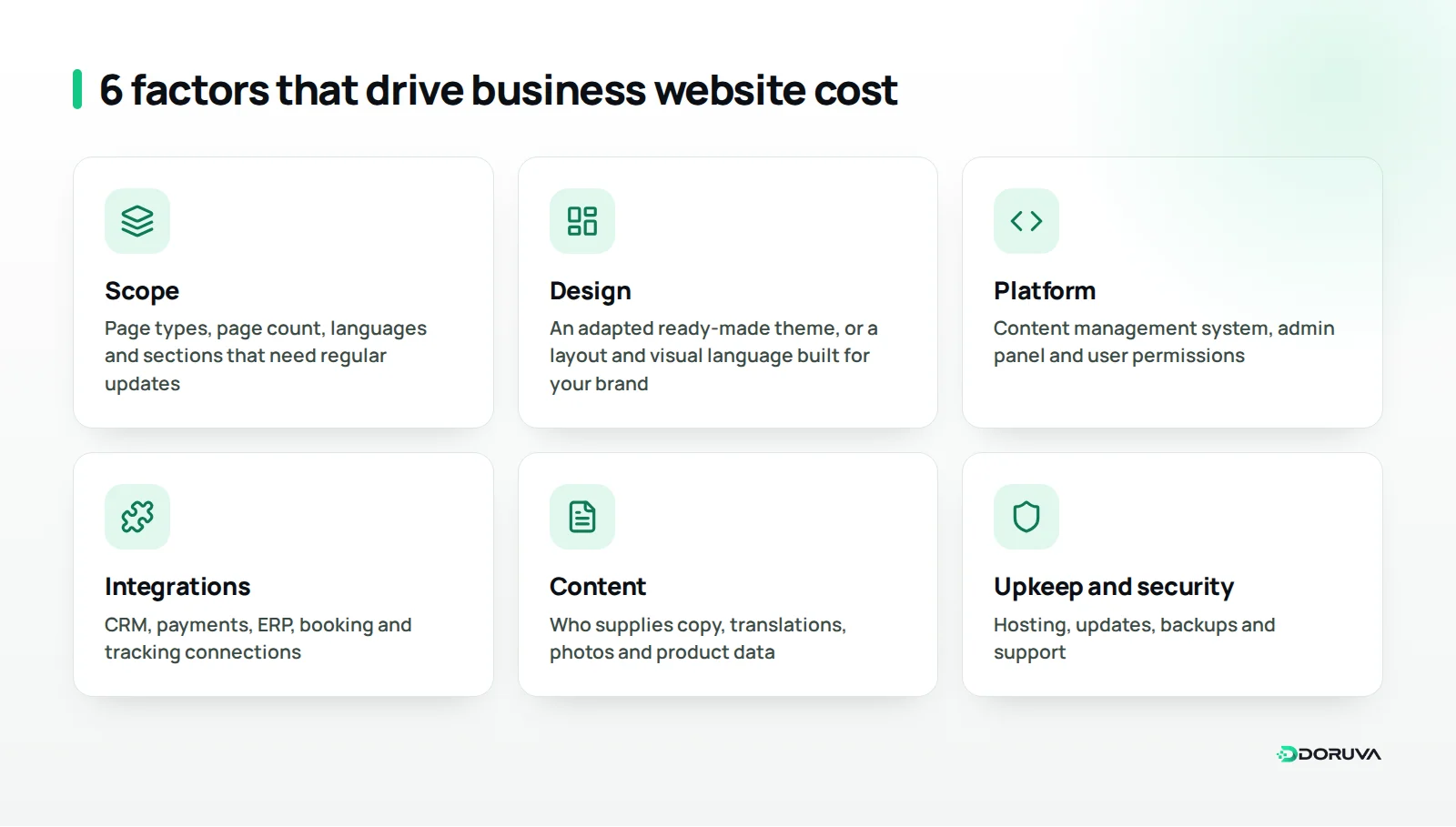
Scope is the single biggest cost driver, because every page type means design, content, development and testing work. Page count on its own is misleading, though: twenty pages built from one template can be finished faster than eight pages that each need a different layout.
To pin down scope, answer these questions:
- How many distinct page types are there? A home page, service page, product page, blog post and contact page are all different types.
- How many of each will there be, and who will enter them?
- Is the site in one language or several? If several, are the translations ready?
- Are there sections that need regular updates, such as a product catalogue, case studies or job listings?
Your answers form the basis of the information architecture. When the navigation, the links between pages and the place of each piece of content are planned up front, changing direction mid-build becomes far less expensive. Vague scope is where budgets most often break.
Where will the content come from?
Will copy, photos, product data and documents come from you, or will the agency produce them? Copywriting, translation, product photography and custom icons may or may not be in the quote. If content isn't ready, the timeline stretches, and a longer timeline means more total effort.
Off-the-shelf theme or custom design?
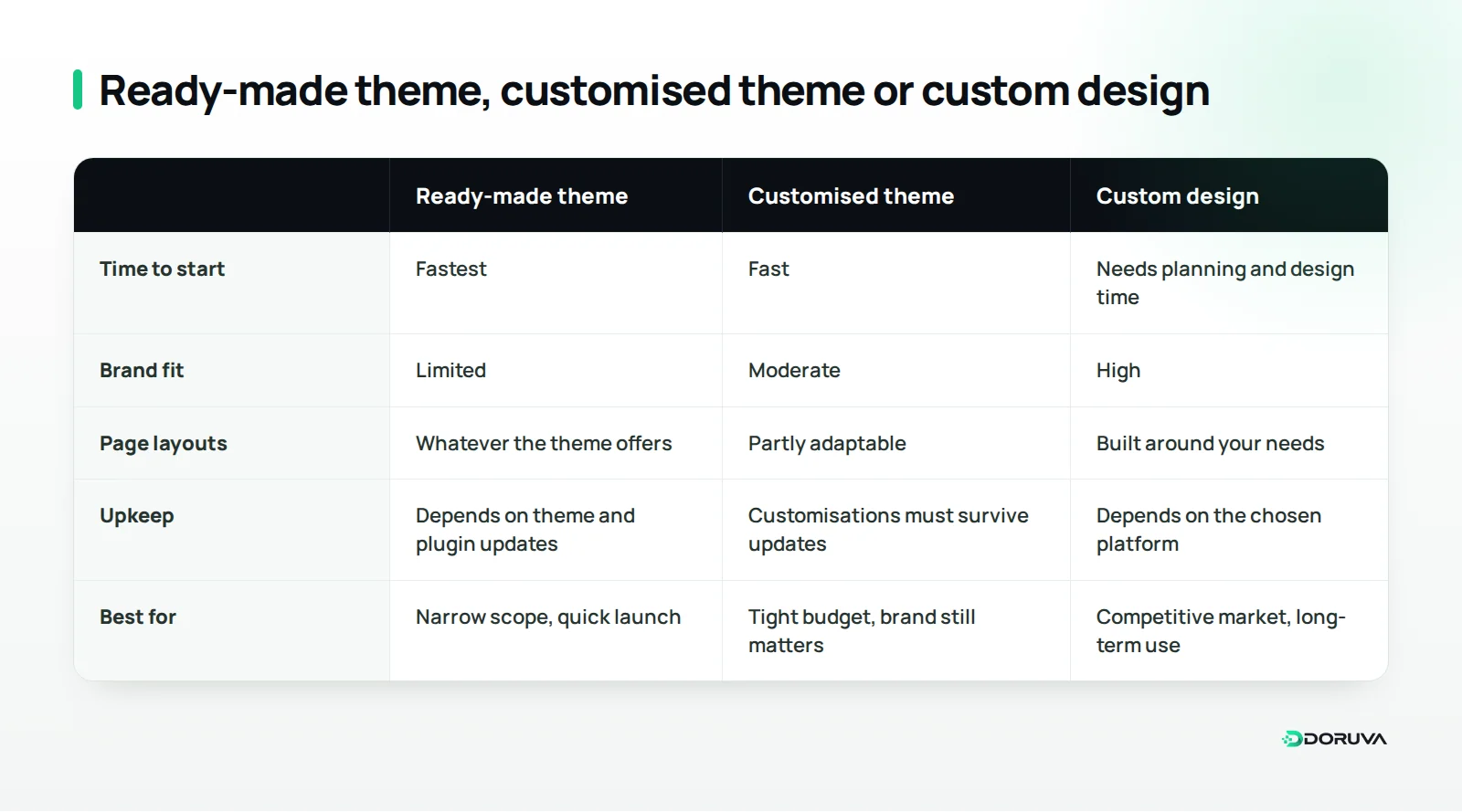
How original the design is comes second only to scope. A ready-made theme gets you started quickly; a custom design gives you a layout, structure and visual language built around your brand, but it takes research and design time.
A custom design process usually covers audience and competitor research, page wireframes, visual design, desktop and mobile variations, and rounds of revisions with you. The number and scope of revision rounds is often left out of proposals, even though it has a direct effect on the schedule.
A site that works properly on every screen size is no longer an extra; it is the baseline. The real difference is whether mobile is treated as a shrunken desktop or designed around what a phone visitor actually needs. A patient booking a check-up and a buyer downloading a spec sheet open the same page for very different reasons.
Why do platform and integrations change the cost so much?
The platform a site is built on and the systems it exchanges data with determine much of the development effort. The gap between a simple brochure site and one that takes payments, pulls stock levels or passes customer data to another system mostly opens up here.
Choosing a content management system
If you want to update the site yourself, you need a content management system (CMS). An existing CMS can be quick to set up; a bespoke admin panel takes more development but contains only the fields you actually use. Who gets which permissions, and whether content needs approval before it goes live, also shape the scope.
Integrations
Each integration is its own piece of design, build and testing. Common ones include:
- Sending form submissions to a CRM or email marketing tool
- Online payments or a booking system
- Pulling product and pricing data from an ERP, inventory or accounting system
- User accounts for dealers, members or customers
- Analytics, tag management and ad conversion tracking
The more integrations you add, the thinner the line between a website and a software project. If your business processes sit at the heart of the site, use the criteria in our guide on choosing between off-the-shelf and custom software to decide which route makes sense.
Where do SEO, performance and accessibility sit in the budget?
SEO, speed and accessibility are not finishing touches; they are part of how well the site is built, so they should appear as their own lines in a proposal. If they are missing, they either won't be done at all or will come back as extra work after launch.
The essentials to cover during the build:
- Technical SEO foundations: clean URLs, a sensible heading hierarchy, meta tags and an XML sitemap
- Optimised images, no unnecessary scripts, and pages that load quickly
- Accessibility basics such as keyboard navigation, sufficient colour contrast and meaningful alt text
- When replacing an old site, redirecting old URLs to their new equivalents
Our technical SEO checklist shows what that work involves, and our free SEO checker gives you a quick read on your current site in a few minutes. If it turns up a long list of problems, it is cheaper to fold those fixes into the redesign scope from day one.
Search visibility is also broadening. Brands that want to be cited in AI-generated answers need content that is clearly structured and easy to quote. We cover that shift in our article on how generative engine optimization differs from SEO; it is much easier to plan for during the build than to retrofit.
What ongoing costs come after launch?
A website isn't finished on launch day; keeping it running, secure and current creates regular costs. When you plan the budget, give these items the same weight as the build itself.
- Domain and hosting: Renewing the domain name and paying for the server or hosting plan the site runs on. As traffic, storage and performance expectations grow, hosting needs change too.
- SSL and security: An HTTPS connection, security patches and, where needed, a firewall and monitoring.
- Maintenance and updates: Keeping the software, plugins and libraries up to date, and fixing bugs as they appear.
- Backups: Taking regular backups and testing that a restore actually works.
- Content and small improvements: New pages, campaign sections, and copy or image updates.
- Licences and third-party services: Premium themes and plugins, web fonts, maps, email and form services.
| Item | Type | What pushes it up |
|---|---|---|
| Discovery and scoping | One-off | Unclear goals, many decision-makers |
| Design | One-off | Custom layouts, many page types, generous revision rounds |
| Development and integrations | One-off | Bespoke admin, payments, ERP or CRM links, user accounts |
| Content and translation | One-off and periodic | Copy not ready, several languages, product photography |
| Domain, hosting, SSL | Ongoing | High traffic, need for a dedicated server |
| Maintenance, security, backups | Ongoing | Many plugins, components that need frequent updates |
| Licences and external services | Ongoing | Premium themes, plugins and subscription tools |
Legal requirements are part of the job
If your forms collect personal data such as names, phone numbers or email addresses, data protection obligations are part of the project: privacy notices, consent where required, cookie choices and secure storage. Which rules apply depends on where you operate and whose data you collect, for example the GDPR in the EU or, for businesses in Turkey, KVKK (Law No. 6698), with guidance published by the Turkish Personal Data Protection Authority. This is general information, not legal advice; for your own situation, talk to a qualified lawyer.
Which questions help you compare proposals fairly?
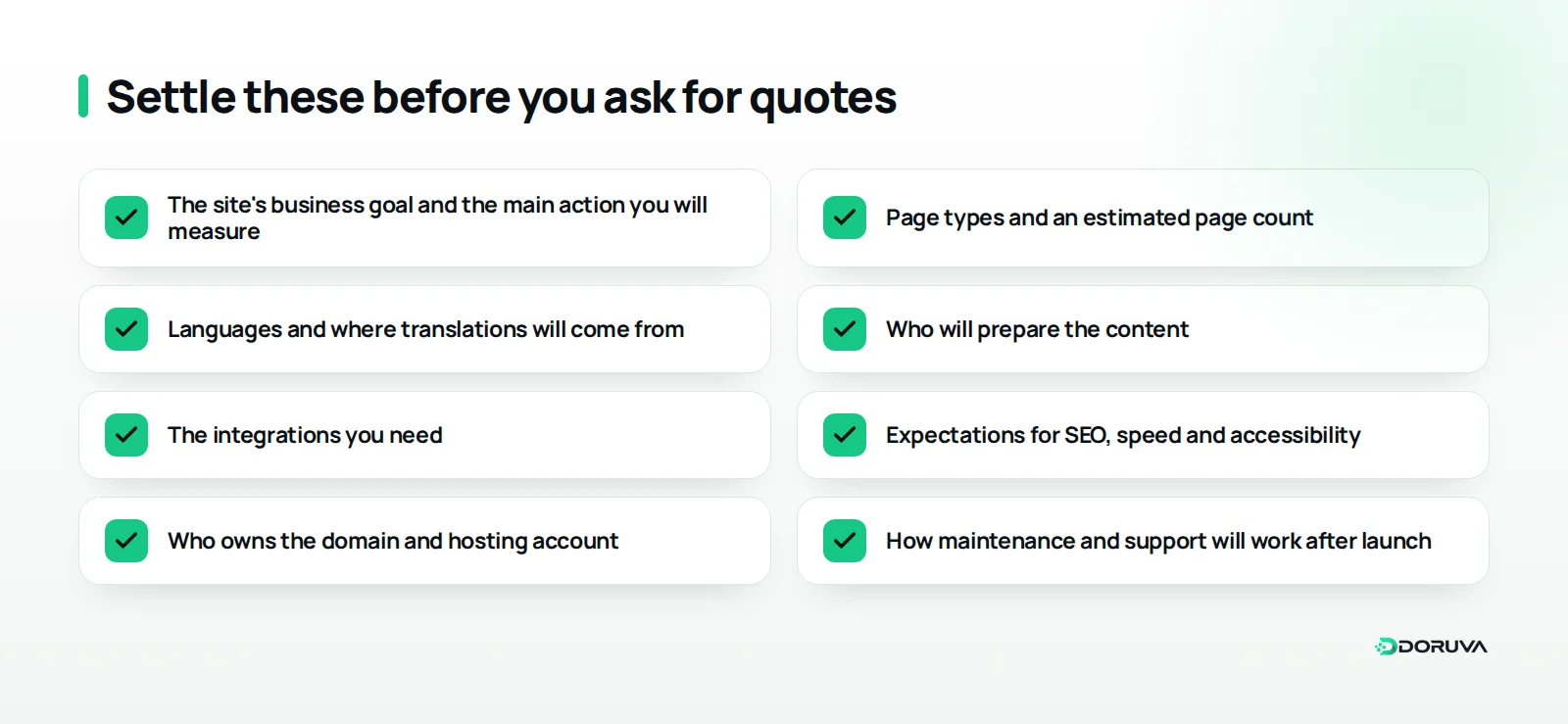
The only reliable way to compare two proposals is to make sure they describe the same job. Most of the gap between two totals comes from differences in scope, not pricing policy.
Ask every team that quotes:
- Which page types will be designed, and how many revision rounds are included?
- Is the design original, or an adapted ready-made theme?
- Who enters the content, and are copywriting and imagery included?
- Which integrations are in scope, and which are not?
- Are technical SEO, performance work and redirects included?
- In whose name will the source code, design files, domain and hosting account be held?
- How will maintenance work after launch, and how are support requests handled?
Question six matters more than it looks. Having the domain and hosting account registered to your business saves a lot of pain if you ever want to change suppliers. A closed setup that only one company can access may look economical at first, but it can lock you in for years.
When does a cheap quote turn out expensive?
A low quote isn't automatically a bad one; for a narrow, well-defined project it can be perfectly reasonable. The problem is when the low number hides gaps you can't see yet: slow pages, plugins nobody updates, layouts that break on mobile, or no tracking at all. Those gaps usually surface a few months after launch, when they are harder to fix.
On a tight budget, how can you bring the cost down sensibly?
The sensible way to cut cost is to trim scope, not quality. Keep the fundamentals intact—speed, security, mobile usability and tracking—and split the project into phases; for most businesses that is the best balance.
- Launch in phases: Go live first with the pages that drive enquiries and trust; leave the blog, careers section or second language for phase two.
- Think in templates: Put service or product pages on one well-designed template instead of designing each page from scratch.
- Prepare content early: When copy, images and documents are ready at kick-off, there is less waiting and less rework.
- Trim the nice-to-have list: Every animation, slider and plugin adds to both the build and the upkeep.
- Name one decision-maker: Feedback that arrives through one channel, in one batch, keeps revision rounds short.
A new coffee brand, for instance, could launch with a home page, product pages, its story and a contact page, and add online ordering in a second phase. The brand becomes visible early, and the second phase can be scoped around how real visitors behave in the first few months.
Summary: next steps for planning your budget
A realistic budget comes from settling the goal first, the scope second and the technology last. Write down what the site needs to achieve for you: more quote requests, distributor applications, bookings or online sales. Then list the page types, where content will come from and the integrations you need.
With that list in hand, proposals start speaking the same language and every line item can be discussed on its merits. Our guide to what a website needs to be visible on Google is a useful cross-check while you define scope.
With Doruva's business web design service, the first step is working out your needs together and making clear what is essential now and what can wait. If you'd like to talk through your project, send us your web design enquiry.
Frequently Asked Questions
Why can't an agency give a fixed price for a business website upfront?
Because the term covers projects of very different sizes. Until page types, languages, design approach and integrations are clear, any number is a guess rather than a quote for real work.
Is a site built on a ready-made theme good enough for a business?
It can be for a narrow project that needs to go live quickly. If brand differentiation, custom page layouts or long-term growth matter, a custom design is usually the sounder investment.
What are the recurring costs of running a website?
The main ones are domain renewal, hosting, SSL and security, software and plugin updates, backups, content updates, and any paid licences or third-party services the site relies on.
Whose name should the domain and hosting account be in?
Ideally your business's, with the login details held by you. That way you keep control of your site if you ever change the team you work with.
Is redesigning an existing site cheaper than starting from scratch?
Not always. Reusing content and structure can save work, but redirecting old URLs, migrating content and cleaning up technical issues are real tasks in their own right.