

What is CMS (Content Management System)?
Definition
A CMS (content management system) is software that lets people create, edit, review and publish website content such as text, images, pages and menus without writing code. It separates content, stored as structured data in a database, from presentation, defined in templates. Traditional systems like WordPress also render the pages, while a headless CMS only stores content and delivers it through an API.
Also known as: CMS, content management system, content management software, website CMS
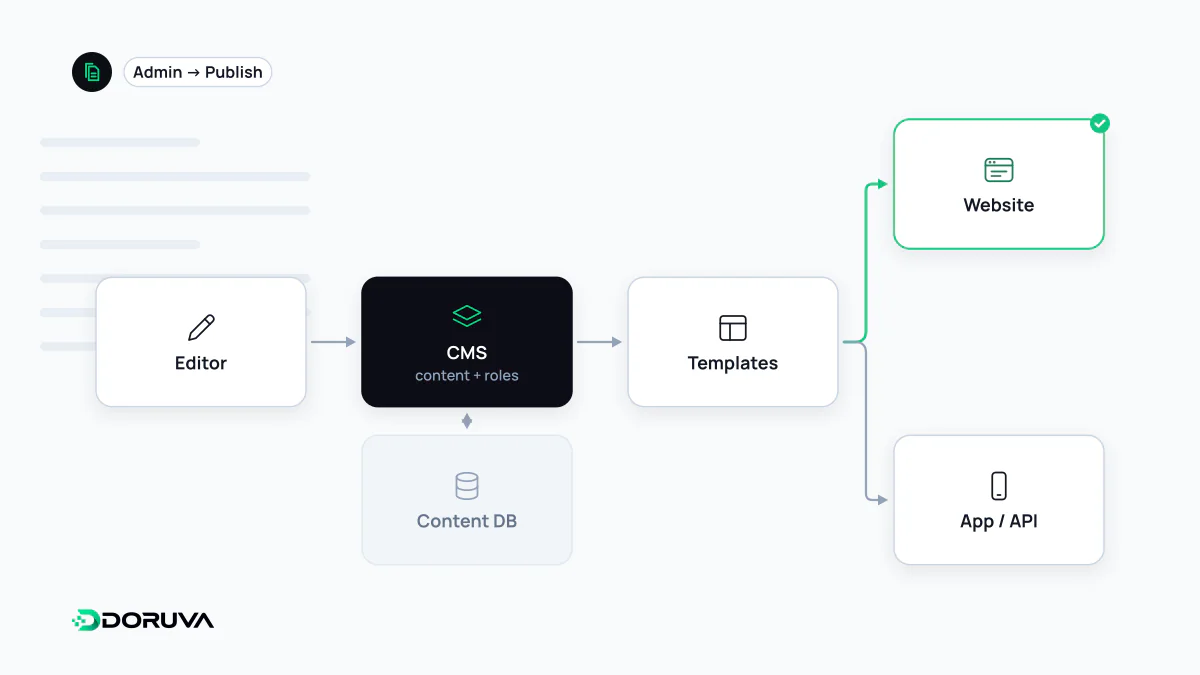
Separating content from presentation
Before content management systems were common, fixing one sentence meant opening an HTML file, editing it and uploading it again over FTP. Every change was a developer's job, and a menu update meant touching dozens of files by hand.
A CMS splits that work in two. Content is stored as structured data, with fields such as title, body, author, date and category. Presentation lives in templates that pour that data into pages. Edit an article once and it updates everywhere it appears: its own page, the category listing, the “latest posts” block on the home page and the sitemap. Redesign the site and the content does not have to be touched at all.
The building blocks of a CMS
- Editor: where content is written, from a plain text box to visual editors that assemble pages from blocks.
- Content model: which content types exist (posts, pages, products, events) and which fields each one has.
- Media library: uploading, resizing and reusing images and files.
- Users and roles: who can draft, who can publish, who can change settings.
- Workflow: drafts, review, scheduled publishing and revision history.
- Classification: categories, tags and other forms of taxonomy.
- URL handling: how each item's permalink is built and what happens when it changes.
- Extensibility: plugins, modules or integrations that add features.
Three architectures
| Approach | How it works | Strength | Watch out for |
|---|---|---|---|
| Traditional (monolithic) CMS | Content, templates and page rendering in one system, e.g. WordPress or Drupal | Fast to set up, familiar to editors, large plugin ecosystem | Ongoing plugin and server maintenance, security updates |
| Headless CMS | Stores content and exposes it via API; the front end is built separately | One content source for web, apps and other channels; full freedom on the front end | Development cost; previews and SEO fields must be built |
| File-based / static | Content lives in Markdown files and an SSG builds HTML | Very fast, secure output; version history in Git | Can be awkward for non-technical editors |
Hosted website builders bundle hosting, design and content editing into one subscription. They are convenient, at the cost of control over data and design.
Questions that decide the choice
- Who will update content, and how often? A team posting weekly news has different needs from one changing a hundred products a day.
- How complex is the content model? Just posts and pages, or linked records such as products, locations, experts and events?
- Do you need multiple languages, approval workflows or fine-grained permissions?
- Can editors manage SEO fields such as title tags, meta descriptions, canonicals and redirects themselves?
- Who is responsible for hosting, updates and backups?
- Can all content be exported cleanly if you ever move to another system?
When a CMS is the wrong tool
A five-page brochure site that changes twice a year may cost more to maintain as a CMS than it gains from one. At the other end, when the “content” is really business data, as in a booking, quoting or membership platform, bending a general-purpose CMS to fit often ends badly; custom software that models the business rules directly is usually the sounder base. The useful question is not “which CMS?” but “who manages what, how, and how often?”.