

What is Taxonomy (Categories and Tags)?
Definition
A taxonomy is the classification system a content management system uses to group posts, pages or products by shared characteristics. The best-known examples are hierarchical categories and flat tags. Because each taxonomy term usually generates its own archive page and URL, taxonomy design directly shapes site structure, internal linking and the number of pages search engines have to crawl.
Also known as: CMS taxonomy, categories and tags, content taxonomy, custom taxonomy, tag archive
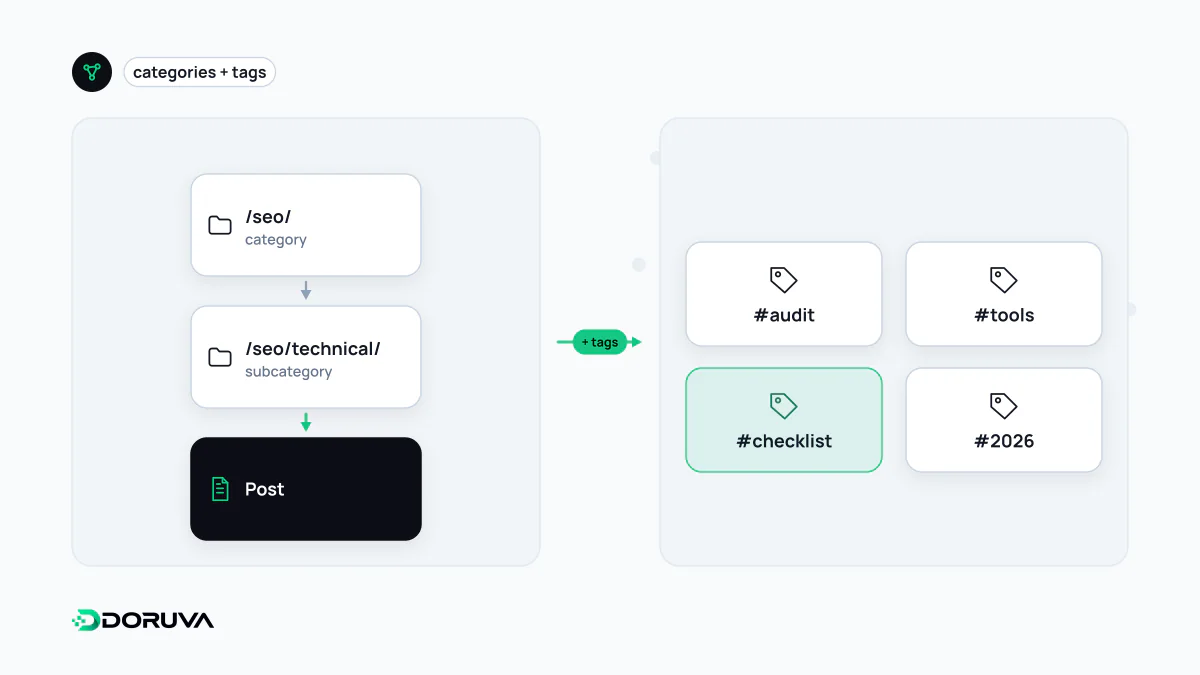
Categories and tags answer different questions
| Category | Tag | |
|---|---|---|
| Structure | Hierarchical, can have children | Flat |
| Question it answers | "Which section of the site does this belong to?" | "Which specific topics does this mention?" |
| Quantity | Few and stable | More numerous, growing over time |
| Serves | Navigation and information architecture | Cross-links between related topics |
Categories form the skeleton of a site: they appear in menus, drive breadcrumbs and usually every item has at least one. Tags are optional cross-references. A "Core Web Vitals" tag can tie together posts filed under both technical SEO and web design.
Taxonomies in WordPress and ecommerce
WordPress ships with two taxonomies for posts: the hierarchical category and the flat post_tag. Custom taxonomies can be registered for other needs, for example a brand classification for products:
register_taxonomy( 'brand', 'product', array(
  'label'        => 'Brands',
  'hierarchical' => false,
  'public'       => true,
  'rewrite'      => array( 'slug' => 'brand' ),
) );
hierarchical decides whether the taxonomy behaves like categories or like tags, and public whether term archives are published on the front end. In online stores, product categories form the backbone, while attributes such as colour and size usually become filters. The URL combinations those filters generate are a separate problem, handled by faceted navigation rules.
The thin tag archive problem
Every tag creates an archive page at its own URL. When authors invent fresh tags for every post, a site accumulates hundreds of tag pages within a few years, most of them listing one or two excerpts. Such pages offer visitors nothing of their own and can count as thin content. Tags that share a name with a category publish an almost identical list at a second URL, creating duplicate content. On the crawling side, all of these pages consume capacity that important URLs could have used.
There are several ways to clean up. Merge near-identical tags and permanently redirect the retired tag URLs to the surviving one; delete tags that hold only one or two items; or add noindex to low-value archives and keep them out of the XML sitemap. Check whether a tag page actually earns search traffic before deciding which route to take.
Governance rules that keep a taxonomy healthy
- Controlled vocabulary: tags come from an agreed list, not an author's mood; creating a new tag is a decision, not a side effect.
- Minimum content threshold: for example, a tag archive is not opened to indexing until it holds at least five items.
- One name per concept: "ecommerce", "e-commerce" and "Ecommerce Sites" collapse into a single term.
- No overlap: a concept is either a category or a tag, never both.
- Make archives worth visiting: key category pages get a short introduction and featured items, so they become more than an automatic list.