

What is Orphan Page?
Definition
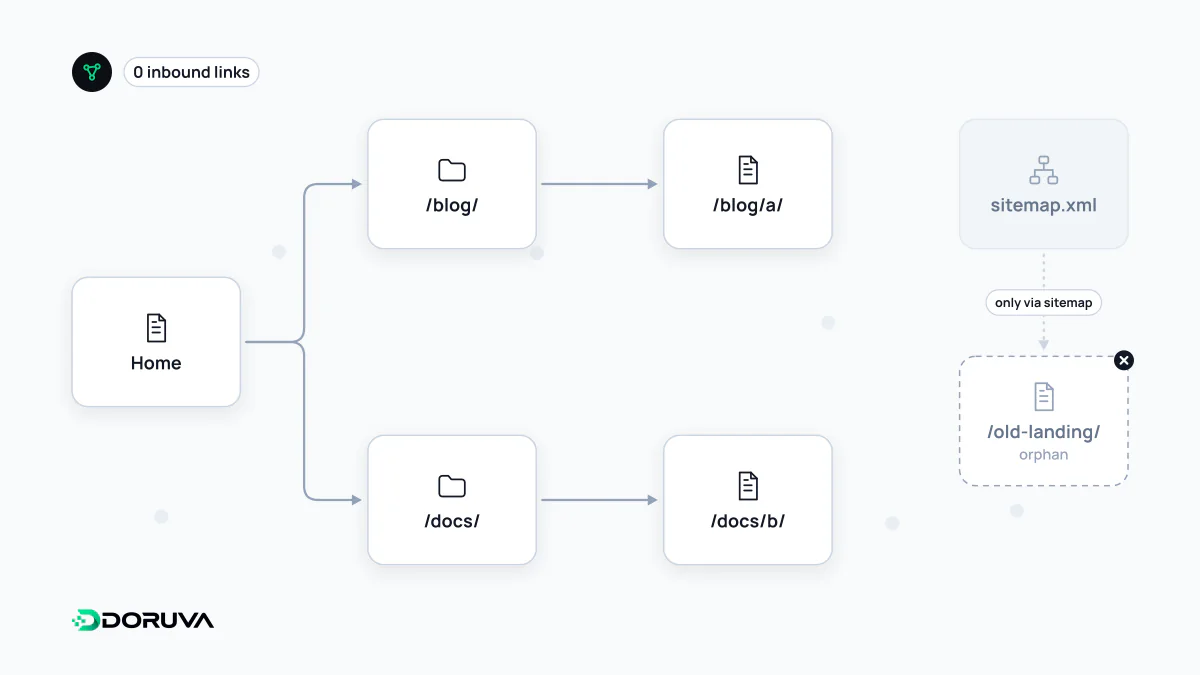
An orphan page is a page that receives no internal links from any other page on the same site, so it cannot be reached through menus, categories or in-content links. Visitors cannot find it by browsing, and search engines can only discover it through other routes such as the XML sitemap or external links, which makes its importance harder for them to judge.
Also known as: orphaned page, orphan URL, unlinked page
Why it is a problem
Search engines explore a site largely by following links. If nothing on the site links to a page, Googlebot will only visit it if it appears in the XML sitemap, has a link from another site or is remembered from earlier crawls. A sitemap enables discovery, but it does not carry what an internal link carries: the page's context within the site and its relative importance.
Internal links and their anchor text tell a search engine "this page is about this topic and is related to these pages". An orphan page lacks that context, so indexing may be slower and, even when indexed, it is harder for the page to be judged a strong candidate. For users the result is simpler still: nobody reads a page nobody can find.
How orphans happen
- pages removed from menus and categories during a redesign but left live,
- landing pages created only for ads or email campaigns,
- products whose category was deleted, or which dropped off listings when out of stock,
- older posts in archives paginated by JavaScript buttons without
href, - tag, author or attachment pages the CMS generates but nothing links to.
For pages that are deliberately unlinked and not meant for search, such as campaign pages, being orphaned is not a mistake; adding noindex makes the intent explicit.
How to find them
Finding orphans means comparing two lists: URLs you know exist and URLs reachable by following links from inside the site.
- Collect known URLs from the XML sitemap, your CMS's published content, Search Console performance and indexing reports, analytics and server logs.
- Crawl the site from the homepage with a crawler that only follows links.
- URLs that appear in the first list but not the second are orphan candidates.
Pages buried many clicks deep are not technically orphans but can suffer similar problems, so review them in the same pass. The SEO Checker also flags sitemap URLs that receive no links from any page in its sample crawl.
What to do
- Valuable, current pages: add contextual links from relevant category, guide or content pages, and make them part of a topic cluster.
- Outdated content covered elsewhere: 301-redirect it to the closest current page.
- Pages with no value: remove them, return 404 or 410 and drop them from the sitemap.
- Deliberately hidden pages: add
noindexand keep them out of the sitemap.
The best prevention is to make "link to it from at least one relevant page" a standard step in your publishing workflow.