

What is Google Analytics 4 (GA4)?
Definition
Google Analytics 4 (GA4) is Google's analytics platform for websites and mobile apps that records every interaction as an event with parameters. Page views, scrolls, form submissions and purchases are all measured with the same event model, and sessions and engagement metrics are derived from those events. It replaced Universal Analytics, which stopped processing data in July 2023.
Also known as: GA4, Google Analytics, Analytics 4, GA4 session, page_view, pageview
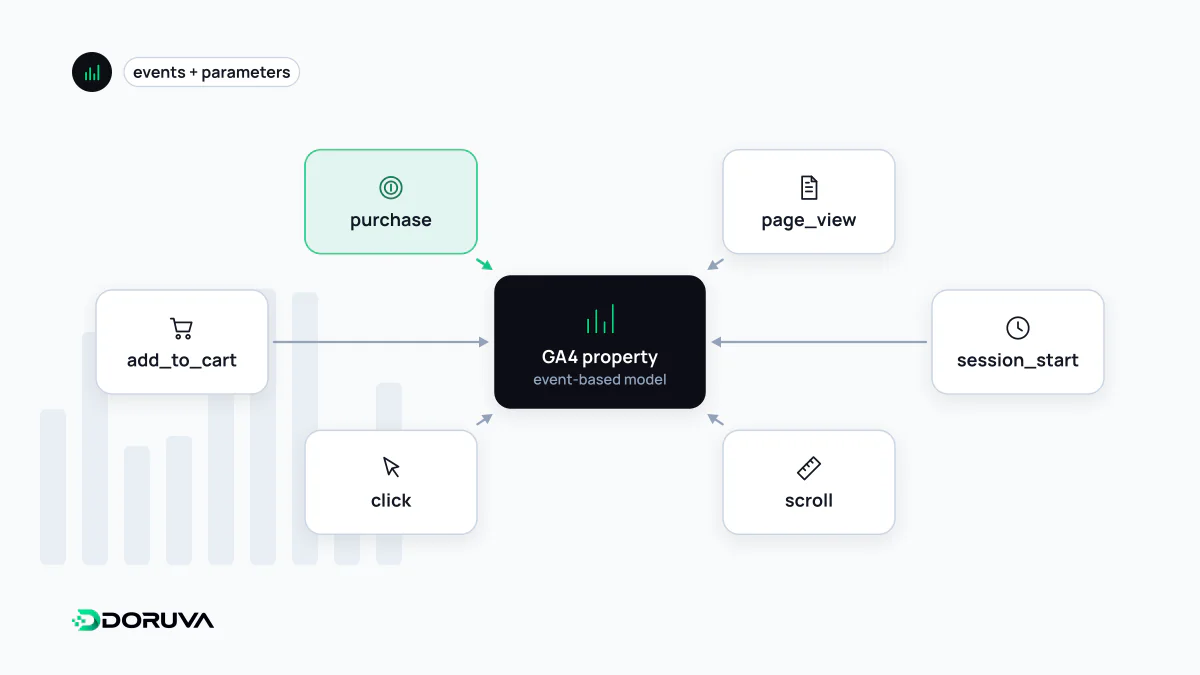
Everything is an event
Universal Analytics split data into hit types: a pageview was one kind of hit, an event another, and events were squeezed into fixed category, action and label fields. GA4 dropped that distinction. A page view, a video play and a purchase are all events, and each event carries whatever parameters it needs. Standard Universal Analytics properties stopped processing data on 1 July 2023, so "Google Analytics" today means GA4.
A GA4 property contains one or more data streams: one for the website and separate streams for iOS and Android apps. A web stream is identified by a measurement ID beginning with G- and is added to the site through the Google tag or a tag manager.
How a pageview is counted
In GA4 a pageview is an event called page_view. As part of enhanced measurement it fires on every page load, and that measurement cannot be switched off. By default, changes the site makes to the browser history state, as single-page apps do when switching routes, also count as views. It carries parameters such as page_location, page_referrer and page_title, and the Views metric in reports is the count of these events.
A classic single-page app mistake is running the automatic history-based measurement alongside a page_view the developers send manually. Every route change is then counted twice.
What a session means in GA4
An analytics session is not the same thing as a sign-in web session. In GA4 it is the period during which a user interacts with the site. It starts when a page is viewed with no session active; GA4 then collects a session_start event and generates a session ID (ga_session_id), which is the timestamp of when the session began. By default a session ends after 30 minutes of inactivity, and that timeout can be changed in the admin settings. There is no limit on how long a session can last.
GA4 flags some sessions as engaged. A session counts as engaged if it does any one of the following:
- lasts longer than 10 seconds (the timer is adjustable),
- includes a key event,
- has two or more page or screen views.
Engagement rate is the share of sessions that were engaged. Bounce rate in GA4 is its exact inverse, the percentage of sessions that were not engaged, which is why it cannot be compared directly with the Universal Analytics metric of the same name.
Event types and key events
GA4 events fall into four groups. Automatically collected events such as session_start and first_visit come with the basic setup. Enhanced measurement events cover scrolls, outbound clicks, site search, file downloads, YouTube video engagement and form interactions without extra code. Recommended events such as generate_lead, sign_up and purchase have names and parameters defined by Google but are implemented by you. When nothing else fits you define a custom event; event tracking covers how to plan and implement them.
Events that matter to the business are marked as key events, a concept GA4 previously called conversions. When a key event is also important for optimising ad campaigns, you create a Google Ads conversion from it.
Reports, explorations and retention
Standard reports show aggregated data. Deeper analysis happens in explorations, which support funnels, path analysis and segment comparisons. In standard properties, retention for user-level data can be set to 2 or 14 months; the setting affects explorations and funnel reports, not standard reports. For long-term access to raw events, use the BigQuery export. There are collection limits too: event names can be at most 40 characters, an event can carry at most 25 parameters, and parameter values are capped at 100 characters.
GA4 and SEO: setting expectations
Installing GA4, removing it, or the engagement rate it reports does not affect rankings. Google's search team has said publicly and repeatedly that Search does not use Analytics data for ranking. GA4's role in SEO is measurement: showing which pages organic visitors land on, how they engage and how often they complete key events. On the consent side, GA4 works with Consent Mode, which adjusts tag behaviour to the visitor's choice; in basic mode nothing is sent before consent, while advanced mode sends cookieless measurement pings.