

What is Web Analytics?
Definition
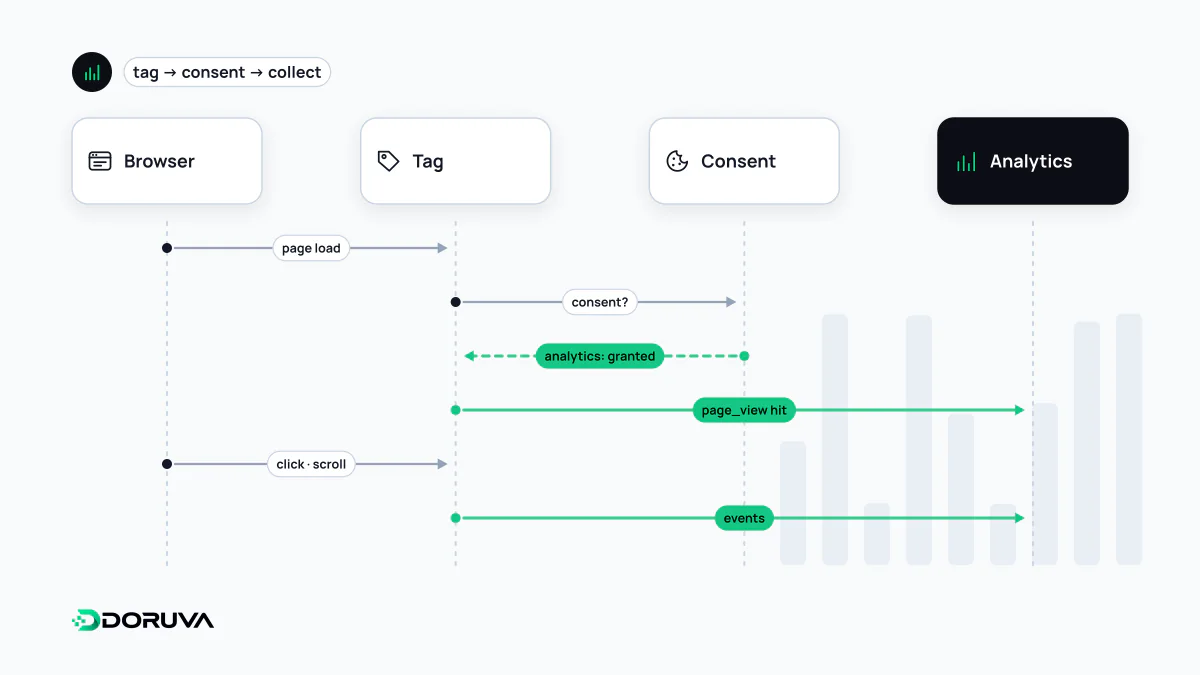
Web analytics is the collection, measurement and interpretation of data about a website's visitors and what they do. It shows which channels bring people in, which pages they view, where they leave and whether they complete goals such as submitting a form or making a purchase. Data is usually collected by a JavaScript tag on the page, sometimes from server logs, and in many jurisdictions requires consent under privacy law.
Also known as: analytics, website analytics, site analytics, digital analytics, visitor analytics
The questions analytics answers
A well-configured analytics setup answers four basic questions:
- Acquisition: where do visitors come from? Organic search, paid ads, social media, links from other sites or direct visits. UTM parameters on links keep campaign traffic distinguishable.
- Behaviour: which pages get viewed, what paths do people take, where do they drop off?
- Outcomes: how often do the actions that matter to the business happen, such as quote requests, sign-ups and purchases?
- Audience: which devices and languages do visitors use, and which countries are they in?
Analytics measures what happens on the site after the click. Which queries showed your pages in search results belongs to the world before the click, and that is what Google Search Console reports. Neither replaces the other.
How the data is collected
| Method | Strength | Weakness |
|---|---|---|
| JavaScript tag in the browser | Rich interaction data: scrolls, clicks, forms | Ad blockers and declined consent leave gaps |
| Server logs | Sees every request, needs no JavaScript | No interaction data; bots must be filtered out |
| Server-side tagging | Data passes through your own server first, so you control what is forwarded | Extra infrastructure to run; does not remove consent obligations |
Server logs have separate SEO value too: log file analysis uses them to show how search engine bots crawl a site.
Users, sessions and events
A "user" in an analytics tool is not a person but a browser or device. The same person visiting from a phone and a laptop, or clearing their cookies, counts as several users. A session groups the interactions of one visit, and an event records a single interaction. Each tool defines these slightly differently, which is the main reason two analytics products never report matching visitor numbers. For Google's definitions see Google Analytics 4; for measuring business-critical actions see event tracking.
Incomplete and noisy by nature
Analytics data is never complete. Visitors who decline cookies, ad and tracking blockers, and browser tracking-prevention features that shorten cookie lifetimes all remove data. Bots, internal staff visits and referral spam add data that should not be there. Read analytics figures as indicators of trends and ratios, not as exact counts. A comparative question like "did the share of organic visitors who request a quote rise this month?" gives far more reliable answers than any absolute number on its own.
Privacy, consent and the law
Analytics tags usually rely on cookies or similar identifiers and process personal data such as IP addresses. In the EU, the GDPR together with the ePrivacy rules requires prior consent for non-essential cookies. In Turkey, under KVKK (Law No. 6698 on the Protection of Personal Data), the cookie guidance published by the Personal Data Protection Authority in 2022 does not treat analytics cookies as strictly necessary and indicates that explicit consent is generally required for them. In practice this means the analytics tag either waits for cookie consent or adapts its behaviour to the visitor's choice. Retention periods, transfers abroad and the privacy notice need attention as well. This is general information, not legal advice.
Analytics data has no direct effect on search rankings. Its value lies in measuring the results of SEO and design work and making visible what actually works.