

What is Broken Link?
Definition
A broken link is a hyperlink that no longer takes the user to a working page: the target returns 404 or 410, the domain no longer resolves, or the server responds with an error. Broken links occur both in internal links between a site's own pages and in external links to other sites. They strand visitors, waste crawler time and signal that content is not being maintained.
Also known as: dead link, broken hyperlink, 404 link, dead URL
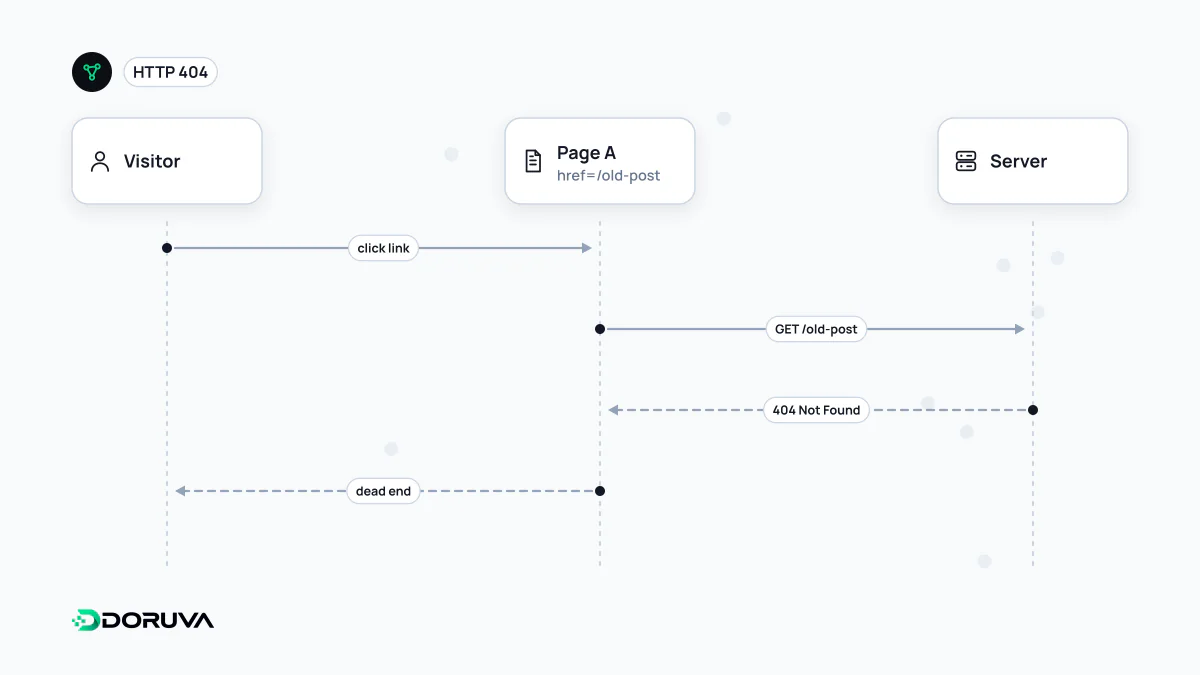
How links break
Most links work on the day they are written and break later. The usual causes:
- A page's slug changes and nobody sets up a redirect from the old address.
- A CMS migration or redesign changes the URL structure while menus and body copy still point to the old paths.
- A typo in a hand-written link, such as
/services/web-desgin/. - The external site you linked to shuts down, lets its domain expire or moves the content.
- Relative path mistakes:
href="services/"resolves to a different URL depending on how deep the current page sits.
This gradual decay is known as link rot. The longer content stays online and the more sources it cites, the more broken links it collects.
Internal and external broken links are different problems
Broken internal links are entirely under your control and come first. Every link from one of your pages to a URL that doesn't exist on your own site sends both visitors and Googlebot to a dead end. The fix is to update the link to the correct, final URL; adding a redirect is the second-best option.
Broken external links result from changes on someone else's site. Replace them with a current source, or remove them when no good alternative exists. Keeping external links healthy is a credibility issue, especially in content that cites its sources.
There is a third kind: links from other sites to pages of yours that no longer exist. They land on a 404 on your site and whatever value they carried is wasted. If there is a genuine replacement page, a 301 redirect recovers it.
How Google sees them
Google is clear that returning a 404 for a page that genuinely doesn't exist is correct and does not hurt the rest of the site. The cost of broken links is indirect. Crawlers spend time on URLs that lead nowhere; if the only internal link to an important page breaks, that page can effectively become an orphan page; and visitors who hit a dead end tend to leave.
Finding them
- Site crawlers follow every link and report each target's status code alongside the page that contains the broken link.
- Search Console: the "Not found (404)" list in the Page indexing report contains URLs Google found linked somewhere and got a 404 for. The URL Inspection tool can show which page a URL was discovered from.
- Server logs: 404 responses together with their
Refererheader reveal which pages are sending real visitors to dead URLs.
The SEO Checker tests internal link targets and a sample of external links on the analysed pages and lists the ones that fail.
What to fix first
- Links in navigation, footers and templates: one mistake there repeats on hundreds of pages.
- Broken links on pages with the most traffic or conversions.
- Old URLs of yours that other sites link to but now return 404.
- Outbound reference links in archive content.
Redirecting every dead URL to the homepage looks like a shortcut but isn't one. Redirects with no matching content confuse users and can be classified by Google as soft 404s.