

What is 500 Internal Server Error?
Definition
500 Internal Server Error is the generic HTTP error code meaning the server hit an unexpected condition that prevented it from fulfilling the request. It is used when no more specific 5xx code applies and says the problem lies on the server, not the client. When Google receives 500s it crawls the site more slowly, and URLs that keep failing are eventually dropped from the index.
Also known as: HTTP 500, 500 error, server error
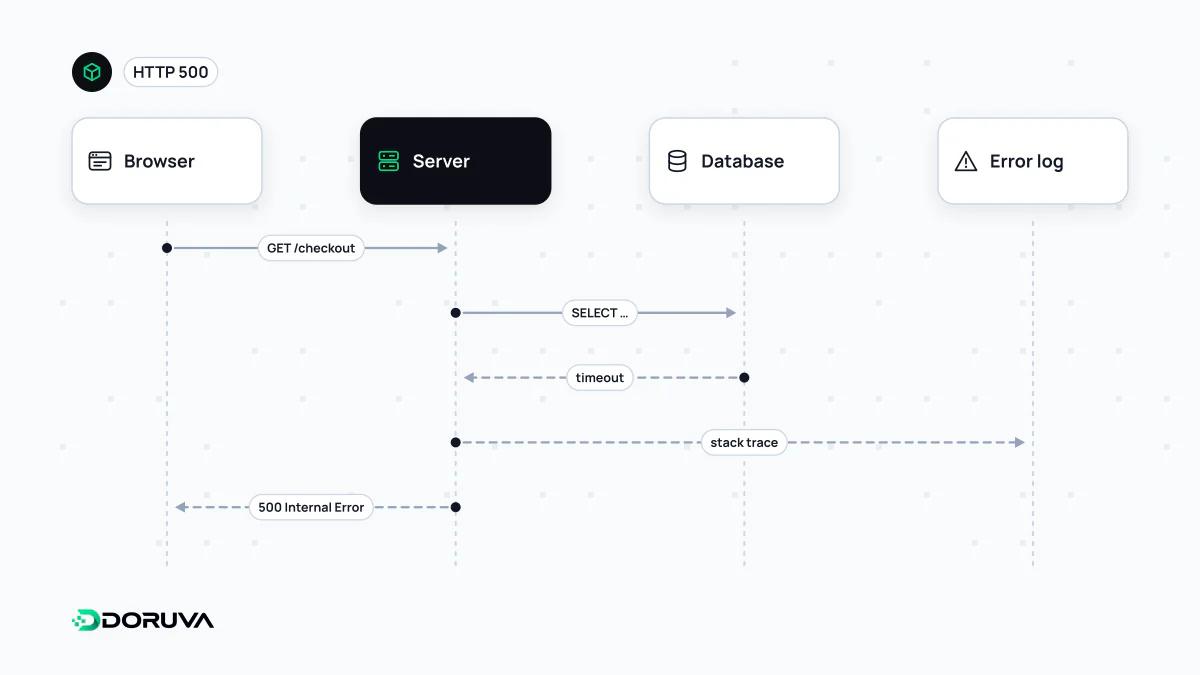
The catch-all code and its close relatives
A 500 says the server ran into something unexpected without saying what. So the first diagnostic step is checking whether it really is a 500 or a more specific 5xx, because each points to a different layer:
| Code | Usually means | Look here first |
|---|---|---|
| 500 | The application or server config crashed while handling the request | Application error log |
| 502 | A gateway or proxy got an invalid response from the server behind it | Proxy log; is the app process running? |
| 503 | Service temporarily unavailable (maintenance, overload) | Maintenance mode, capacity |
| 504 | The proxy got no timely answer from the upstream server | Slow queries, timeout settings |
Tracing the failure
- Reproduce it: use
curl -sI URLto find out whether it fails on every request, only with certain parameters or only under load. - Follow the timestamp: find the 500 in the web server's access log, then jump to the application error log at the same second. The stack trace often names the problem outright.
- Use a request ID: an
X-Request-IDheader added by the proxy and written into the application's own log ties records together across layers. It is the backbone of good logging and distributed tracing. - Check the last change: errors usually start right after a release: a missing environment variable, a failed database migration, a syntax error in
.htaccess, a memory limit. If the cause isn't obvious, rolling back buys time to investigate.
What users should see
Keep the error page plain: say something went wrong, that the team knows, and what the user can do next. Never put stack traces, file paths, SQL queries or version numbers in the response; that detail helps attackers map your system and belongs in the server-side log only. The page should still carry status 500, because serving the error screen with 200 misleads both monitoring and search engines.
How Googlebot reacts
Google lowers a site's crawl rate when it receives 500s, in proportion to the number of distinct URLs returning server errors. Indexed URLs are kept for a while, but ones that fail persistently are eventually removed. Once the server returns 2xx again, crawling gradually recovers.
The most critical case is robots.txt returning a 5xx: Google stops crawling the site for the first 12 hours and then relies on the last good copy for the next 30 days. An error in that single file can pause crawling of the whole site. Use 503, not 500, for planned maintenance; Google's handling of every code is documented on Google Search Central.