

What is 504 Gateway Timeout?
Definition
504 Gateway Timeout is the HTTP status code a server returns when, acting as a gateway or proxy, it does not receive a timely response from the upstream server it needs to complete the request. The connection may well have been established; the problem is that no answer arrived before the proxy's timeout expired. Slow database queries, long-running work and waits on external services are the usual causes.
Also known as: HTTP 504, 504 error, gateway timeout error, upstream timeout
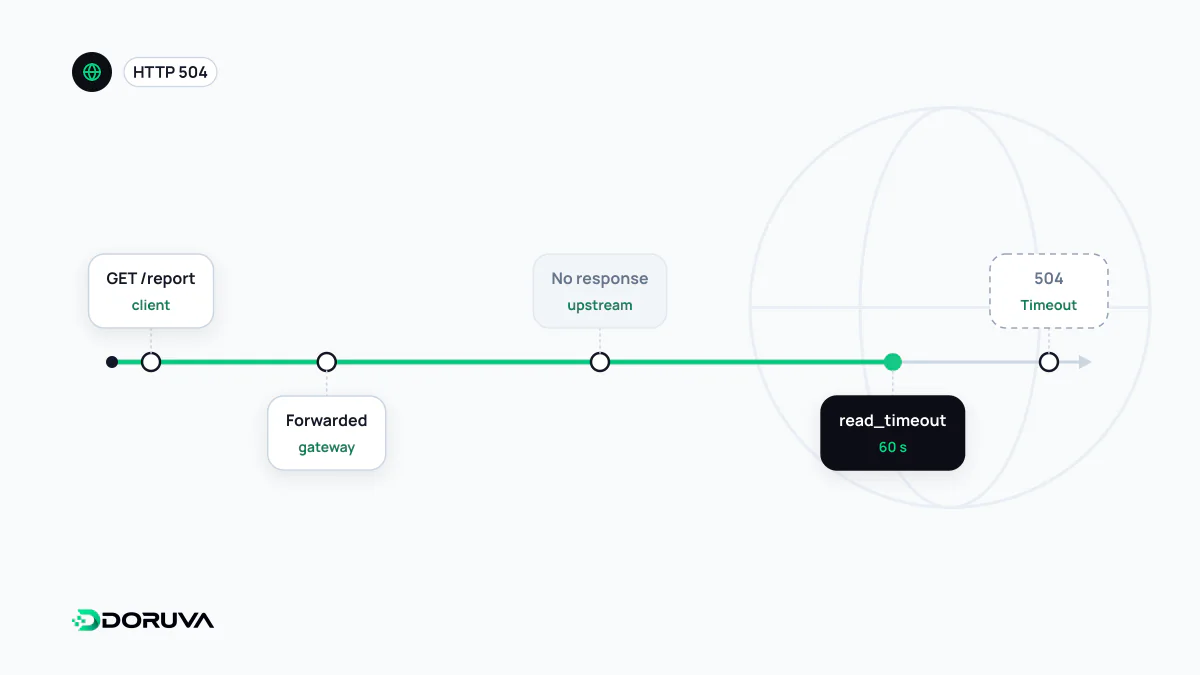
The proxy stopped waiting
A reverse proxy does not wait forever after forwarding a request to the application behind it. Every layer has a timeout, and if nothing comes back in time the proxy drops the upstream connection and answers the client with a 504. The application may still be busy and might finish a few seconds later, but the user will never see that result.
In Nginx the relevant settings are proxy_connect_timeout, proxy_send_timeout and proxy_read_timeout, all of which default to 60 seconds. Note that proxy_read_timeout applies between two successive reads, not to the whole response. When it fires, the error log shows:
upstream timed out (110: Connection timed out) while reading response header from upstreamThe shortest timeout in the chain wins
When a request passes through several intermediaries, each has its own clock and the first one to expire decides the outcome. Cloudflare waits 125 seconds for an origin response by default, and when that runs out it shows its own 524 code rather than a plain 504. If an Nginx proxy behind it is set to 60 seconds, a 70-second request is cut off by Nginx with a 504 long before Cloudflare's limit matters. So the first debugging question is always: whose timer ran out?
Where the time goes
- Queries doing full table scans, where the right database index often fixes the problem outright.
- The application blocking on a slow third-party API before it can respond.
- An exhausted connection pool: requests sit in line waiting for a free database connection.
- Reports, exports or bulk emails executed inside the HTTP request itself.
Why raising the timeout is the wrong fix
The first instinct is to bump the timeout from 60 to 300 seconds. That hides the symptom without removing the slowness, and every waiting request keeps a worker and a connection busy. Endpoints that take minutes to answer are also an easy target for resource-exhaustion abuse, so sensible timeouts double as a security control. The durable fix is to take long work out of the request-response cycle: the request drops the job onto a job queue, returns 202 Accepted immediately, and the client polls a separate endpoint for the result.
location /api/ {
    proxy_pass http://127.0.0.1:3000;
    proxy_connect_timeout 5s;
    proxy_read_timeout 30s;
}
A short connect timeout also means that when the upstream is completely unreachable, users get an answer in seconds instead of staring at a blank screen for a minute.
Effects on search and users
Google treats a 504 as a 5xx response and slows its crawling accordingly. The quieter problem is the responses that don't quite time out but come close: a high TTFB wears out users' patience and delays everything the browser does afterwards. Occasional 504s are usually the same slow endpoints caught at a busy moment, so watching the distribution of response times lets you catch them before they turn into errors.