

What is Connection Pool?
Definition
A connection pool is a cache of open connections to a database or other service that an application reuses instead of opening a new connection for every request. Code borrows an idle connection from the pool, runs its work and returns it. Pooling removes the repeated cost of establishing connections and caps how many connections the application holds against the server at any one time.
Also known as: connection pooling, database connection pool, DB pool, pooler
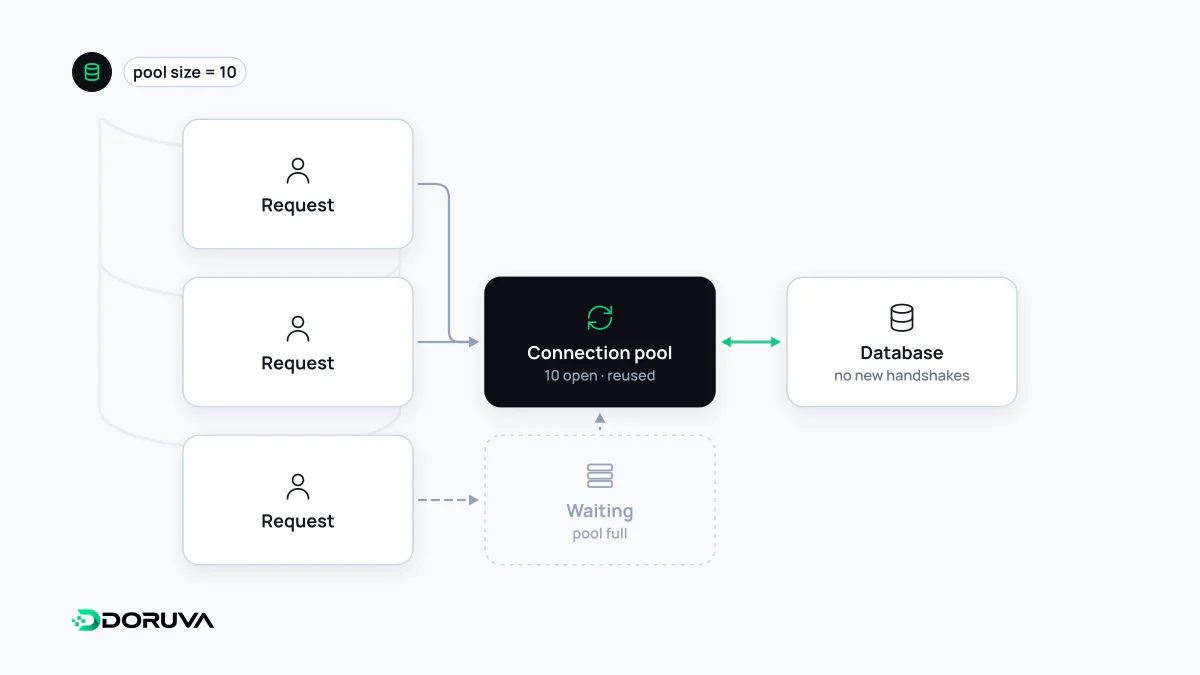
The hidden cost of a new connection
Opening a connection to a database is not free. The client sets up a TCP connection, usually negotiates TLS on top of it, authenticates, and the server allocates resources for the new session. PostgreSQL, for instance, starts a separate operating-system process for every connection. For a query that takes two milliseconds, the handshake can easily cost more than the query.
An application that connects and disconnects on every HTTP request pays that cost constantly. Under load the problem stops being just latency: every database has a hard ceiling on concurrent connections, and once it is reached new connections are refused.
Borrow, use, return
A pool opens connections up front or on demand and keeps them alive. When code needs to talk to the database it checks a connection out, and when it is done it hands it back. If every connection is busy, the caller waits in a queue until one frees up. Most pooling libraries expose the same handful of settings:
- Maximum size — the most connections the pool will ever hold open.
- Acquire timeout — how long a caller waits for a free connection before failing.
- Idle timeout — when an unused connection gets closed.
- Max lifetime — recycling long-lived connections, which protects against firewalls and load balancers silently dropping them.
Here is the pattern with the pg library for Node.js:
import { Pool } from "pg";

const pool = new Pool({
  connectionString: process.env.DATABASE_URL,
  max: 10,
  idleTimeoutMillis: 30000,
  connectionTimeoutMillis: 5000,
});

const client = await pool.connect();
try {
  await client.query("BEGIN");
  await client.query("UPDATE stock SET qty = qty - 1 WHERE product_id = $1", [42]);
  await client.query("COMMIT");
} catch (err) {
  await client.query("ROLLBACK");
  throw err;
} finally {
  client.release(); // forget this and the connection never comes back
}
For single queries, pool.query() does the checkout and release for you; explicit checkout is only needed when several statements must share one transaction.
Why a bigger pool is rarely faster
When requests slow down, the reflex is to raise the pool size. But the database server has a fixed number of CPU cores and a finite amount of disk throughput. Running hundreds of queries in parallel mostly means they all contend for the same resources and each one gets slower. A modest pool with a short queue in front of it often delivers better overall throughput than a large one.
The number that actually matters is the total: application instances × pool size. It has to stay below the server limit, with headroom for admin tools, migrations and background jobs. PostgreSQL's max_connections defaults to typically 100. Four app servers with a pool of 30 each would exceed that on their own.
In-process pools and external poolers
A pool can live inside the application process or run as a separate service between the application and the database. In the PostgreSQL ecosystem the best-known example is PgBouncer, which offers three modes. Session pooling assigns a server connection for as long as the client stays connected. Transaction pooling assigns one only for the duration of a transaction, letting many clients share a few real connections. Statement pooling goes further and disallows multi-statement transactions. Transaction mode is the popular choice, with a catch: session-level features such as SET, LISTEN and session advisory locks do not behave as expected.
External poolers matter most in serverless deployments. Each function instance tends to hold its own small pool, so a traffic spike that starts hundreds of instances can flood the database with connections. A shared pooler absorbs that burst into one bounded set.
Symptoms worth recognising
- Leaked connections: a code path that throws before releasing slowly drains the pool until every request hits the acquire timeout.
- Long-held transactions: calling a slow external API inside a transaction keeps a connection checked out for the whole wait.
- "Too many connections" errors: almost always a sign that nobody did the instances-times-pool-size arithmetic after scaling out.
Most pool libraries report total, idle and waiting counts. Graphing those three numbers is the fastest way to tell whether a slowdown lives in the database or in the pool configuration.