

What is Website Design?
Definition
Website design is the process of planning and building a website, from defining its goals through information architecture, content, interface and interaction design to development, testing and launch. It covers more than visual appearance: whether visitors find what they came for, how fast the site loads, how accessible it is and how well search engines can crawl it. UI, UX and responsive design are parts of this whole.
Also known as: web design, website creation, site design, web design process
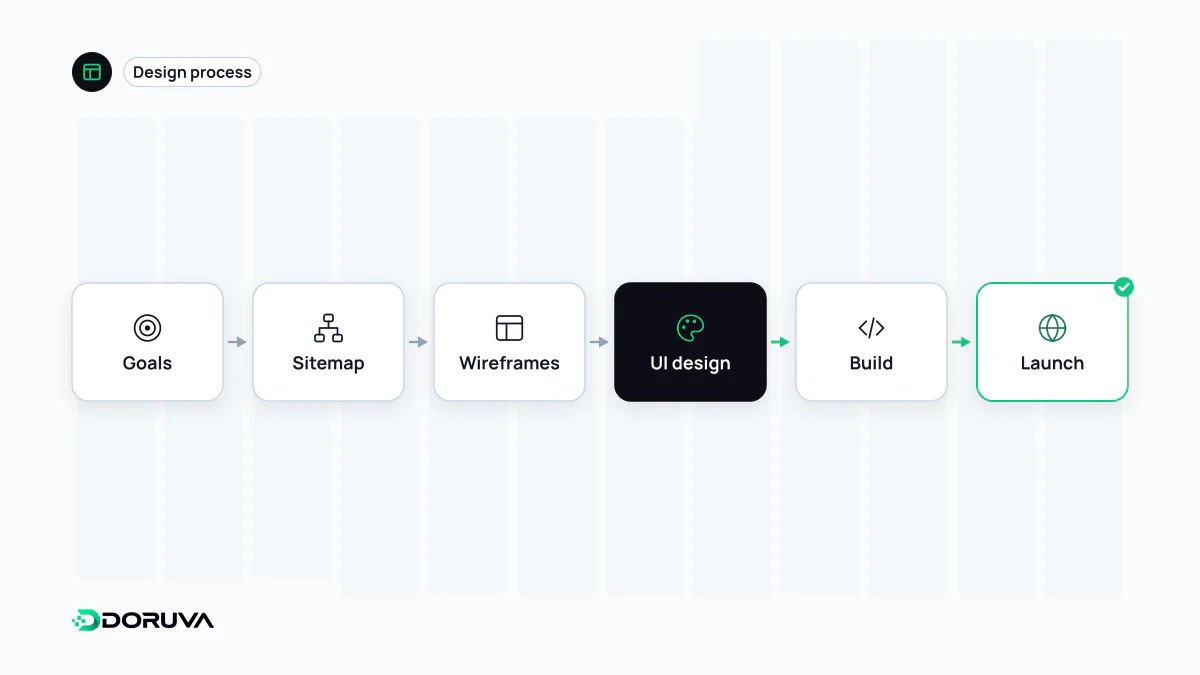
From goals to launch
A good website starts with decisions, not a design file. The order can flex from project to project, but none of these stages should be skipped:
- Goals and audience: what is the site for? Collecting enquiries, selling products, taking bookings and informing readers each call for a different structure. This is where you establish who arrives, on which devices and with what question.
- Information architecture: pages, navigation, categories and URL patterns are decided, along with how many clicks it takes to reach any given piece of information. See information architecture.
- Content: real copy, product data and imagery should be ready before the visual design, or at the latest alongside it. Layouts designed around placeholder text tend to fall apart once real content arrives.
- Wireframes and prototypes: page layouts are blocked out without colour or imagery as wireframes, then tested as clickable prototypes where it helps.
- Interface design: typography, colour, components and visual hierarchy. The principles of this layer are covered under UI design.
- Development: the design becomes code, with attention to semantic HTML, responsive behaviour across screen widths, speed and how editors will manage content.
- Testing and launch: forms, mobile layouts, accessibility, redirects, titles and meta tags and analytics are checked. After launch, basic technical checks can be repeated with a tool such as the SEO Checker.
- After launch: real usage data comes in and friction points get fixed. A website isn't finished on the day it goes live.
More than how it looks
People often equate website design with appearance, yet most of the decisions that shape a visitor's experience are invisible: how fast the page loads, whether the navigation makes sense, how many fields a form asks for, what an error message says. That wider view is the territory of UX design.
The same invisible decisions affect search visibility. Heading hierarchy, URL structure, whether content is rendered on the server or only in the browser, and page speed are all settled during design and show their consequences in SEO. Keyboard navigation, adequate colour contrast and meaningful alt text are not finishing touches either; they belong in the first draft.
Template or custom build?
| Criterion | Template or page builder | Custom design |
|---|---|---|
| Upfront cost and time | Low and fast | Higher and longer |
| Distinctiveness | Limited; many sites look alike | Built around the brand |
| Performance control | Bounded by the theme and plugins | Unneeded code can be left out from the start |
| Long-term maintenance | Tied to theme and plugin updates | Code and process under the team's control |
The right answer depends on budget, how much bespoke functionality the site needs and what the in-house team can maintain. A well-chosen template can be enough for a small brochure site; projects with custom workflows, integrations or several languages run into a template's limits quickly.
The costly redesign mistake
When an existing site is redesigned, the most expensive error is changing URLs without a plan. A new design launched without a redirect map can wipe out years of accumulated search traffic and the value of inbound links overnight. Any redesign that changes URLs, content structure or the domain should be run as a site migration: a list of old and new addresses, one-to-one redirects, and monitoring of errors and traffic after launch.