

What is UX (User Experience)?
Definition
UX (user experience) is the sum of a person's perceptions and responses when using, or expecting to use, a product or service: can they find what they need, finish their task without friction and trust the outcome? UX design is the practice of researching users and shaping structure, flows and content so those tasks succeed.
Also known as: user experience, UX design, user experience design
Bigger than the screen
ISO 9241-210, the standard for human-centred design, defines user experience as a person's perceptions and responses resulting from the use or anticipated use of a system, product or service. The definition is deliberately broad: how fast a page loads, what an error message says, the email that arrives after an order and how easy it is to reach support are all part of the experience.
That is why UX is not a synonym for UI. The interface is the most visible layer, but a flawless interface can't rescue a badly structured flow. If shoppers can't find the delivery time on a product page, the problem is rarely the colour or the typeface; it is where that information sits and how much weight it gets.
How UX work unfolds
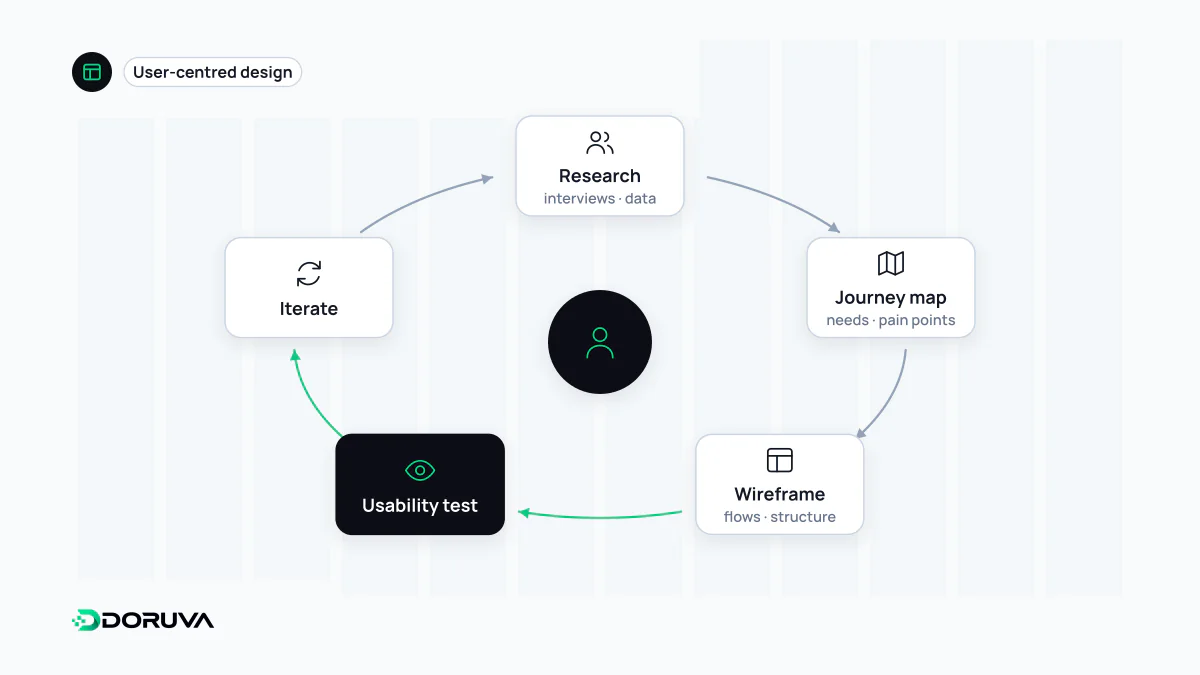
- Research: interviews, analytics, support tickets, on-site search logs. Understanding the search intent that brings people to a site also tells you what its pages need to answer.
- Definition: the audience, the priority tasks and what success means are made explicit.
- Information architecture and flows: navigation, page hierarchy and the steps someone takes to complete a task.
- Prototyping: ideas become concrete quickly and cheaply as wireframes and prototypes.
- Usability testing: real people attempt real tasks while you watch where they get stuck. Even small rounds with a handful of participants tend to surface the most obvious problems.
- Iteration: after launch, data keeps coming in and weak steps get fixed. UX is a loop, not a project phase.
Measuring experience
"Are users happy?" has no single-number answer, so teams read several signals together:
- Task success rate: the share of participants who complete a task unaided.
- Time on task and error count: finishing the same job faster and with fewer wrong turns.
- Questionnaires: standard scales such as the ten-item System Usability Scale (SUS) make it easier to compare versions over time.
- Behavioural data: drop-off points in a funnel, form abandonment.
- Performance: a page that loads slowly or reacts late to a tap undermines even a well-designed flow; metrics such as INP capture that responsiveness.
Analytics tells you what happened; research tells you why. Neither replaces the other.
UX and search visibility
Google says its core ranking systems look to reward content that provides a good page experience, and that there is no single page experience signal. The experience measure it explicitly says its ranking systems use is Core Web Vitals; other aspects of page experience don't directly help a site rank, though they make it more satisfying to use. In practice, good UX won't lift irrelevant content, but it makes sure relevant content actually gets people where they were going.
Common mistakes
- Treating UX as a box ticked once at the start of a project.
- Designing for the team's own habits; designers and developers are rarely the target user.
- Asking people what they want instead of observing what they do, which is usually more reliable.
- Dark patterns such as hidden fees or cancellation flows built to wear people down: they can move a number in the short term while eroding trust for good.
- Leaving accessibility for later. A flow that fails for someone using a screen reader or only a keyboard is not a good experience; see web accessibility.