

What is Sitelinks?
Definition
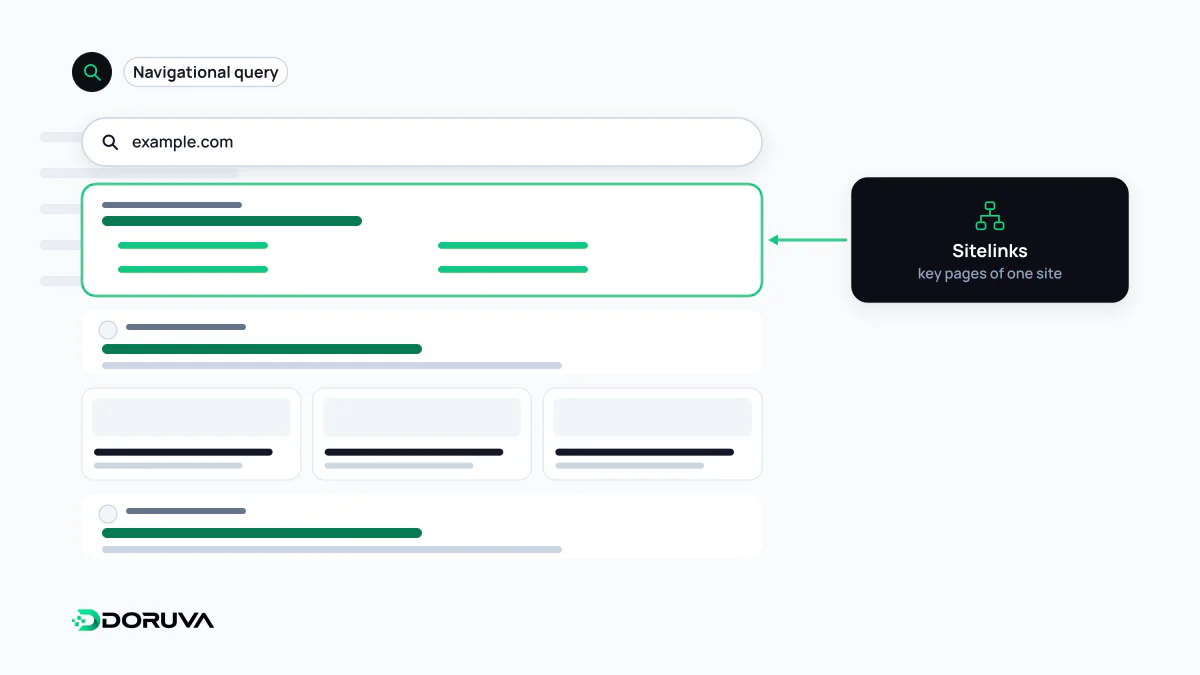
Sitelinks are additional links to other pages on the same domain that Google groups beneath a site's main search result. Google's systems generate them automatically by analysing the site's structure, and site owners cannot add or choose them directly. They appear most often for navigational searches, such as a query for a brand name, where the user is clearly looking for one specific site.
Also known as: Google sitelinks, site links, organic sitelinks
When they show up
Sitelinks are most prominent when it is obvious the searcher wants a particular site. Someone typing a bank's name is almost certainly trying to reach that bank, so Google may add shortcuts such as "Log in", "Contact" or "Branches" beneath the main result. For broader informational queries they are less common and may appear only as a single row of short links under a result.
Google's documentation describes the process as automated: its systems analyse the link structure of a site to find shortcuts that save users time. Sitelinks are therefore a SERP feature you earn through structure, not one you can buy or configure.
You cannot add them, but you can shape them
There is no Search Console setting to add or order sitelinks, and no structured data type that triggers them. Google's best practices nonetheless influence which pages get picked and how they are labelled:
- Informative titles and headings: keep page titles and headings relevant and compact. A site where every page is titled "Home | Company" gives Google little to name its shortcuts with.
- A logical architecture: important pages should be reachable from the main menu and from the sections they belong to. Clear site navigation is the most direct way to show the system your site's skeleton.
- Concise anchor text: internal links should describe their target briefly and accurately.
- Less repetition: several near-identical pages make it unclear which one deserves to be a shortcut.
Getting rid of an unwanted sitelink
There is no Search Console switch for hiding a single sitelink. Google's advice is to remove the page or keep it out of the index with noindex. That makes the first question whether the page should be in search at all. If an expired campaign page appears as a sitelink, retiring it and redirecting to the relevant category is usually right; if the page is still needed, update its title and internal links so they reflect what visitors actually look for.
The sitelinks search box is gone
The site search box that used to appear under many brand results was removed from Google Search worldwide from November 21, 2024, following an announcement in October 2024. The nositelinkssearchbox meta rule is no longer used. Leftover WebSite / SearchAction markup does not need to be removed, since unsupported structured data causes no problems. The change did not affect other sitelink formats.