

What is Site Navigation?
Definition
Site navigation is the set of structures, such as the main menu, submenus, mega menus, breadcrumbs and footer links, that lets visitors and search engine crawlers move between the pages of a website. Good navigation makes the site's information architecture visible and shows people where they are and where they can go. For SEO, it provides crawlable internal links that help important pages get discovered and understood as important.
Also known as: website navigation, navigation menu, main menu, mega menu, footer navigation
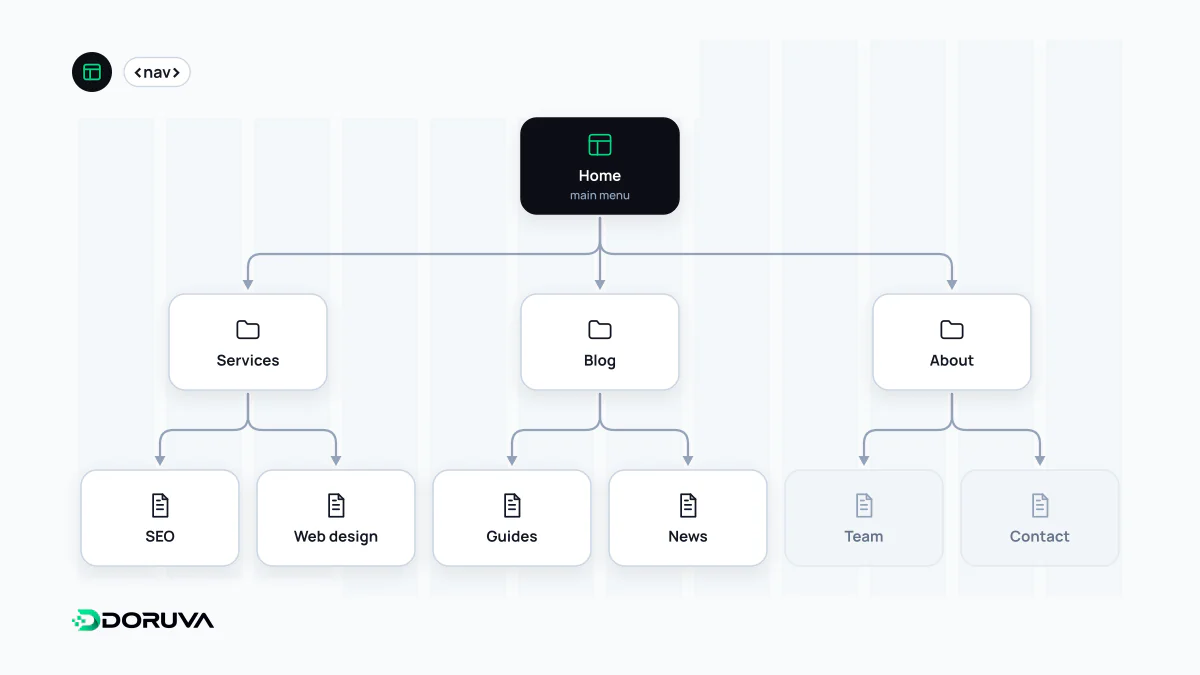
Layers of navigation
Most sites have several navigation systems, each doing a different job:
- Global navigation: the top menu that sits in the same place on every page and lists the main sections.
- Local navigation: links between pages within one section, such as a sidebar inside a product category.
- Mega menu: a wide panel that opens from a main menu item and lays out subcategories in columns, common on large shops and corporate sites.
- Breadcrumbs: a trail that shows where the current page sits in the hierarchy.
- Footer navigation: contact details, legal pages, careers and other secondary links at the bottom of every page.
- Utility navigation: functional links such as sign-in, basket, language switcher and search.
Every one of these is the visible surface of the site's information architecture. Deciding what goes in the menu is really deciding how content is grouped and which pages matter most.
Menu links search engines can follow
Google's documentation states that it can generally only crawl a link if it is an <a> element with an href attribute. Links inserted with JavaScript are fine as long as they end up as that same markup. Trouble starts when menus are built from click handlers pretending to be links:
<!-- Crawlable -->
<a href="/services/web-design/">Web design</a>

<!-- Not reliably crawlable -->
<span onclick="go('/services/web-design/')">Web design</span>
<a onclick="go('web-design')">Web design</a>
The details are in Google Search Central's link guidelines. Menu links are internal links: a page in the main menu is one click from the home page, which keeps its crawl depth low. Menu labels are also anchor text, so "Web design" tells users and search engines more about the target page than "What we do".
Mega menus and mobile menus
On a big catalogue, a mega menu gets shoppers to the right category in two or three clicks. The price is hundreds of links on every page: priorities blur, the HTML grows and the signal about which pages truly matter gets weaker. What tends to work better is keeping the mega menu to first- and second-level categories and leaving deep filter combinations (colour, size, price) out of it entirely; those belong to faceted navigation inside the category page.
On phones the menu usually hides behind a "hamburger" button. Two things matter here: the menu links should be in the HTML even while the menu is closed, not fetched from the server only when it opens, and the one or two most important actions should stay visible without opening the menu at all.
What the footer is for
The footer is where people look after scrolling to the end without finding what they wanted: contact details, privacy and cookie notices, careers, branch locations. It is the right home for pages that do not deserve a main-menu slot but should be reachable from everywhere. Stuffing it with hundreds of keyword-laden links for every city and service combination helps nobody and repeats the same clutter on every page of the site.
Building an accessible menu
Wrap the main menu in a <nav> element, and give each <nav> a distinguishing label when there is more than one. Mark the link to the current page with aria-current="page". Dropdowns must open and close from the keyboard, expose their expanded state through ARIA, and never rely on hover alone. Broken or redirecting links in a menu are easy to spot with a crawl that checks internal links, such as the one the SEO Checker runs.