

What is SPA (Single-Page Application)?
Definition
A SPA (single-page application) is a web app model that loads one HTML document into the browser and handles every later page change by rewriting that document's content with JavaScript instead of requesting a new one. Data usually comes from APIs, and the address bar is updated through the History API. Its counterpart is the multi-page application (MPA), which fetches a fresh HTML document from the server on every navigation.
Also known as: single-page application, single page app, single-page app
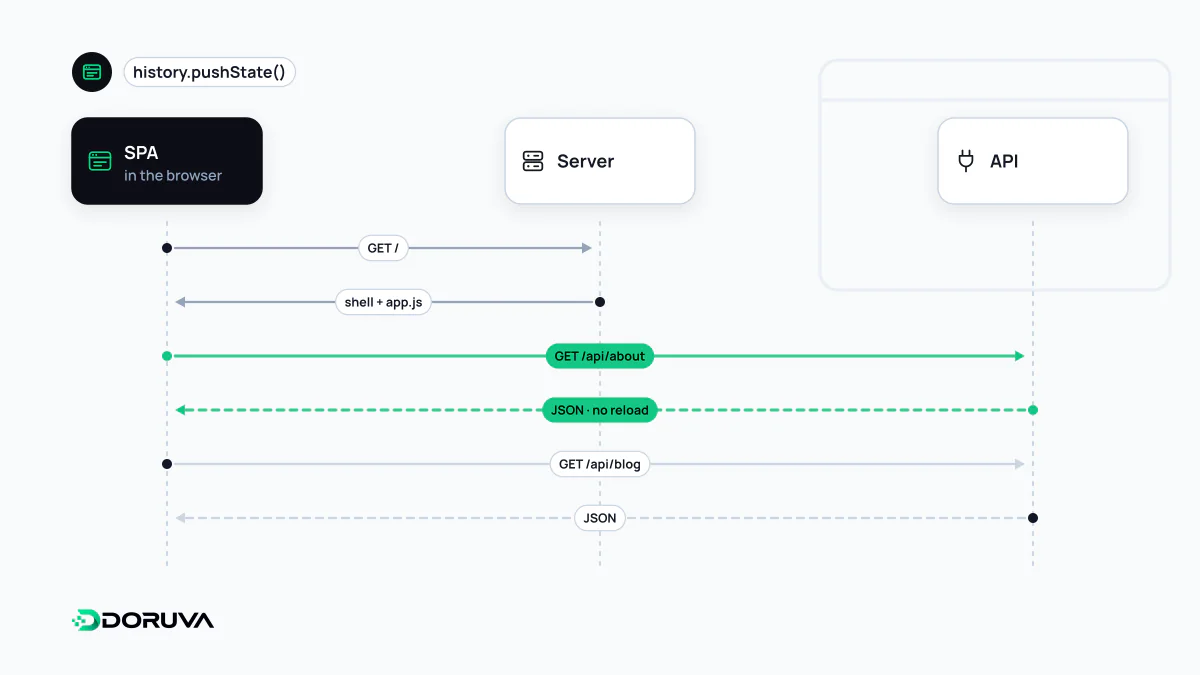
SPA versus MPA
A traditional website is an MPA: every link click makes the browser request a new HTML document from the server, tear down the current page and load the next one from scratch. In an SPA the document never changes after the first load. The app's router intercepts link clicks, fetches whatever data it needs from an API, updates the relevant part of the DOM and changes the URL in the address bar to match the new view.
| MPA | SPA | |
|---|---|---|
| Navigation | New document per page | Same document, content swapped by JavaScript |
| Server's job | Renders HTML for every page | Mostly serves a shell plus JSON data |
| App state | Reset on every navigation | Kept across views (a playing video, a half-filled form) |
| First load | Only that page's resources | The app framework, often in one large JavaScript bundle |
| Search engines | Content in the HTML response | Depends on how the app renders |
The seamless experience is what makes SPAs attractive for apps people stay in for a long time, such as email clients, admin dashboards and design tools. The price, as MDN puts it, is extra effort around SEO, state management, navigation and meaningful performance monitoring.
How client-side routing works
// Intercept the click, skip the full reload
link.addEventListener("click", (e) => {
  e.preventDefault();
  history.pushState({}, "", "/products/shoes");
  renderView("/products/shoes");
});

// Back and forward buttons
window.addEventListener("popstate", () => renderView(location.pathname));
Older SPAs used fragment URLs such as /#/products. Google's documentation says Googlebot can't reliably resolve URLs built that way and recommends the History API instead. Links should also stay real <a> elements whose href is an actual address; even if the router intercepts the click, browsers and bots still need to see the link.
Known SEO traps
- Empty initial HTML: if content is only rendered client-side, a search engine sees it only after running the JavaScript, and bots that don't run JavaScript never see it.
- 200 on every route: the server returns the same shell for any path, so missing pages turn into soft 404s. Google suggests two fixes: a JavaScript redirect to a URL where the server responds with 404, or adding a
noindexrobots meta tag to the error view with JavaScript. - Per-route metadata: each view must update its own title, description and canonical tag, and ideally those should already be present in the HTML the server sends.
The JavaScript SEO entry walks through diagnosis in more depth, and the SEO Checker reports content and link differences between the raw HTML and the rendered page.
Measurement and accessibility gaps
In an MPA every navigation is a page load, so the analytics script counts page views on its own. In an SPA nothing reloads, so view changes have to be picked up from History API events. If you haven't confirmed that your web analytics setup does this, every visit is reported as a single page view. Performance metrics similarly lean towards the first load.
On accessibility, the SPA has to take over two things the browser does for free in an MPA: moving focus to a sensible place, such as the new view's heading, and telling screen readers that the content has changed. Without that, a blind user can't tell whether the link they activated did anything. It's a recurring finding in web accessibility audits of SPAs.
Today's hybrid model
The Next.js documentation defines a "strict SPA" as an app served from one HTML file, with every route and data fetch handled in the browser, and notes that such apps tend to load a lot of JavaScript before becoming interactive. Frameworks like Next.js instead emit separate HTML per route, render the first load on the server or at build time, and handle later navigations client-side, just like an SPA. Users keep the app-like feel, and search engines find a complete HTML document at every URL.