

What is Shopping Cart?
Definition
A shopping cart is the ecommerce component that holds the products, quantities and selected variants a visitor intends to buy until they proceed to checkout. It handles adding and removing items, changing quantities, applying coupons and showing a subtotal, and its contents can be stored in the browser, in a server-side session or in a database record tied to the customer's account.
Also known as: cart, basket, shopping basket, mini cart, online cart
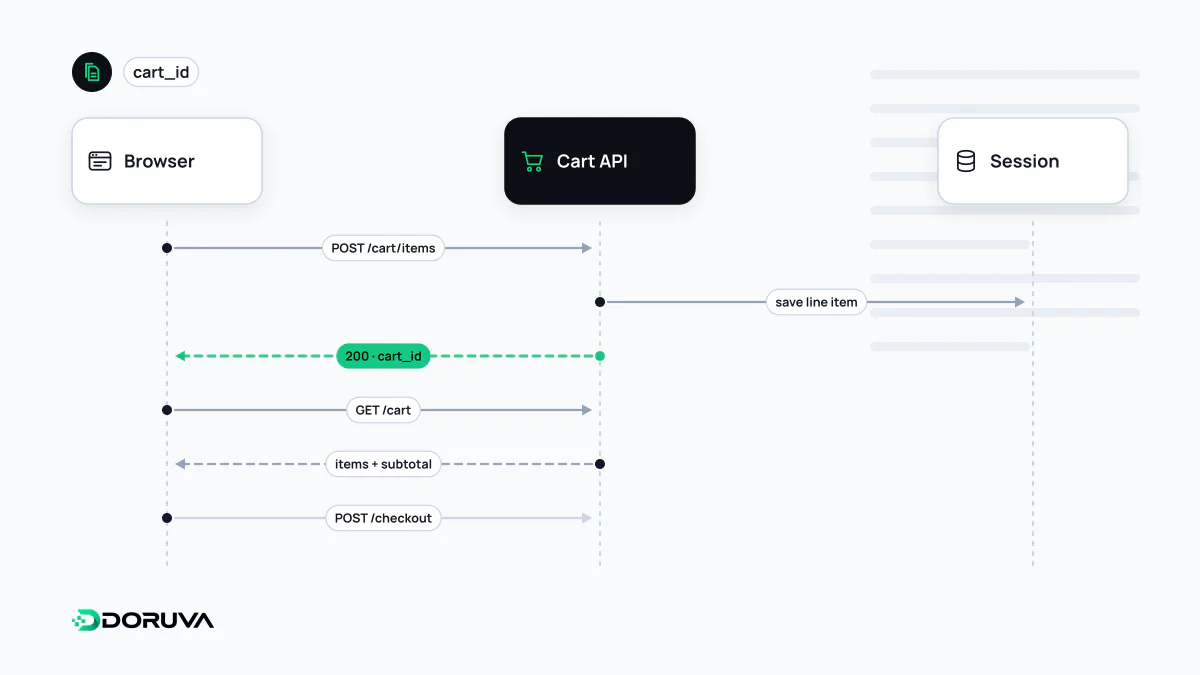
Where the cart lives
A cart looks trivial but hides several architectural choices. There are three common models:
- Browser only: contents sit in a cookie or localStorage. Easy to build, but the cart vanishes on another device and the server knows nothing about it until checkout.
- Server-side, session-bound: the browser only holds a cart ID, while the contents live on the server in a session store or database.
- Persistent cart: a signed-in customer's cart belongs to their account, so items added on a phone appear on a laptop.
The scenario that breaks most often is a guest who fills a cart and then logs in. Without an explicit merge rule covering duplicate items, summed quantities and products that have since sold out, customers either lose items or find quantities they never chose.
A cart is not a reservation
In most stores, putting an item in the cart does not hold it. Stock is usually decremented when the order is created or payment starts. During a sale that difference matters, because hundreds of people may have the same last unit in their carts. Some shops reserve stock for a few minutes once checkout begins and release it when the timer expires. Whatever the policy, "only 2 left" badges in the cart should come from live inventory, not a cached number.
Never trust the browser with the price
The core rule of cart security: the client says what it wants, the server decides what it costs. A request should carry nothing more than an identifier and a quantity:
POST /api/cart/items
Content-Type: application/json

{"sku": "TEE-CTN-RED-M", "quantity": 2}
Unit price, discounts, tax and shipping are recalculated on the server from the catalogue and promotion rules every time. An endpoint that accepts a price field in the request body invites anyone with developer tools to set their own. The same applies to coupons: validity and usage limits are checked server-side.
Caching and crawlers
A cart is personal and must never be stored in a shared cache. If a CDN or reverse proxy caches one shopper's cart page, the next visitor may see it. Cart responses should therefore send Cache-Control private, no-store. When product pages are served as cached HTML, the cart counter in the header is filled in afterwards with a separate request.
Cart pages have no search value. The real crawling problem is add-to-cart actions implemented as GET links such as ?add-to-cart=123: bots follow them, generate endless meaningless URLs and add server load. Anything that changes state should be a form submission or a POST request, not a plain link.
What to measure
Add to cart, remove from cart and view cart are the first commercial steps of the conversion funnel. Logged with product and value data, they show which items get carted but not bought. A sharp drop between cart and checkout usually points to something concrete, such as shipping costs appearing for the first time, and it is where any abandoned cart analysis should start.