

What is Checkout?
Definition
Checkout is the part of an online store where the contents of the shopping cart become an order: the shopper enters delivery and billing details, picks a shipping option, sees the final total and pays. Because it is the last step before a purchase, form length, surprise costs, speed and error handling have a direct, measurable effect on how many orders are completed.
Also known as: checkout page, checkout flow, checkout process, guest checkout, order completion
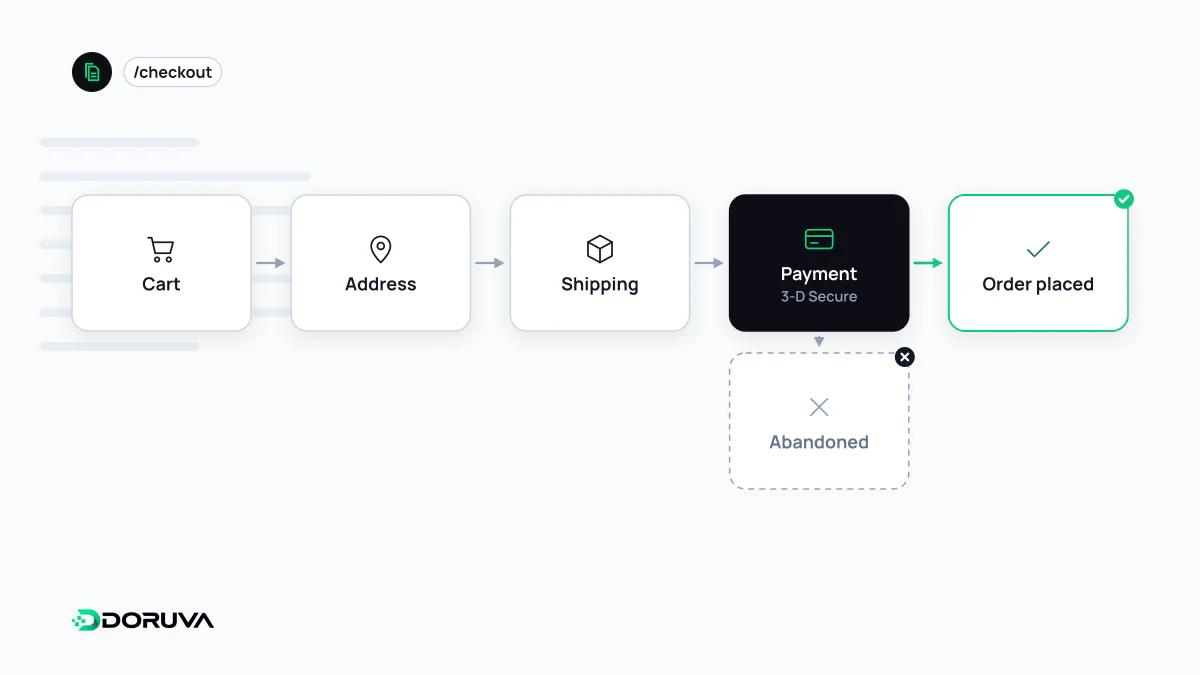
Where friction accumulates
By the time someone reaches checkout they have mostly decided to buy, so the orders lost here are lost to the process, not the product. The same friction points come up again and again:
- shipping or extra fees revealed only on the final screen;
- being forced to create an account before paying;
- long forms full of fields nobody needs, with optional ones that look mandatory;
- validation errors that do not say which field is wrong, or that wipe the form;
- a missing payment method the shopper expected;
- a "Place order" button that lags, freezes or creates two orders on a double click.
Let people buy as guests
web.dev's guidance on payment and address forms notes that not allowing guest checkout is cited as a major reason for cart abandonment and recommends making guest checkout the default. Account creation can be offered after the order is placed, with a single password field, since email, name and address are already known. You keep the conversion and still gain the account.
Build a form the browser can fill
Correct autocomplete tokens let browsers fill saved addresses and cards in one tap. For numeric data, inputmode="numeric" on a text input brings up the right mobile keyboard without the spinner arrows that type="number" adds:
<label for="name">Full name</label>
<input id="name" name="name" autocomplete="shipping name">

<label for="address">Address</label>
<textarea id="address" name="address" autocomplete="shipping street-address"></textarea>

<label for="card">Card number</label>
<input id="card" name="card" autocomplete="cc-number" inputmode="numeric">
When card fields are rendered inside the payment provider's iframe, the provider handles those attributes; address and contact fields remain the store's job. The web.dev article covers the details. Visible labels and errors announced to screen readers are also basic web accessibility requirements, not extras.
The most expensive seconds on the site
Checkout is where third-party scripts accumulated across the rest of the site do the most damage. Chat widgets, session recorders and marketing tags rarely belong here; they occupy the main thread and slow the response to clicks. A sluggish reaction to "Place order" is an INP problem in the most literal sense. Loading only what the order needs improves both speed and security.
The second click on a slow button is a classic failure. Disabling the button while the request runs helps, but the real safeguard is processing the order request idempotently on the server, so a repeated submission can never charge the customer twice.
One page or several steps?
There is no universal winner between a one-page checkout and a multi-step flow. One page shows every field and the total at once; multiple steps keep each screen short and guide progress with an indicator. Decide with A/B tests and funnel data rather than opinion. Track begin checkout, shipping details, payment details and purchase as separate events so you can see which sub-step leaks. What happens after the shopper presses pay is covered under payment gateway.