

What is Interaction Design?
Definition
Interaction design (IxD) is the discipline of shaping how people act on an interface and how the system responds: what users can do, how they discover it, and what feedback they get. It covers the behaviour of buttons, forms, menus and animation, states such as loading, error and success, and the timing of responses, so that users always understand what is possible and what just happened.
Also known as: IxD, microinteractions, interaction designer
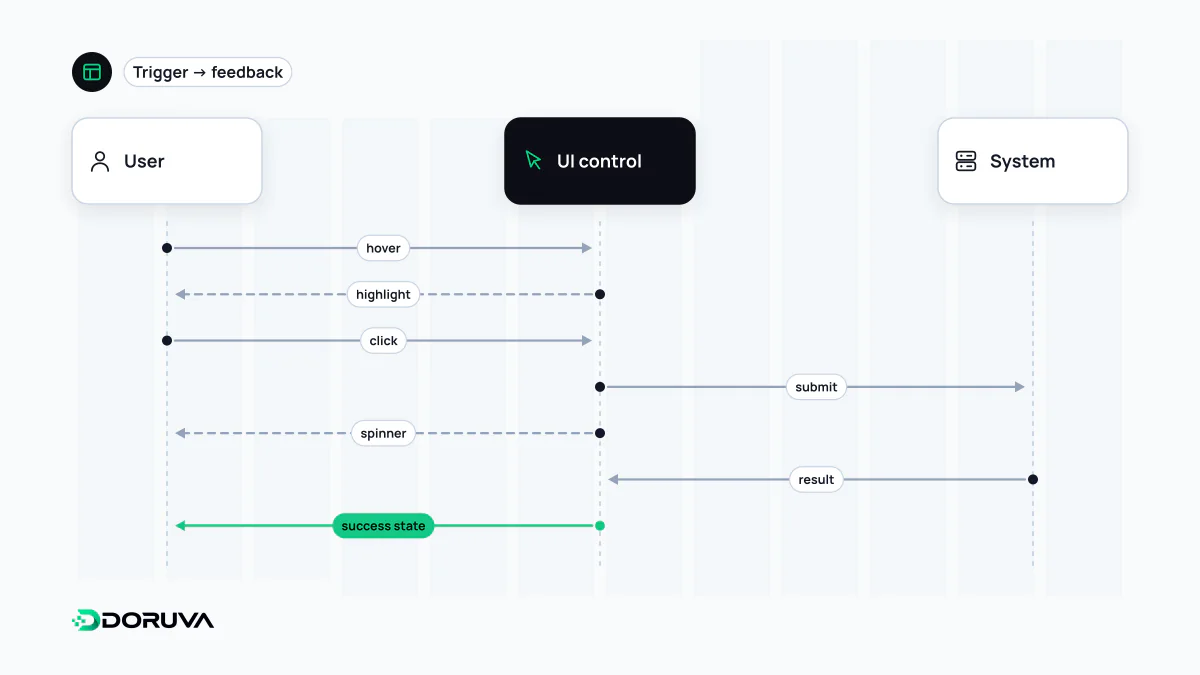
The loop every interaction runs through
Each interaction follows the same cycle: the user notices something, acts on it, the system responds, and the user interprets the result. Interaction design is about removing doubt at every step of that loop.
- Discoverability: things you can click should look clickable. Underlines, button shapes and chevrons are signifiers that tell people an action exists. A link styled exactly like body text still works, but nobody finds it.
- Mapping: the relationship between a control and its effect should feel natural, like a slider that increases the value as it moves right.
- Feedback: every action leaves a trace: a pressed state, a cart badge that ticks up, a confirmation after a form is sent.
- Constraints and recovery: prevent the wrong action up front (do not offer past dates in a booking picker) or make it reversible afterwards (an "Undo" after deleting).
Designing states, not screens
Mockups usually show a form in its empty, ideal state. Real users meet that form in several others, and that is where most problems live:
| State | What the user needs to know |
|---|---|
| Empty | Which fields are required, and in what format? |
| Focused | Which field am I typing into right now? (a visible focus ring) |
| Validation error | What did I get wrong and how do I fix it? Say it in text, next to the field. |
| Submitting | Did it register? A disabled button with a spinner also prevents double submissions. |
| Success | What happened, and what happens next? |
| Server error | Is my input lost? Can I try again? |
Define these once per UI component and every form on the site behaves consistently, instead of each page improvising its own error handling.
Timing and perceived speed
Whether an interface feels fast depends largely on how quickly the first visible reaction arrives. INP, one of Google's Core Web Vitals, measures how long a page takes to visually respond to interactions; web.dev rates 200 milliseconds or less as good. Even when the underlying work takes longer, showing something within that window (a pressed state, a skeleton screen, a progress bar) cuts down on repeated clicks and abandoned sessions.
Motion is part of timing too. Used well, it shows where a panel came from or where an added item went. Long decorative transitions just tax every interaction. Respect the operating system's reduced-motion setting for people who are made unwell by movement on screen:
@media (prefers-reduced-motion: reduce) {
  .panel { transition: none; }
}
Designing for more than a mouse
An interface conceived around a mouse behaves differently on a touchscreen or a keyboard. Touch devices have no hover, so a menu that only opens on mouse-over may be unreachable on a phone. Keyboard users need every interactive element in the Tab order with a visible focus indicator. WCAG 2.2 success criterion 2.5.8 (Level AA) asks for pointer targets of at least 24 by 24 CSS pixels, with listed exceptions. All of this overlaps with web accessibility.
How it relates to UI and UX design
UI design is concerned with how a screen looks and UX design with the experience as a whole; interaction design sits between them and deals with how the interface behaves over time. On small teams one person does all three. Because behaviour cannot be fully conveyed by static mockups, clickable prototypes and short motion studies are the discipline's main deliverables. Patterns that steer users into choices they did not intend are not clever interaction design; they are a dark pattern.