

What is Google Merchant Center?
Definition
Google Merchant Center is a free console where businesses send Google their product data, store details, shipping and return settings. That data lets products appear in free listings across Google Search, the Shopping tab, Images and other Google surfaces, and, once a Google Ads account is linked, the same product data powers Shopping ads.
Also known as: Merchant Center, GMC, Google Merchant, Merchant Center Next
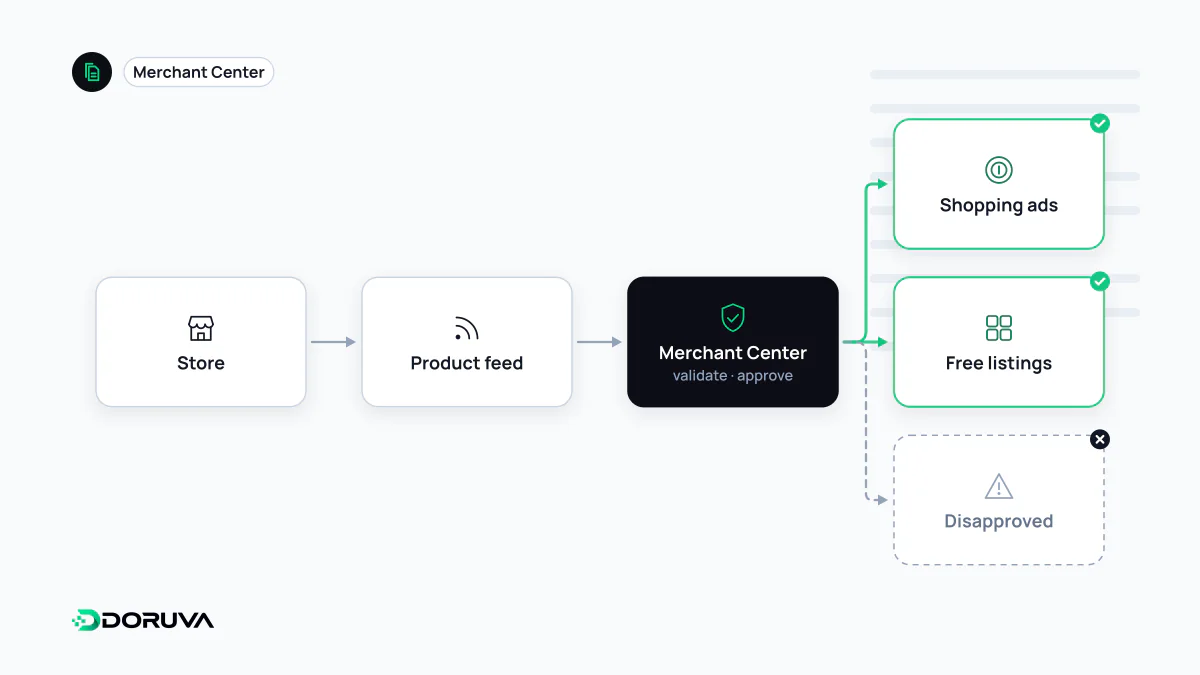
Where Merchant Center fits
Google can learn about a product by crawling its page, but price, stock, delivery time, return terms and variant details are most reliable when they come straight from the seller. Merchant Center is where that data is submitted and managed. It is not an advertising tool in itself: Shopping ads draw on Merchant Center data once a Google Ads account is linked, but products can appear in free listings without any ad spend.
According to Google's help documentation, free listings can show on the Shopping tab, in Google Search, Google Images and Lens, YouTube, Google Maps and Gemini. The feature is switched on by default for most accounts, yet being enabled does not guarantee visibility; matching depends on the quality of the data and on what people search for.
Ways to get products into the account
- Files: a tab-delimited or XML product feed, fetched from a URL or uploaded via SFTP, re-fetched every 24 hours by default.
- Google Sheets: a simple source for small catalogues, where edits in the sheet flow through to the account.
- Automatic collection from the website: Google can read product details from structured data on product pages.
- Ecommerce platform integrations: platform apps that sync the catalogue directly.
- Merchant API: for systems that push price and stock changes in near real time. The legacy Content API for Shopping was sunset on 18 August 2026.
Required data and account setup
Every product needs an ID, title, description, landing page link, image link, availability and price, and new products also need a brand. Categories such as apparel add attributes like colour, size, age group and gender. Google's current guidance on identifiers is clear: submit a GTIN when the manufacturer has assigned one, and never guess or invent one. The official product data specification is the authoritative list.
The account itself needs attention too: a verified and claimed website, shipping settings, and a return policy published on the site. Gaps here can limit visibility even when individual products are perfectly specified.
Common reasons for disapproval
- a price or availability mismatch between the feed and the landing page;
- landing pages that are unreachable, redirect elsewhere or return errors;
- promotional text or watermarks overlaid on product images;
- missing or incorrect product identifiers;
- misrepresentation flags on sites lacking contact details, return terms or clear payment information.
An item-level disapproval usually clears once the feed is fixed. An account-level suspension requires changes on the website itself followed by a review request.
Not the same tool as Search Console
| Merchant Center | Search Console | |
|---|---|---|
| Purpose | Send product and store data to Google | Report on crawling, indexing and search performance |
| Direction of data | Seller to Google | Google to site owner |
| Typical task | Fix feed errors, disapprovals, shipping settings | Fix indexing issues, analyse queries |
The two complement each other. Google Search Console evaluates on-page markup in its product and merchant listing reports, while Merchant Center evaluates the feed. Google explicitly allows adding Product structured data and submitting Merchant Center data at the same time, and says doing both helps it understand and verify the information.