

What is Product Feed?
Definition
A product feed is a structured file or API stream that lists a store's products with attributes such as ID, title, description, price, availability, image and landing page URL. Google Merchant Center, marketplaces and comparison sites read the feed to list products and power shopping ads, so it has to be kept in sync with what the store actually shows and sells.
Also known as: shopping feed, product data feed, XML product feed, merchant feed, catalog feed
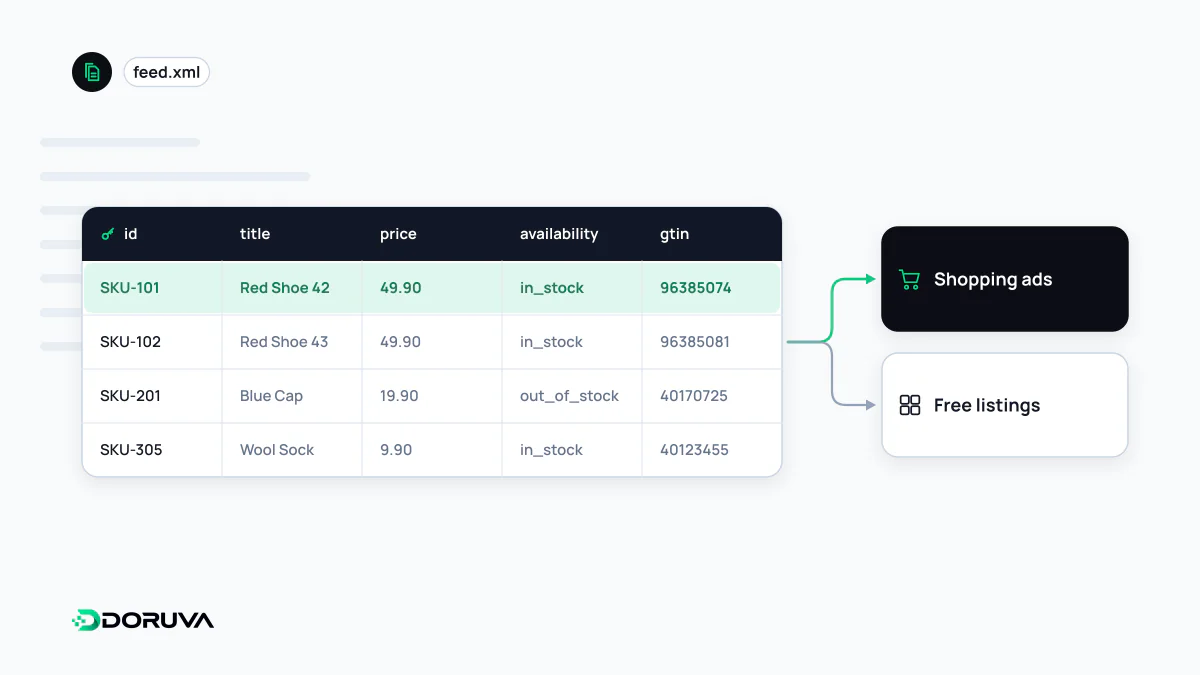
Anatomy of a feed item
Each row or XML item in a feed represents one sellable product. The channel's specification defines which attribute names it expects. For Google Merchant Center, the core attributes include:
| Attribute | Holds | Watch out for |
|---|---|---|
id | A stable product identifier | Most shops use the SKU; change it and the channel treats the item as new |
title, description | Name and description | Must match the product page, not read like ad copy |
link, image_link | Landing page and main image | Crawlable, stable URLs that do not redirect |
price, availability | Price and stock status | Must match what the landing page shows |
brand, gtin, mpn | Brand and product identifiers | Never invent a GTIN; leave it empty if none exists |
item_group_id | Shared ID for a set of variants | Groups variants such as colour and size under one product |
Which attributes are required or recommended depends on product category and target country; Google's product data specification is the reference.
File formats and delivery methods
Merchant Center accepts tab-delimited text (.txt, .tsv) and XML in RSS 2.0 or Atom 1.0. Files can be fetched from a URL or uploaded over SFTP, and Google Sheets or an API connection can act as the source instead. In an RSS-based feed, Google-specific attributes live in the g: namespace:
<rss version="2.0" xmlns:g="http://base.google.com/ns/1.0">
<channel>
<item>
<g:id>TEE-CTN-RED-M</g:id>
<g:title>Cotton T-Shirt, Red, Size M</g:title>
<g:link>https://example.com/cotton-tee?color=red&size=m</g:link>
<g:price>24.90 USD</g:price>
<g:availability>in_stock</g:availability>
<g:item_group_id>TEE-CTN</g:item_group_id>
</item>
</channel>
</rss>Ampersands inside XML must be written as &. Forgetting this in URLs with query strings is one of the most common reasons a feed fails to parse.
Keeping the feed honest
A feed is a snapshot, while a store changes all day. File-based sources are fetched every 24 hours by default. If prices or stock move faster than that, the landing page may show a sale price while the feed still carries yesterday's figure, and channels can disapprove or pause items when they detect the mismatch. The usual pattern is a full feed generated daily plus real-time price and inventory updates sent through an API. On Google's side that means the Merchant API: the older Content API for Shopping was sunset on 18 August 2026 and is being progressively shut down.
Habits that degrade feed quality
- Stuffing titles with promotional slogans and capital letters.
- Pointing
linkat a category page or the homepage instead of the product. - Collapsing variants into one item and losing colour and size data.
- Deleting sold-out items and re-adding them later under a new ID, which throws away their history.
- Setting the feed up once and never reviewing diagnostics for category or identifier warnings.
Feed, sitemap or structured data?
These three are often confused. An XML sitemap only lists URLs to crawl and says nothing commercial about a product. Product schema marks up the same facts on the page itself. A feed delivers those facts in bulk, independently of the page. Google notes that using Product markup and Merchant Center data together helps it understand and verify the information, which is exactly why the two should never disagree on price or availability.