

What is Pagination?
Definition
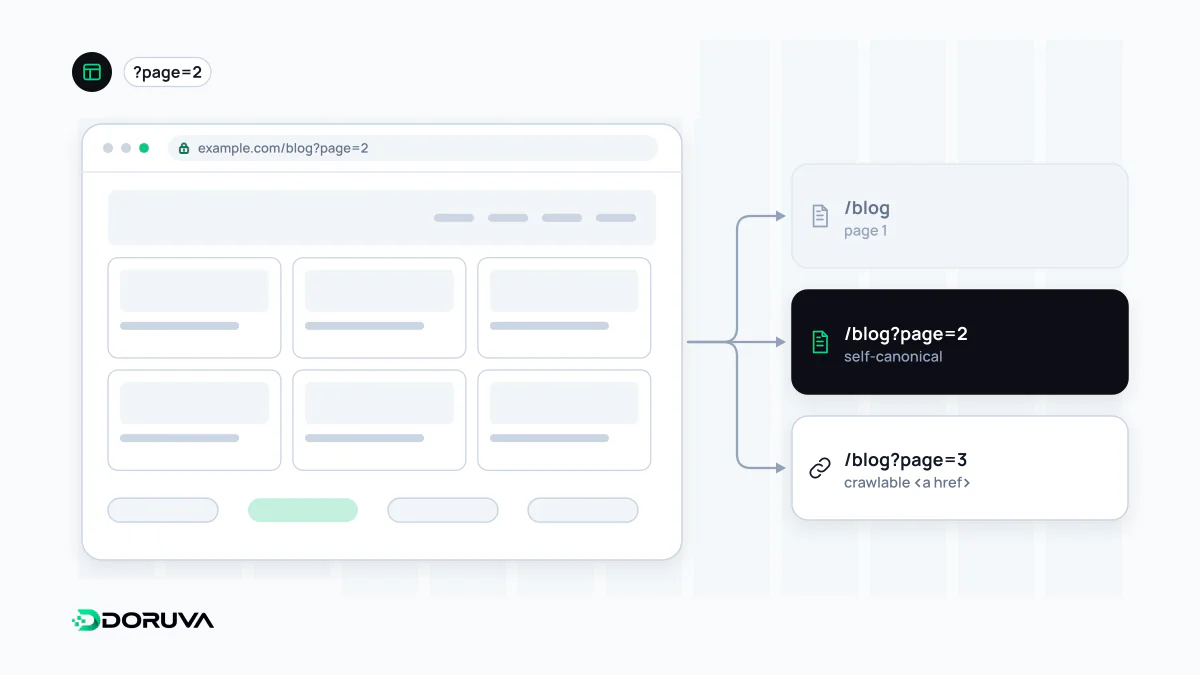
Pagination is the splitting of a long list, such as products, blog posts or search results, across several pages. Besides numbered pages it covers infinite scroll, which loads more items as the user scrolls, and "load more" buttons. For SEO the real question is whether items deep in the list can be discovered, which requires each page to have its own URL and real links.
Also known as: paginated pages, infinite scroll, load more button, paging
The real problem is the bottom of the list
A category with 600 products shown 24 at a time produces 25 pages. A search engine can only reach the products on page 25 by following links to get there. Built badly, pagination buries those items far beyond a sensible crawl depth, or hides them entirely. So the SEO job of pagination is not to rank page 7; it is to make the whole list reachable.
The setup Google recommends
- Give each page a unique URL, such as a
?page=3parameter or a/page/3/path. - Link pages with real
<a href>elements. Each page should link at least to the next one; linking every page back to the first also signals where the series starts. - Don't canonicalise the series to page one. Each page should point to its own canonical URL. Pointing page 3 at page 1 tells Google to drop it, along with the discovery path to everything listed there.
- Don't put page numbers in fragments. Google ignores
#page=3, so every page collapses into one URL. - Keep sort and filter variants in check. Stop re-sorted copies of the same list from being indexed with
noindexor robots.txt rules.
<!-- /category/coffee-machines/?page=3 -->
<link rel="canonical" href="https://www.example.com/category/coffee-machines/?page=3">
...
<nav aria-label="Pages">
  <a href="/category/coffee-machines/">1</a>
  <a href="/category/coffee-machines/?page=2">Previous</a>
  <a href="/category/coffee-machines/?page=4">Next</a>
</nav>
Whatever happened to rel="prev" and rel="next"?
Google no longer uses rel="prev" and rel="next", once the standard way to mark up a paginated series. Other search engines may still read them, so there is no need to strip them out, but for Google the series is now understood only through the actual links between pages.
Infinite scroll and load-more buttons
Both patterns can feel smoother for users, but they carry a specific risk: Google's crawlers don't click buttons and generally don't trigger JavaScript that updates the page in response to user actions. Items that only appear after scrolling may simply not exist as far as the crawler is concerned.
The fix is to layer these patterns on top of crawlable pagination. A "load more" button can be an <a href> pointing to ?page=2; when JavaScript runs, it intercepts the click, appends the next batch in place and updates the address with the History API. Without JavaScript, the link simply navigates. Visitors get a continuous list, and crawlers reach every page through a real URL. It is the general principle of JavaScript SEO applied to lists. Online shops can add a safety net by listing product URLs in a sitemap or a Merchant Center feed.
Mistakes that keep coming back
- Blanket
noindexon page 2 onwards, which over time weakens the path to deep items. - Page numbers rendered as
<span>elements oronclickhandlers with nohref. - Returning an empty list with a 200 for page numbers that don't exist (
?page=999) instead of a 404.
Google's current guidance is in its pagination and incremental loading documentation. Where pagination meets filters, see faceted navigation.