

What is PageSpeed Insights?
Definition
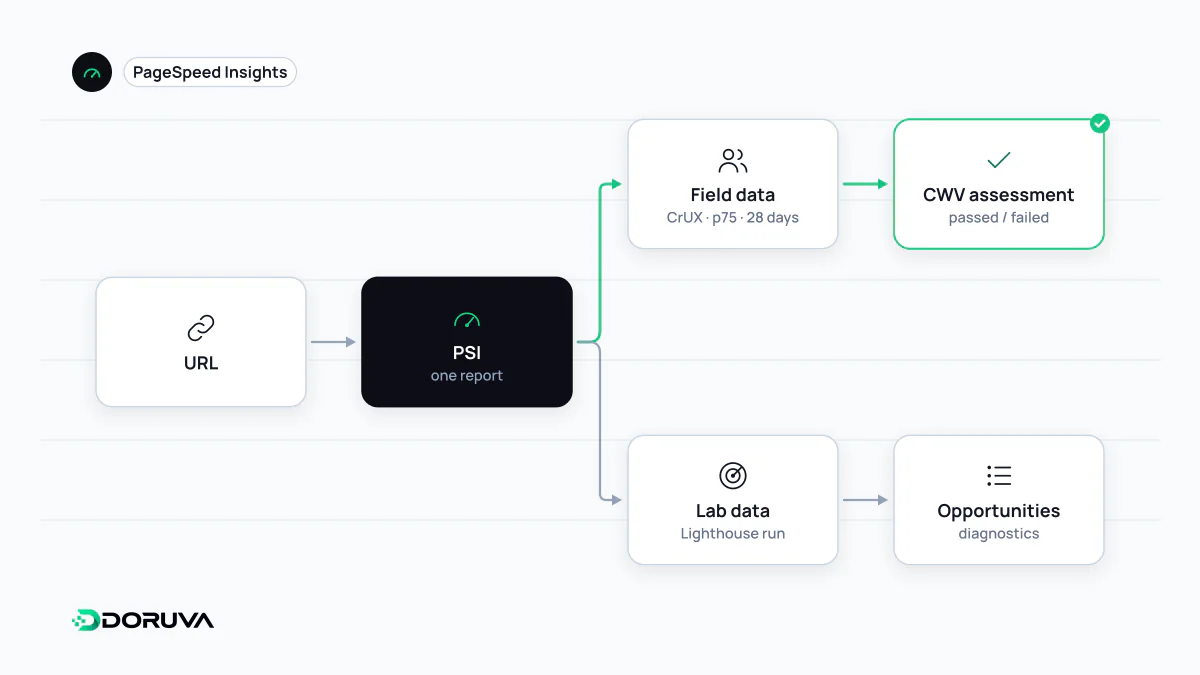
PageSpeed Insights (PSI) is Google's free web tool that reports the performance of a URL separately for mobile and desktop. The top of the report shows real-user data collected from Chrome users through the Chrome UX Report, including the Core Web Vitals assessment; the bottom shows a Lighthouse lab test with a performance score and specific diagnostics. The same data is available through an API.
Also known as: PSI, Google PageSpeed, PageSpeed test, Google speed test, PageSpeed Insights API
Two data sources on one page
When you test a URL in PSI you are really asking two separate questions. The upper section, "Discover what your real users are experiencing", summarises what Chrome users visiting the page experienced over the previous 28 days, drawn from the CrUX dataset. The lower section, "Diagnose performance issues", is the result of a single Lighthouse run executed on Google's infrastructure at the moment you clicked Analyze. The Mobile and Desktop tabs switch both sections.
It is common for the two sections to disagree, and usually nothing is wrong. The reasons are covered under field data and lab data; to read PSI correctly you mainly need to know which box shows which kind of data.
The top section: the Core Web Vitals assessment
The Passed or Failed label at the top is the page's Core Web Vitals assessment. With sufficient data, a page passes when the 75th percentile of LCP, INP and CLS all sit in the "good" range. FCP and TTFB are shown as well; they help diagnosis but do not decide the verdict.
| Metric | Good | Needs improvement | Poor |
|---|---|---|---|
| FCP | ≤ 1.8 s | 1.8–3 s | > 3 s |
| TTFB | ≤ 0.8 s | 0.8–1.8 s | > 1.8 s |
The coloured bar under each metric shows what share of visits landed in the good, needs-improvement and poor buckets. It says more than the single percentile: a page whose p75 sits just under a threshold can lose its pass after a small regression.
A switch labelled "This URL" and "Origin" sits at the top right. When a page lacks enough data, PSI falls back to origin data covering every page on the site, and if the origin lacks data too, the section is not shown at all. On a low-traffic page, the number you are looking at may well be the whole site's.
The bottom section: lab diagnostics
The lab test simulates a mid-tier phone on a mobile network for the mobile tab and an emulated desktop on a wired connection for the desktop tab. The 0–100 performance score here is the Lighthouse score, which is not the same thing as the Core Web Vitals assessment. The real value lies in the diagnostics below it: which image is the LCP element, which scripts keep the main thread busy, which resources hold up rendering.
Run the test twice and the score may move a few points. When judging a change, look at the trend over several runs rather than a single result.
Testing at scale with the PSI API
The same engine is available as an API for regular, scripted testing of many URLs:
curl "https://www.googleapis.com/pagespeedonline/v5/runPagespeed?url=https://example.com/&strategy=mobile&category=performance&key=YOUR_API_KEY"The lab result arrives in lighthouseResult, while field data sits in loadingExperience for the URL and originLoadingExperience for the origin. Google's documentation states that it plans to stop including CrUX data in this API and points to the CrUX API and CrUX History API for programmatic field data. The PSI documentation has the details.
Common misreadings
- Treating the score as the goal. A green lab score does not prove that real users have a good experience. Check the assessment at the top first.
- Testing only the home page. Problems usually live in product, category and article templates. For a site-wide view, the Core Web Vitals report in Google Search Console groups similar URLs.
- Expecting fixes to show up immediately. Field data covers a 28-day window, so an improvement appears gradually over several weeks.
- Mistaking origin data for page data. Comparisons made without checking which toggle is active are misleading.