

What is Heatmap?
Definition
A heatmap is a visualisation of visitor behaviour on a web page that uses colour intensity to show where activity concentrates. Areas that attract many clicks, mouse movement or scrolling appear in warm colours, while neglected areas appear cool. It shows where on the page the behaviour behind analytics numbers actually happens, and it is a standard input for conversion rate optimization work.
Also known as: heat map, click map, scroll map, click heatmap, scroll heatmap
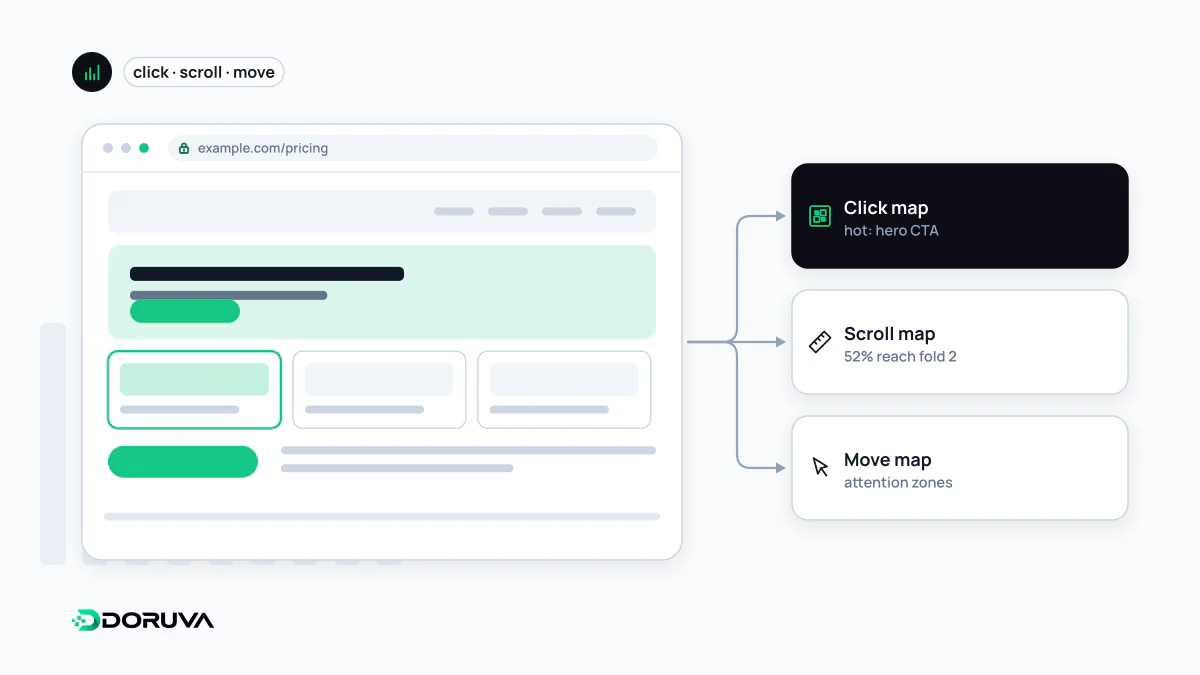
Kinds of heatmap
- Click maps show where clicks, and taps on mobile, cluster. Heavy clicking on an image or heading that is not a link suggests visitors expect one there.
- Scroll maps show what share of visitors reach each depth of the page, which tells you whether key information or a call to action sits below the point most people ever see.
- Move (hover) maps show where the mouse cursor travels on desktop. Cursor position correlates with gaze only loosely, so treat this type with the most caution.
Many tools pair heatmaps with session recordings and flags for rage clicks (rapid repeated clicks on one spot) and dead clicks (clicks that produce no response). For finding broken components, those signals often get you there faster than the map itself.
From picture to decision
Say a service page's scroll map shows that only 35% of visitors reach the pricing section. That does not prove pricing should move up; it gives you a good hypothesis to test. Heatmaps generate questions; an A/B test or a user interview supplies the answer. Keep a few things in mind while reading one:
- Separate devices. Desktop and mobile layouts differ, so a merged map is meaningless. What counts as above the fold changes from device to device too.
- Dynamic content. Dropdowns, carousels, personalised blocks and the cookie banner can make clicks register over the wrong elements.
- Enough data. A map built from a few hundred views generalises from a handful of people. It also cannot tell you who the visitors were or why they came; search and paid traffic can behave very differently on the same page.
Privacy and performance costs
Heatmap and session-recording tools capture behaviour in fine detail. Text typed into form fields and personal information displayed on screen must be masked, or passwords, phone numbers and health details can end up on a third-party server. These tools are non-essential and in most cases should only run once the visitor has given cookie consent.
There is a speed cost as well. Recording scripts listen to events on the main thread continuously and send data back. Run them on the pages where you have a specific question, for a limited period, rather than everywhere and forever. Managing the script through a tag manager makes switching it on and off simple.