

What is Git?
Definition
Git is a free, open-source, distributed version control system that records changes to files as snapshots called commits. It was created in 2005 by Linus Torvalds and the Linux kernel community. Every clone carries the full project history, so a team can see who changed what, when and why, undo a bad change, and work on the same codebase in parallel without overwriting each other.
Also known as: version control, version control system, VCS, commit, git commit
The problem version control solves
Without version control, projects drift into a familiar mess: site_final.zip, site_final_v2.zip, two people overwriting each other in a shared folder, and nobody able to say who changed a line or why. Git fixes this by recording every change with its author and explanation, letting several people work on separate lines of development at once, and making any past state of the project recoverable.
It was written in 2005 by Linus Torvalds and the kernel community after the Linux project lost free access to the proprietary tool it had been using. Speed, a fully distributed model and support for thousands of parallel branches were design goals from day one, and Git has since become the default for most software teams.
Commits are the unit of history
A commit is a snapshot of the project at a point in time. It stores an author, a timestamp, a message and a pointer to its parent commit, and it is identified by a hash computed from its contents. Because each commit references the hash of the previous one, quietly altering history is detectable.
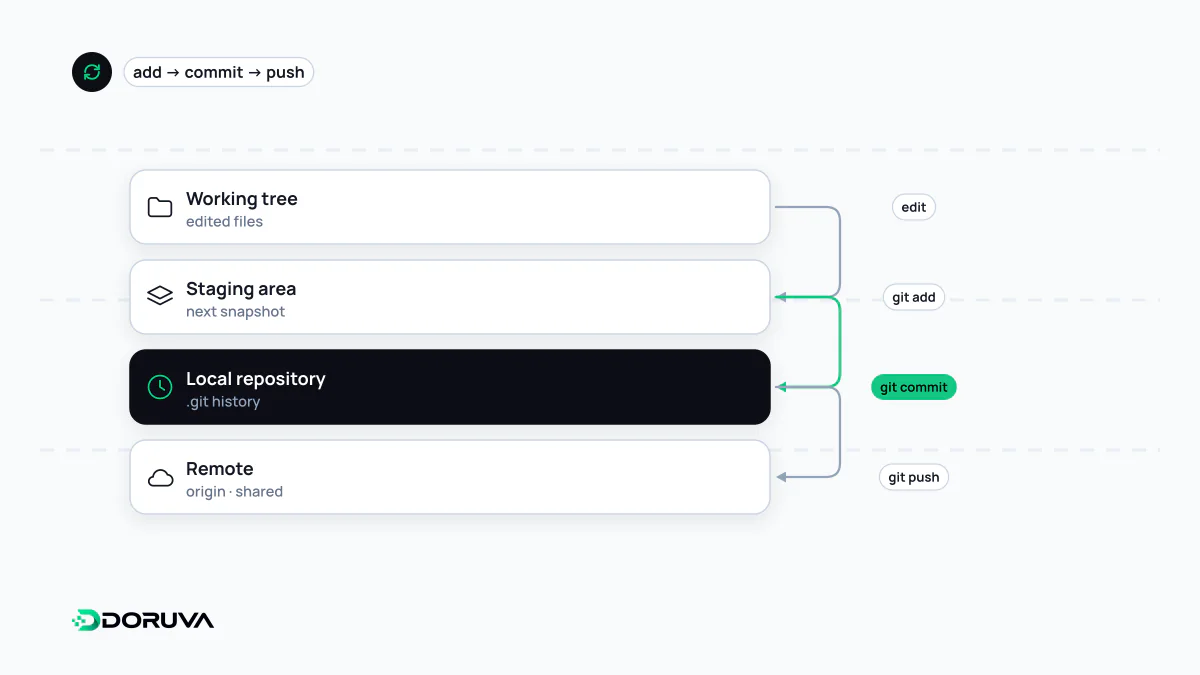
Changes move through three areas: the working directory you edit, the staging area (the index) where you assemble the next commit, and the repository that holds permanent history.
git status                         # what has changed?
git add src/contact-form.ts        # stage the change
git commit -m "Validate phone numbers on the contact form"
git log --oneline -3               # last three commits
A useful commit holds one logical change, and its message explains why as well as what. A commit called “fixes” that touches thirty files is nearly worthless when you are hunting a regression six months later.
What “distributed” means in practice
Older centralised systems kept history on one server. With Git, every clone is a complete copy, so you can commit, browse history and create branches offline. When you are ready to share, git push sends your commits to a remote repository and git pull or git fetch brings in everyone else's.
A common mix-up: Git is not GitHub. Git is the open-source program on your machine. GitHub, GitLab and Bitbucket are hosting services that store Git repositories and add code review, issue tracking and automation on top.
How teams use it day to day
Each piece of work usually happens on its own branch, goes up for review as a pull request and is merged into the main branch once approved. Pushes to main can trigger the CI/CD pipeline, which runs tests and ships the new version. If a release misbehaves, git revert creates a new commit that undoes the faulty one, a clean basis for a rollback, while tags mark exactly which code went out as which release.
What should never be committed
- Secrets: API keys, database passwords,
.envfiles. Supply them through environment variables or a secrets manager instead. - Generated files:
node_modules, build output, caches. List them in.gitignore. - Large binaries: videos and heavy design files bloat every clone; if they must be versioned, an extension such as Git LFS keeps them out of the main history.
Deleting an accidentally committed password in a later commit does not remove it: the value still sits in history and in every clone. The right response is to revoke the credential immediately and issue a new one.