

What is CRM (Customer Relationship Management)?
Definition
CRM (customer relationship management) is both the practice of managing a company's interactions with prospects and customers and the software used to do it. A CRM system keeps contacts, conversations, quotes and sales opportunities in one place, so sales, marketing and support teams share the same customer history and managers can see how much business sits at each stage of the sales pipeline.
Also known as: Customer Relationship Management, CRM software, CRM system, sales CRM
The problem a CRM replaces
In a small company, customer knowledge starts out scattered across a salesperson's phone, an inbox and a spreadsheet. When that person goes on holiday, nobody knows which quote is where; two colleagues call the same prospect in one week; marketing can only guess how many sales a campaign produced. A CRM pulls all of that into a single system of record.
Most CRMs are built around the same objects:
- Contacts and accounts: who someone is, which company they belong to, and what they have agreed to receive.
- Leads: interest that has not been qualified yet, such as a website enquiry.
- Deals (opportunities): a concrete potential sale with a value, a probability and an expected close date.
- Activities: calls, meetings, emails and notes, forming a timeline of every touchpoint.
- Tickets: post-sale requests and complaints.
Reading a sales pipeline
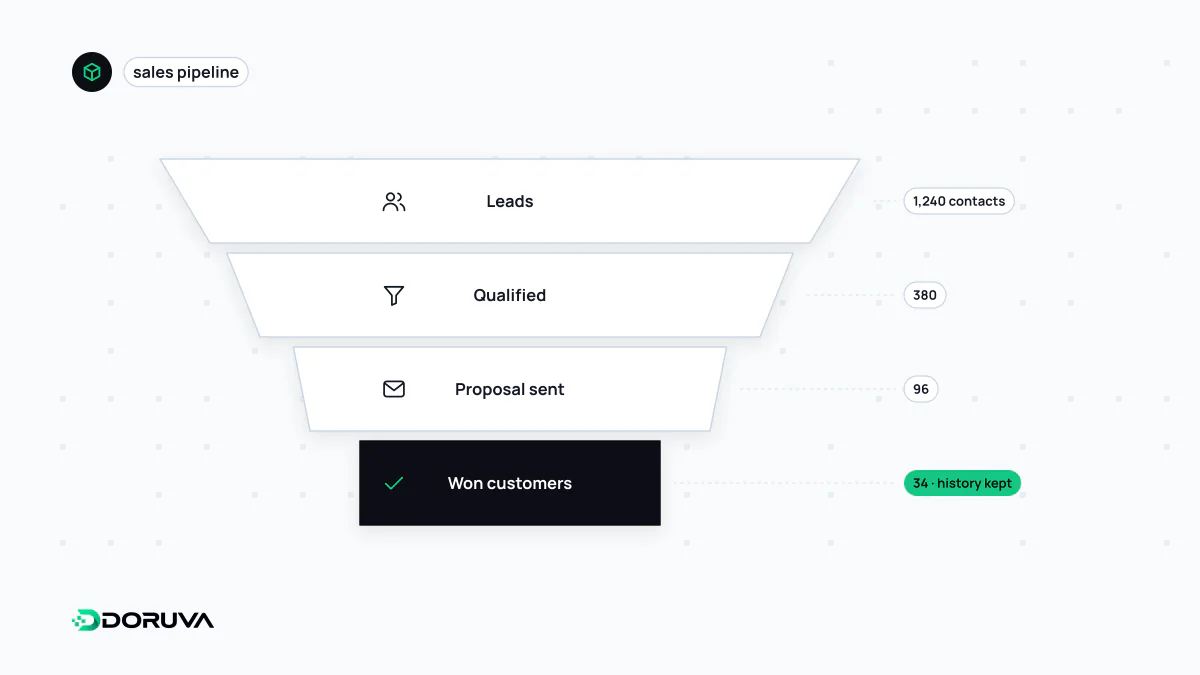
The pipeline is the most visible thing a CRM gives management. Deals move through stages such as discovery, needs analysis, proposal, negotiation, and won or lost. The total value at each stage, combined with stage-to-stage conversion rates, turns revenue forecasting from a hunch into arithmetic: if a quarter of proposals usually close and €400,000 is currently at proposal stage, expecting around €100,000 from that stage is reasonable.
The same numbers expose bottlenecks. If most deals sit at proposal stage for weeks, the problem is not lead generation; it is how quotes get produced. Seen this way, a CRM is the sales-side continuation of the conversion funnel that starts on the website.
Connecting the CRM to everything else
A CRM becomes more valuable the less data is typed in by hand. The most common connections:
- Website forms: a contact or quote form creates a lead directly through the CRM's API. Capture UTM parameters with the submission and you can trace which campaign produced which deal.
- Event notifications: when a deal is marked won, the CRM can send a webhook that opens a project in the delivery team's tool or alerts finance.
- ERP and e-commerce: orders, invoices and payments usually originate in the ERP; for a salesperson to see a customer's outstanding balance, that data has to flow into the CRM.
The slow part of an integration is rarely the API call. It is data hygiene: the same company recorded three times under three spellings, phone numbers in five formats, and no agreement on which system is the source of truth for which field.
Off-the-shelf or custom?
Hosted SaaS CRMs such as Salesforce, HubSpot, Zoho and Microsoft Dynamics 365 can put a standard sales process live within weeks, and for most companies they are the right starting point. Custom development, or custom modules alongside an existing CRM, tends to come up when the process is highly industry-specific (dealer networks, field teams, project-based pricing), when per-seat licence fees have grown into a major cost line, or when customer data must be kept in a particular environment.
A store of personal data
A CRM is by definition a repository of personal data. Under laws such as the EU's GDPR or Turkey's KVKK, the purpose of processing, retention periods, who has access, and how deletion requests are honoured all need to be designed in rather than bolted on, and marketing messages generally require the recipient's consent. This is general information, not legal advice. In practice, role-based access, masking of sensitive fields, and recording where each contact came from and under what permission do most of the work.