

What is Code Splitting?
Definition
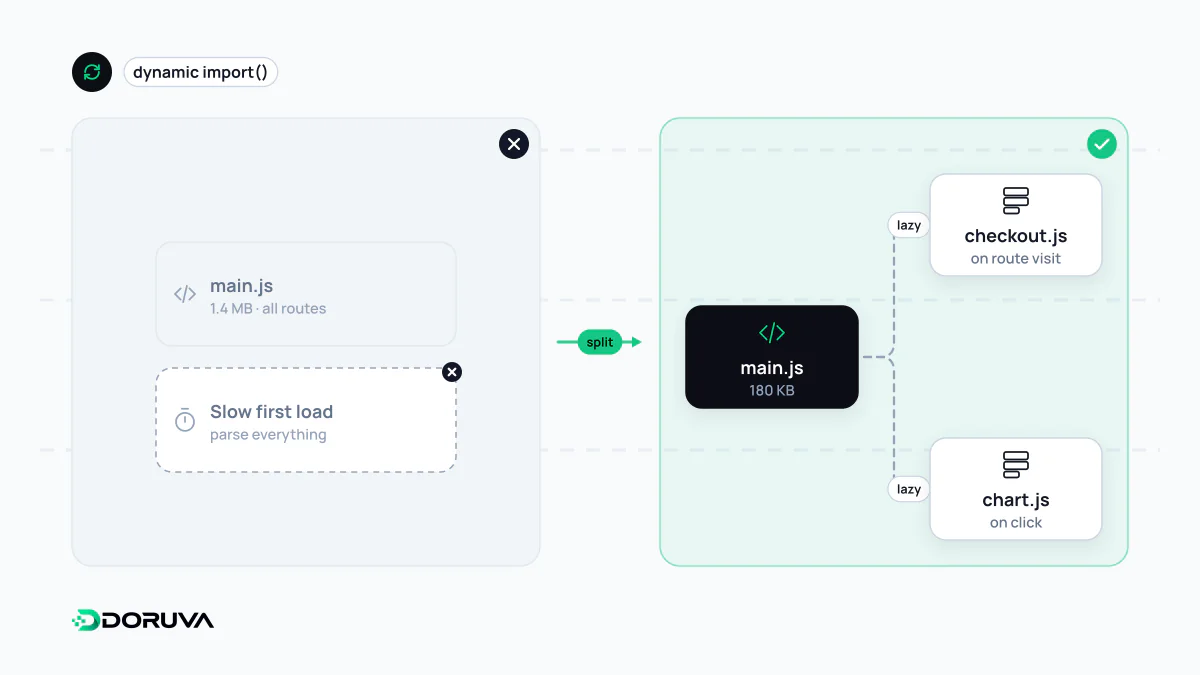
Code splitting is the technique of breaking a web application's JavaScript into smaller pieces (chunks) that can be loaded independently, instead of shipping one large bundle. The browser downloads only the code needed right now, and other chunks load when the user reaches a route or uses a feature. Bundlers such as webpack, Rollup, esbuild, Vite and Turbopack perform the splitting.
Also known as: bundle splitting, chunk splitting, route-based splitting
Bundles, chunks and bundlers
A modern app consists of hundreds of modules, thousands once dependencies are counted. A bundler starts from an entry point, follows the import statements to build a module graph, transforms sources such as TypeScript or JSX, and writes the files the browser will receive. Those output files are bundles, and each piece produced by splitting is a chunk. As part of the build process the output is usually minified, and file names get a hash derived from their content:
_next/static/chunks/main-8f3c21.js        (shared core)
_next/static/chunks/app/page-1a7d90.js    (home route)
_next/static/chunks/app/cart/page-c44e02.js
_next/static/chunks/942-5b1f6e.js         (shared dependency)
Because a file name only changes when its content does, browsers can cache these chunks for a long time, and a change to one route invalidates only that route's chunk.
Where to split
- By route: the most common split and usually the biggest win. Next.js splits code by route automatically, so nobody downloads the checkout code until they open checkout.
- By component or feature: heavy parts that not every visitor uses, such as a map, a rich-text editor or a charting library, load only when needed.
- By library: rarely changing third-party code goes into its own chunk so it stays cached when application code is redeployed.
// The library downloads only when the user clicks "Export"
button.addEventListener("click", async () => {
  const { exportPdf } = await import("./pdf-export.js");
  exportPdf(report);
});
Dynamic import() is the standard way to create a split point. React.lazy in React and next/dynamic in Next.js apply the same mechanism at component level.
Effect on performance metrics
The less JavaScript the first load ships, the less the browser has to parse and execute, which frees the main thread sooner. In the lab that shows up as lower TBT; in the field, interactions get a faster response and INP improves. On pages that draw their content with JavaScript, the main content also appears earlier.
The cost of over-splitting
More chunks are not automatically better. Many tiny files add per-request overhead, softened but not removed by HTTP/2, and small files compress less efficiently. If an on-demand feature only starts downloading when the user clicks, they feel the delay; the fix is to prefetch it on hover or when the browser is idle. Request waterfalls, where one chunk loads another that loads a third, are another common pattern. And deferring critical UI that's visible on the first screen turns a saving into a loss.
How to measure it
Bundle analysers visualise which modules end up in each chunk and how much space they take. From Next.js 16.1, the next experimental-analyze command does this over Turbopack's module graph; projects on webpack can use the @next/bundle-analyzer plugin. Chrome DevTools' Coverage panel shows how much of the loaded code actually ran on the page. The natural companion to splitting is tree shaking, which removes code that is never used from the bundle altogether.