

What is Query Parameter?
Definition
A query parameter is a key-value pair in the part of a URL that follows the question mark, with pairs usually separated by ampersands, as in ?color=black&page=2. It passes filtering, sorting, search or tracking information to the server or to scripts on the page. It differs from a path parameter, which identifies the resource inside the path itself. Because search engines treat every distinct parameter combination as its own URL, parameters can create duplicate content.
Also known as: query string, URL parameter, path parameter, GET parameter, querystring
Anatomy of a URL with parameters
https://shop.example.com/shoes/running?color=black&size=10&sort=price#reviews
└scheme┘ └──────host──────┘└────path─────┘└──────────query─────────────┘└fragment┘
Everything between the question mark and the fragment is the query string. The URI standard (RFC 3986) does not prescribe its internal format; the key=value pairs joined by & come from HTML form submission and have become the near-universal convention. Reserved and non-ASCII characters are percent-encoded: a space becomes %20 (or + in form encoding) and “é” becomes %C3%A9 in UTF-8. Use URLSearchParams in the browser or your framework's URL helpers rather than concatenating strings by hand, which is where most encoding bugs come from.
Path parameters, query parameters and fragments
| Part | Example | Usual job | Reaches the server? |
|---|---|---|---|
| Path parameter | /invoices/2291 | Identifies which resource you want | Yes |
| Query parameter | ?status=unpaid&limit=25 | Filters, sorts or paginates a view of that resource | Yes |
| Fragment | #reviews | Points to a position within the page | No, it stays in the browser |
APIs follow the same split. GET /v1/invoices/2291 fetches one invoice; GET /v1/invoices?status=unpaid&page=3 returns a filtered collection. Identity goes in the path of the API endpoint, options go in the query. “URL parameter” is used loosely for both kinds.
How search engines treat parameter URLs
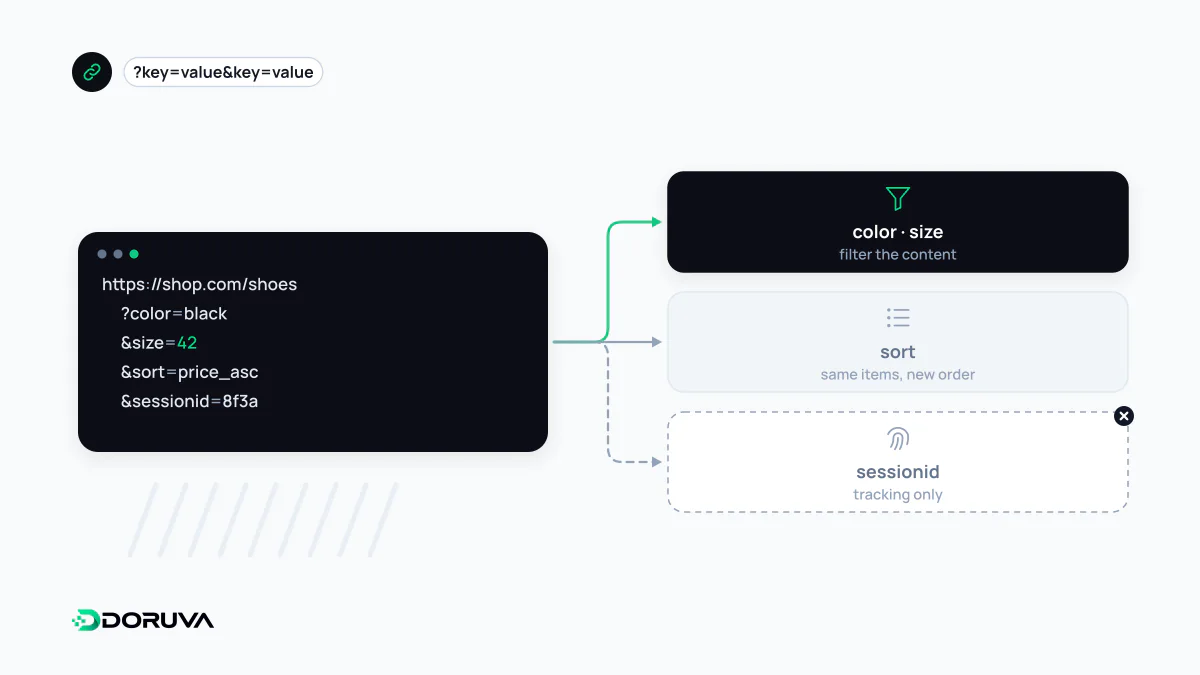
To a crawler, ?color=black&size=10 and ?size=10&color=black are two different URLs even if they render identical pages. It helps to sort parameters into two groups:
- Content-changing: filters, sort order, page numbers, internal search terms. Each may genuinely produce a different listing.
- Passive: campaign tags such as UTM parameters, session IDs, affiliate codes. The page stays the same; only the address changes.
Passive parameters create straightforward duplicate content. Content-changing ones multiply: five filters with a handful of values each can produce tens of thousands of crawlable combinations. On shops with faceted navigation, that is the classic way crawl budget gets burned on near-empty pages. Google retired the URL Parameters tool in Search Console in 2022, so handling now depends entirely on the signals your site sends.
Keeping parameters under control
- Canonicalize passive variants to the clean URL with a canonical URL.
- Link to clean URLs internally. Adding tracking tags to your own navigation recreates the problem canonical tags are trying to fix.
- Use one separator and a fixed order. Google recommends the standard
&; commas, semicolons and brackets are hard for crawlers to recognize as separators. - Block worthless combinations from crawling in robots.txt when they never need to be indexed. A blocked URL is never fetched, so a canonical or noindex on it will not be seen; choose one approach per URL.
- Return 404 for empty results. Google advises a 404 when a filter combination yields nothing or makes no sense.
- Treat pagination separately.
?page=2lists different products and should normally be self-canonical rather than pointing to page one.
Google's faceted navigation guide covers these options in detail.
What never belongs in a query string
Query strings are copied far and wide: browser history, server and proxy logs, analytics reports, and the Referer header sent to third-party sites. HTTPS encrypts them in transit but does nothing about those copies. Passwords, session IDs, personal data and access tokens therefore belong in the request body or headers, never in the URL.