Custom Software
Digitizing Business Processes for SMBs: Moving from Spreadsheets to a System
Digitizing business processes means moving work out of spreadsheets and message threads into one system with roles, permissions and an audit trail. For SMBs, the safest route is to start with a single process, clean the data first and switch over through a short pilot and a time-boxed parallel run.
By Mehmet ÇalışırPublished 10 min read
Contents
This guide is for small and mid-sized businesses that still run orders, service requests, stock or customer follow-up from shared Excel or Google Sheets files. Spreadsheets are not the villain here; plenty of companies grow up on them. The trouble starts when a file stops being a spreadsheet and turns into a "system" that everyone edits at once and nobody really owns.
What does digitizing business processes actually mean?
Digitizing a business process means defining how a piece of work flows from start to finish, then moving that flow into a system where data entry, approvals, notifications and reporting all happen in one place. Scanning paper forms or uploading a spreadsheet to the cloud is not digitization on its own. If the rules of the work still live in people's heads and in manual checks, the process has not been digitized; it has only changed screens.
A well-digitized process brings four things together:
- A single source of truth
- Every piece of information has one current record, so nobody has to ask which file is the latest.
- Roles and permissions
- The system decides who can see what, who can change what and who approves.
- An audit trail
- You can see who changed a record, when, and what they changed.
- Automated steps
- Notifications, reminders and repetitive calculations run on rules, not on someone remembering.
Together, these tie the work to the process rather than to individuals. When someone goes on leave or leaves the company, the work keeps moving.
How do you know spreadsheets are no longer enough?
The clearest sign is that keeping the spreadsheet working takes more effort than the work the spreadsheet supports. If you recognize several of the symptoms below, it is time to plan the move.
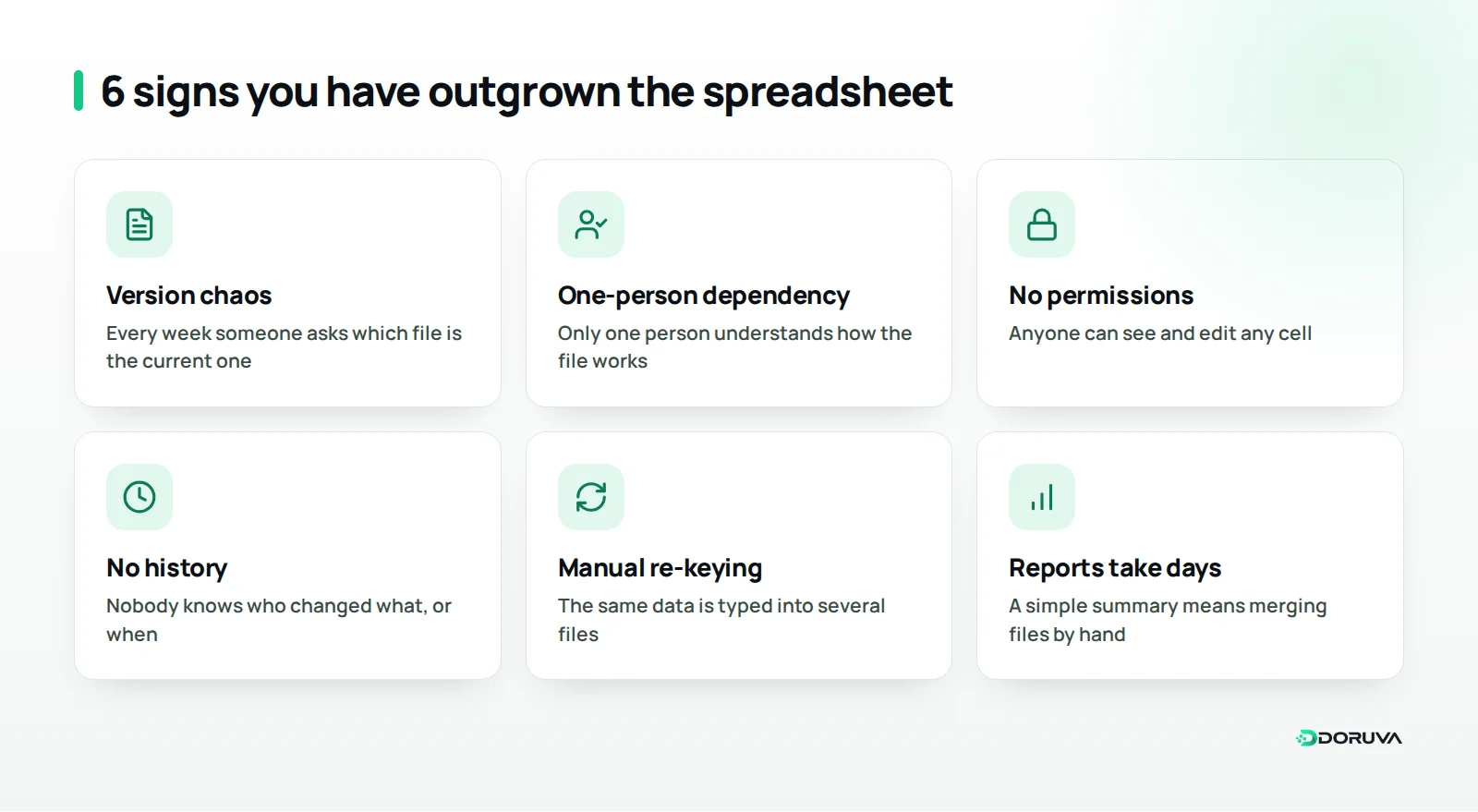
Take a concrete case. A company that installs and services air-conditioning units logs every call-out in a shared spreadsheet. Technicians are phoned throughout the day, job completions are typed in each evening, and spare-part usage sits in a separate file. At the end of the month, answering "how many visits did each customer get, and which parts did we use?" means merging two files and losing a day. At that point the issue is not anyone's spreadsheet skills; the process has simply outgrown what a spreadsheet can carry.
Risk is the other warning sign. In a file where anyone can edit any cell, a deleted row or a broken formula can go unnoticed for weeks. And a file full of customer details traveling around by email is a security and compliance problem in its own right.
Which process should you digitize first?
Start with a process that repeats often, involves several people and is expensive to get wrong. Trying to digitize everything at once wears the team out and drags the project on, while a clear win in one process builds confidence for the next.
When weighing up candidates, ask:
- How often does it happen? Work done dozens of times a day comes before work done once a month.
- How many people or departments touch it? Every hand-off is a chance for information to get lost or garbled.
- What does a mistake cost? A quote sent at the wrong price or a forgotten service visit costs money and customers directly.
- How much manual re-keying is there today? Processes where the same data is typed into several places are the best candidates for business process automation.
Common starting points for smaller businesses include quotes and orders, service and support requests, stock movements, purchase approvals, leave and expense requests, and customer follow-up. For a small manufacturer it might be the order-to-production-to-dispatch flow; for an accounting practice, collecting and tracking client documents.
Write down today's baseline first
Before you switch, make a simple note of how the chosen process performs today: how long it takes to enter an order, how many hours the month-end report eats up, which mistakes have happened recently. These notes do not need to be precise measurements, but a few weeks after the switch they let you answer "did it actually help?" with something concrete. They are also the most persuasive way to show the team what the new system has bought them.
Off-the-shelf tool or a system built for you?
If your process looks much like other businesses' processes, an off-the-shelf tool is usually the better fit; if it is shaped by rules that set you apart, a custom system serves you better, and for many SMBs the most efficient answer is a mix of both. A common setup is an off-the-shelf CRM for customer follow-up and standard accounting software, with a custom application handling the business-specific order and production flow and connecting to both.
Whichever route you take, think early about how the new system will talk to the tools you already use. If data still moves between it and your accounting software, online store or courier by hand, the spreadsheet habit of copy and paste has simply moved house. Plan the built-in connectors of an off-the-shelf tool, or the integrations a custom system needs, as part of the scope from the start.
We cover seven questions to guide that decision in our article on off-the-shelf versus custom software. The comparison below summarizes the three options in front of you when you move off spreadsheets.
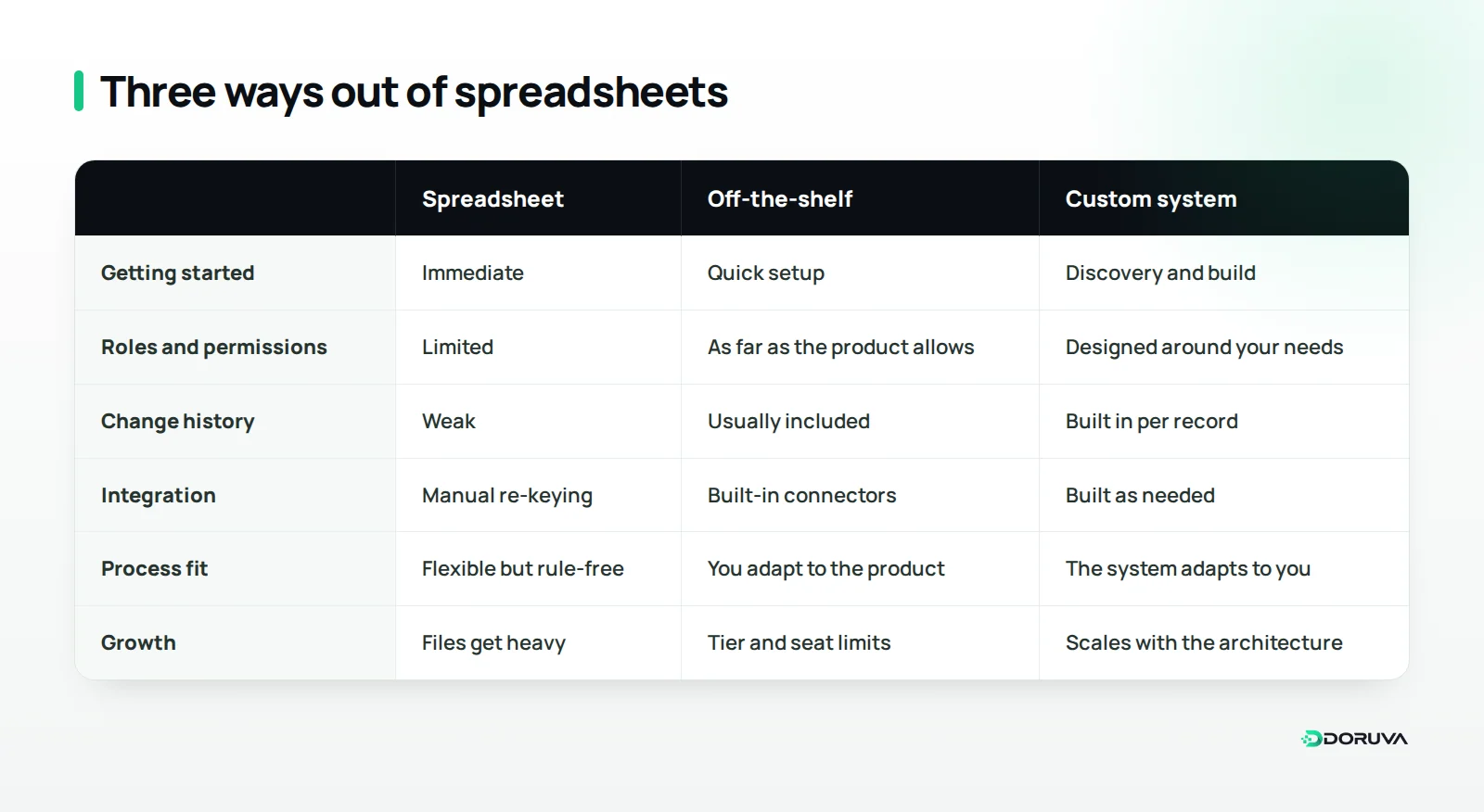
If you are an agency or a project-based team, a ready-made team management and CRM panel such as Doruva One, which brings clients, projects, tasks and team communication into one place, can be a quick way out of spreadsheets and chat groups without building anything from scratch. If your industry's own rules dominate the work, a custom system will fit better over the long run.
How do you move from spreadsheets to a system, step by step?
The move runs through six steps: map the process, clean the data, design the data structure, pilot with a small group, run old and new in parallel for a short, fixed period, and archive the old file. Following that order is the safest way to switch without stopping the business or losing data.
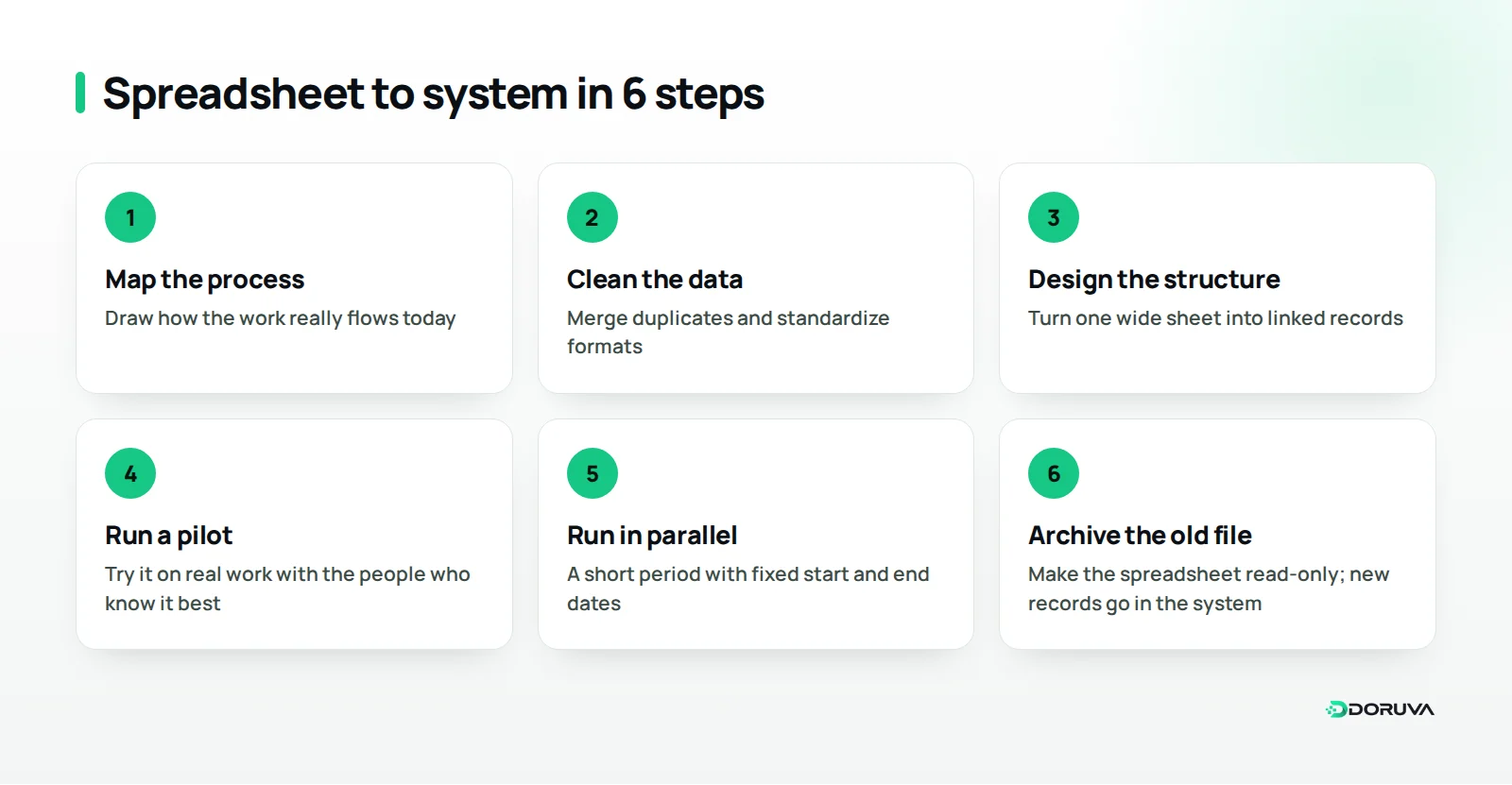
- Map the process as it really is: draw where the work starts, who hands it to whom, which approvals it passes and where it ends. Ask why every column in the spreadsheet exists; you will find some that nobody uses any more.
- Clean the data: merge different spellings of the same customer, remove empty and broken rows, and standardize date and phone formats.
- Design the data structure: the single wide sheet becomes linked tables such as customers, orders and products. That structure lives in the database behind the system and ensures each piece of information is stored in exactly one place.
- Start with a small pilot: try the system on real work with the few people who know the process best. Missing fields and unnecessary steps surface here.
- Plan a short parallel run: old file and new system can run side by side for a while, but the start and end dates must be fixed up front. A parallel run that drags on means double the work and two versions of the truth.
- Lock the old file as a read-only archive: once the switch is complete, close the spreadsheet to edits and keep it for historical reference. New records are created only in the system.
If you want to plan these steps as a proper software project, our guide on how to run a custom software project walks through each phase from discovery to launch.
What should you watch for when migrating data?
The single most important rule is not to carry dirty data into the new system; if spreadsheet inconsistencies come across unchanged, the new system looks unreliable from day one. The table below pairs common spreadsheet problems with how a well-built system handles them.
| In the spreadsheet | In the system |
|---|---|
| The same customer on several rows under different names | One record per customer, with a unique customer ID |
| Free-text statuses ("done", "finished", "ok") | A predefined list of statuses |
| Dates and phone numbers in mixed formats | Format checks at the point of entry |
| Formulas broken by accident | Calculations run as system rules |
| No idea who changed what | Change history on every record |
| Files emailed back and forth | Role-based access through a single login |
Do the migration as a trial run at least once before the real thing. Afterwards, compare record counts, spot-check randomly chosen records against the old file, and only proceed to the final migration when the results match.
Personal data and data protection
If the data includes customer, employee or supplier details, it is personal data and falls under data protection law. In Turkey that means Law No. 6698 on the Protection of Personal Data, known as KVKK; businesses serving EU residents also need to consider the GDPR. A migration is a good moment to review what you actually hold, drop what you no longer need and limit who can see what. The Turkish data protection authority publishes its official guidance at kvkk.gov.tr. This section is for general information only; please seek legal advice on the obligations that apply to your specific situation.
How do you get the team to actually use the new system?
Build the system with your team rather than for them, and close the old route on a fixed date. Even a technically flawless system fails if people keep slipping back to the spreadsheet.
- Name a process owner: one person makes sure the system is used properly, questions get answered and feedback is collected.
- Involve users early: pick the pilot group from the heaviest future users; a system shaped by their suggestions is far easier to adopt.
- Write short, visual how-tos: one-page notes such as "how to open a new order" beat long manuals.
- Make the payoff visible: showing that the month-end report now takes minutes is more persuasive than any pep talk.
- Close the old route: once the parallel run ends, stop new entries in the spreadsheet, or you will end up with two versions of the truth.
Treat complaints in the first few weeks as input for improving the system, not as resistance. Making small adjustments quickly is one of the best ways to build the team's trust in the new way of working.
Summary and next steps
Moving from spreadsheets to a system does not have to be a sweeping transformation program. Pick the one process that hurts most, map how it really works today, clean the data before you move it, switch over through a short pilot and a dated parallel run, and archive the old file. The win in that first process gives you both the method and the team's confidence for the next one.
At Doruva we help small and mid-sized businesses move work out of spreadsheets and chat groups into a single system, using existing tools where they fit and custom-built software where they do not. If you would like help choosing where to start, talk to us about digitizing your processes.
Frequently Asked Questions
Should we stop using spreadsheets altogether?
No. Spreadsheets remain excellent for analysis, quick calculations and one-off reports. What should move out is operational record-keeping that several people edit at the same time.
How many processes should we digitize at once?
Starting with a single process is usually the safest approach. A clear result in that first process proves the method and builds the team's trust in the new system.
How long should old and new run side by side?
It depends on the business and how busy the process is, but the start and end dates should be fixed in advance. A parallel run that drags on means double work and inconsistent data.
What happens to historical records in our old spreadsheets?
Cleaned historical data can be migrated into the new system, or the old file can be kept as a read-only archive. The right choice depends on how often you need to look back at past records.
What should we watch for with customer data during migration?
Move only the data you genuinely need, restrict access by role and know where the data is stored. For obligations under KVKK or the GDPR in your specific case, get legal advice.