

What is HTTP/2?
Definition
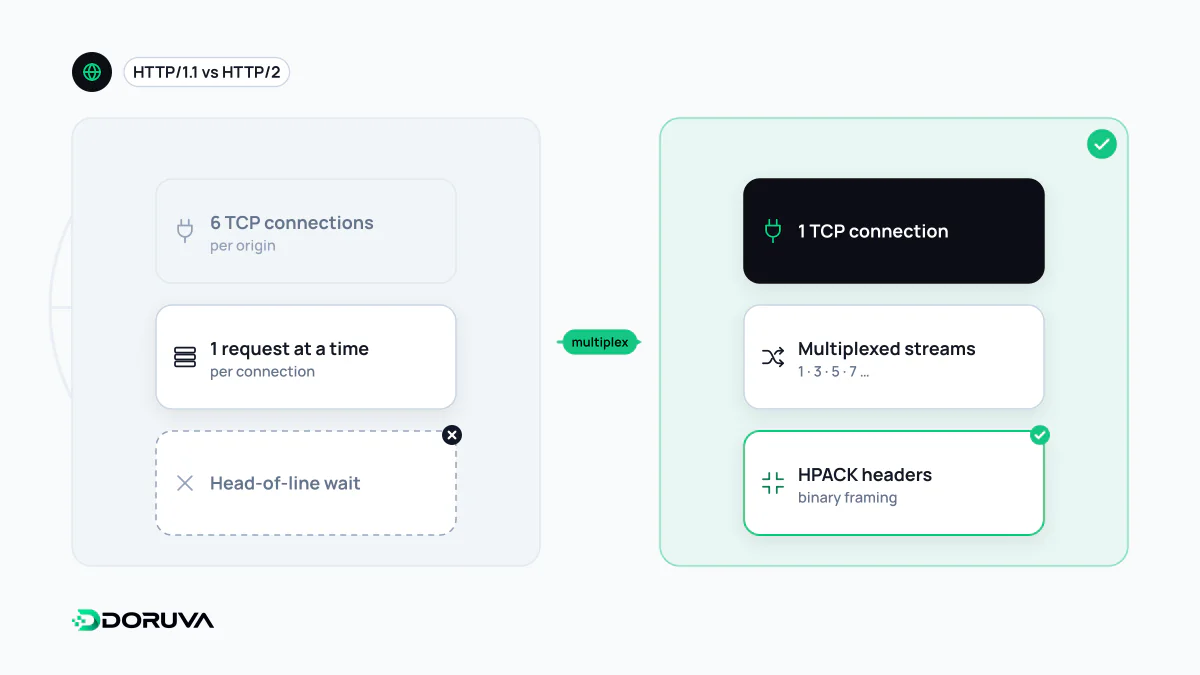
HTTP/2 is the second major version of the HTTP protocol, standardised in 2015. It splits requests and responses into binary frames so that many requests can travel concurrently over a single TCP connection (multiplexing), and it compresses headers with HPACK. Methods, status codes and headers keep the same meaning as in HTTP/1.1; only the way data is packaged and transported on the wire changes.
Also known as: HTTP 2, h2, HTTP2, RFC 9113
The HTTP/1.1 bottleneck
An HTTP/1.1 connection can only work on one response at a time. The next request waits until the previous response has fully arrived. Pipelining was specified to fix this but never took off in browsers, so browsers worked around it by opening several parallel connections per host, typically six. On a page with dozens of stylesheets, scripts and images, those slots fill up quickly and everything else queues.
A whole generation of performance tricks grew out of that limit: concatenating files into one bundle, packing icons into sprite sheets, and spreading assets across extra hostnames (domain sharding) to coax the browser into opening more connections. HTTP/2 removed the underlying constraint instead.
Streams, frames and multiplexing
In HTTP/2 every request-response exchange is a stream, and each stream is cut into small binary frames. Frames from different streams can be interleaved on the same TCP connection, and the receiver reassembles them using the stream identifier in each frame header. A small stylesheet no longer has to wait behind a large script; one connection carries dozens of exchanges in parallel.
Your application code sees no difference. The request and response model, methods, status codes and headers are unchanged. The difference shows up on the wire: the request line becomes pseudo-headers such as :method, :path and :authority, and header names are always lowercase.
$ curl -sI --http2 https://example.com/
HTTP/2 200
content-type: text/html; charset=UTF-8
cache-control: max-age=600
content-encoding: br
HPACK and repetitive headers
Most of the hundreds of requests behind a page load carry near-identical headers: the same user-agent, the same accept values, the same long cookie string. HTTP/1.1 resends all of it as plain text every time. HPACK (RFC 7541), the header compression format of HTTP/2, keeps a static table of common header fields plus a dynamic table that both sides build up over the life of the connection, so a header that has already been sent can be referenced by its index. This is separate from body compression: shrinking HTML, CSS and JavaScript is still the job of HTTP compression such as gzip or Brotli.
What happened to server push
HTTP/2 shipped with server push, which let a server send resources the browser had not asked for yet. Pushing critical CSS alongside the HTML was supposed to save a round trip. In practice the server cannot see what is already in the browser's cache, so push frequently wasted bandwidth on files the client already had. Chrome disabled it by default in Chrome 106, and Firefox followed in version 132 in October 2024. The replacements are preload hints and the 103 Early Hints status, both of which tell the browser what it will need and leave the decision to fetch with the browser.
Limits and practical notes
- TCP head-of-line blocking remains. One lost TCP packet stalls every stream on that connection until it is retransmitted, as the current specification, RFC 9113, states plainly. That is the main reason HTTP/3 moved to QUIC over UDP.
- Browsers only speak it over TLS. In browsers HTTP/2 runs on TLS as
h2, negotiated through ALPN during the handshake. Cleartexth2cis deprecated. - Old hacks can backfire. Domain sharding splits traffic that would otherwise share one well-warmed connection. Bundling is no longer mandatory, but whether to bundle is still a measured trade-off between compression ratio and cache granularity.
- Prioritisation was reworked. The dependency tree from RFC 7540 is deprecated in RFC 9113; the simpler Extensible Priorities scheme (RFC 9218) replaces it.
To check what your site negotiates, open the Network panel in Chrome DevTools and enable the Protocol column; h2 means HTTP/2. The SEO Checker also reports the protocol agreed during the TLS handshake.