

What is Clickjacking?
Definition
Clickjacking is an attack in which a page is loaded inside an invisible or disguised iframe on another site, so that a user clicks a button on it without realising. The user thinks they are clicking something harmless while actually changing a setting or confirming an action on a site where they are logged in. The main defence is restricting framing with the CSP frame-ancestors directive and the X-Frame-Options header.
Also known as: UI redressing, UI redress attack, click hijacking
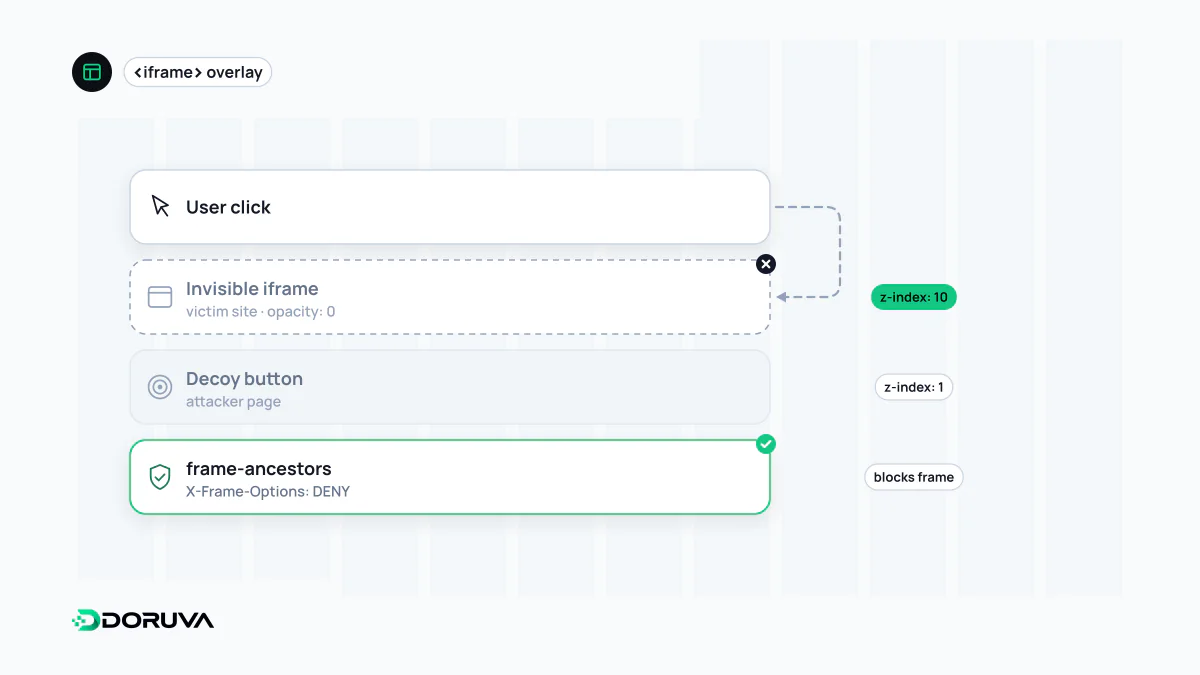
The button you see is not the button you press
The idea behind clickjacking is simple. The attacker's page loads a page from the target site in an iframe, makes the iframe transparent, and positions it exactly over an enticing button of its own. The visitor thinks they are clicking “claim your prize”; the click actually lands on “delete account”, “confirm payment” or “allow camera access” in the invisible layer. If the visitor is logged in to the target site, the action runs with their own permissions.
So the weakness is not a bug in the target's code but the fact that its pages can be framed by another origin. Account settings, payment confirmations, social “follow” or “like” buttons and one-click admin actions are typical targets. From the user's point of view it is a close relative of dark patterns, except that the deception is staged on someone else's site.
The real fix: the server decides who may frame it
The browser enforces framing rules, but the server sets them through HTTP headers. The modern control is the frame-ancestors directive of Content Security Policy; X-Frame-Options can be sent alongside it for older browsers.
# Never allow framing
Content-Security-Policy: frame-ancestors 'none'
X-Frame-Options: DENY

# Allow framing only by our own site
Content-Security-Policy: frame-ancestors 'self'
X-Frame-Options: SAMEORIGIN

# Ourselves plus one named partner
Content-Security-Policy: frame-ancestors 'self' https://partner.example
Details that matter in practice:
- The
ALLOW-FROMvalue ofX-Frame-Optionsis ignored by modern browsers. To allow a specific external site,frame-ancestorsis the only option. - Neither control works when set through a
<meta http-equiv>tag. Both must be real response headers. frame-ancestorslimits who may embed your page. It is easy to confuse withframe-src, which limits what your page may embed.- Pages that are meant to be embedded elsewhere, such as an embeddable widget, should get a wider policy on those routes only, not across the whole site.
Extra layers, and what no longer counts
OWASP's clickjacking guidance lists SameSite session cookies as an additional layer: cookies marked Lax or Strict are not attached to requests from an iframe embedded on another site, so a framed page appears logged out. That only helps when the targeted action needs a session. Old “frame-busting” scripts, which detect framing in JavaScript and break out to the top window, are not a dependable defence and do not replace the headers.
Requiring re-authentication or an explicit confirmation step for sensitive actions also pays off here, and against CSRF-style attacks that make a user act without intending to.
Checking your own pages
In the browser's developer tools, open the Network tab, select the main HTML response and look for frame-ancestors inside content-security-policy, or for x-frame-options. On the command line, curl -sI https://example.com shows the same headers. Doruva's SEO Checker also flags the absence of both headers, for information, in its security headers section.