

What is Content Security Policy (CSP)?
Definition
Content Security Policy (CSP) is an HTTP response header that tells the browser which sources a page may load scripts, styles, images and connections from, and which sites may embed it in a frame. The browser blocks anything the policy does not allow. It is mainly used as an additional layer of defence that makes injected scripts much harder to execute in cross-site scripting (XSS) attacks.
Also known as: CSP, Content-Security-Policy header, CSP header, strict CSP
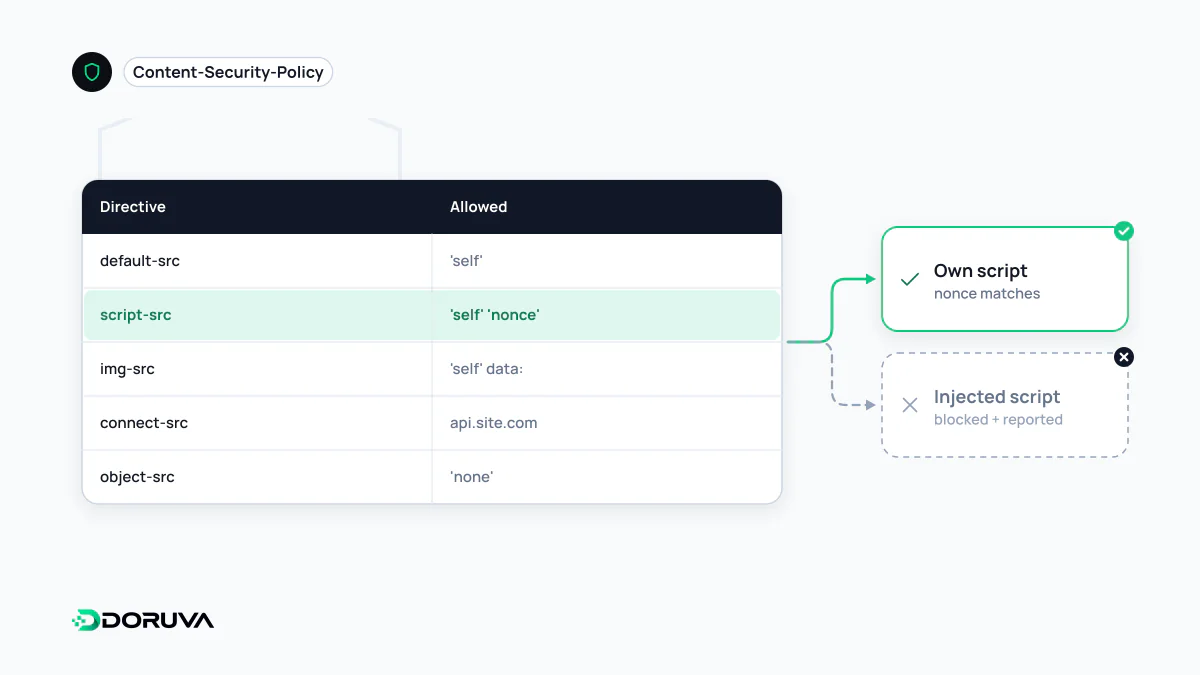
An allowlist the browser enforces
By default a page may run scripts from anywhere, send requests to any host and be framed by any site. CSP narrows that freedom. The server sends a set of rules in the Content-Security-Policy HTTP header; for the lifetime of the page the browser blocks every resource that breaks those rules and logs a violation to the console. Its primary target is XSS: even if an attacker manages to inject a script tag, the script will not run unless it satisfies the policy.
Directives you will meet most often
| Directive | Controls |
|---|---|
default-src | Fallback for any resource type not listed separately |
script-src | JavaScript sources; the part that matters most |
style-src, img-src, font-src | Stylesheets, images and fonts |
connect-src | Destinations for fetch, XHR and WebSocket connections |
frame-ancestors | Who may embed the page; the flexible successor to X-Frame-Options against clickjacking |
object-src, base-uri | Plugin content and the <base> element; usually 'none' in strict policies |
upgrade-insecure-requests | Upgrades the page's HTTP subresource requests to HTTPS |
Nonces beat domain allowlists
The intuitive approach is to list trusted domains. In practice such policies tend to leak: a large CDN or analytics host you allow may also serve scripts an attacker can abuse. The recommended alternative is a strict CSP. On every response the server generates an unpredictable random nonce and writes it both into the header and into each legitimate <script> tag:
Content-Security-Policy: script-src 'nonce-k9Qz2xL7' 'strict-dynamic'; object-src 'none'; base-uri 'none'

<script nonce="k9Qz2xL7" src="/js/app.js"></script>
An injected script that does not know the nonce is refused. 'strict-dynamic' extends trust to scripts loaded by an already trusted script, which makes tag managers and third-party loaders workable, but it widens trust transitively and deserves a deliberate decision. Static sites can use 'sha256-…' hashes of inline script contents instead of nonces. When a nonce or hash is present, browsers ignore 'unsafe-inline'; relying on 'unsafe-inline' alone throws away most of CSP's protection against XSS.
Report first, enforce later
Dropping a strict policy onto a live site can quietly break analytics, chat widgets or payment forms. The safer route is to ship it first as Content-Security-Policy-Report-Only. With that header the browser blocks nothing and only sends violation reports to the endpoint named by report-to (or the older report-uri). Once the reports are clean and the legitimate sources are covered, the same rules move to the enforcing header. MDN keeps a current guide to CSP and its directives.
Limits worth knowing
CSP is a second line of defence, not a substitute for encoding user data correctly when it is written into HTML. A loose policy, or a compromised allowed source, still lets XSS through, and CSP does not fully stop script-less attacks such as injected markup that changes what a page shows. Plan it together with the other security headers. Note too that a policy delivered via <meta http-equiv> does not support frame-ancestors, report-uri or sandbox, so send it as a real HTTP header wherever possible.