

What is CORS (Cross-Origin Resource Sharing)?
Definition
CORS (Cross-Origin Resource Sharing) is the mechanism by which a server uses HTTP headers to declare which other origins may read its responses through JavaScript running in a browser. It relaxes the browser's default same-origin policy in a controlled way. CORS is enforced by browsers, not servers, so it offers no protection against requests sent to the server directly.
Also known as: Cross-Origin Resource Sharing, CORS error, CORS policy, Access-Control-Allow-Origin, CORS preflight
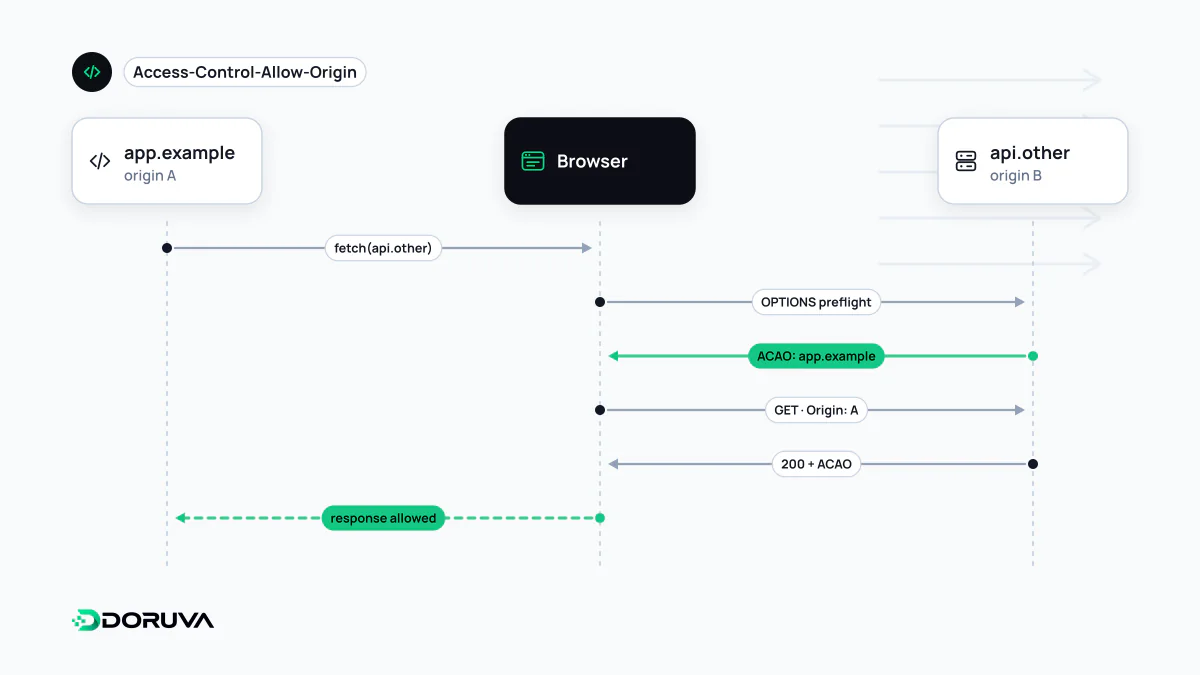
The rule CORS relaxes
To a browser, an origin is the combination of scheme, host and port. https://example.com and http://example.com differ in scheme, https://api.example.com differs in host, and https://example.com:8080 differs in port, so all of them are separate origins. Under the same-origin policy, script on one page can send requests to another origin but, as a rule, cannot read the response. That is what stops a malicious site in one tab from reading your data on a site where you are logged in.
Modern applications, though, routinely run the front end on app.example.com and the API on api.example.com. CORS is the standard way for a server to say "I allow this origin to read my responses", and it does so entirely through HTTP headers.
Simple requests versus preflighted ones
A request counts as "simple" when it uses GET, HEAD or POST, only safelisted headers and a content type of text/plain, multipart/form-data or application/x-www-form-urlencoded. The browser sends it straight away and then decides, based on Access-Control-Allow-Origin, whether the calling script may see the response.
Use an HTTP method such as PUT or DELETE, a header such as Authorization or a JSON body, and the browser first asks permission with an OPTIONS request, the preflight:
OPTIONS /api/orders/42 HTTP/1.1
Origin: https://dashboard.example.com
Access-Control-Request-Method: DELETE
Access-Control-Request-Headers: authorization

HTTP/1.1 204 No Content
Access-Control-Allow-Origin: https://dashboard.example.com
Access-Control-Allow-Methods: GET, POST, DELETE
Access-Control-Allow-Headers: Authorization, Content-Type
Access-Control-Max-Age: 600
Vary: Origin
If the answer allows it, the real DELETE follows. Access-Control-Max-Age says how many seconds the browser may cache that permission, and Vary: Origin stops a shared cache from handing one origin's response to another when the header value depends on the caller.
Credentials and the wildcard trap
By default, cross-origin requests carry no cookies. When the client opts in with credentials: "include", the server must reply with Access-Control-Allow-Credentials: true and name an explicit origin; a response with Access-Control-Allow-Origin: * is rejected. The dangerous shortcut seen in many codebases is echoing back whatever Origin header arrives. Combined with credentials, that lets any website read a logged-in user's data. Keep an allowlist of origins on the server and respond only to those that match.
What CORS does not do
CORS is enforced by browsers alone. curl, a server-side script or a bot ignores these headers completely and can call your API however it likes. Even in a browser, a simple POST still reaches the server and is processed; CORS only hides the response from the calling script. Access control therefore belongs in server-side authorization, and state-changing endpoints still need protection against CSRF.
When the console reports a "blocked by CORS policy" error, the fix is almost always in the server configuration: the request usually reached the server and only the browser withheld the response. Changing front-end code rarely helps. The full rules are documented in MDN's CORS guide.