

What is Authorization?
Definition
Authorization is the process of deciding what an authenticated user, application or service is allowed to do with a specific resource. It grants or denies access based on roles, permissions, ownership or contextual rules. Where authentication answers "who are you?", authorization answers "are you allowed to do this?" — and it always runs after identity has been established.
Also known as: AuthZ, Access control, Authorisation
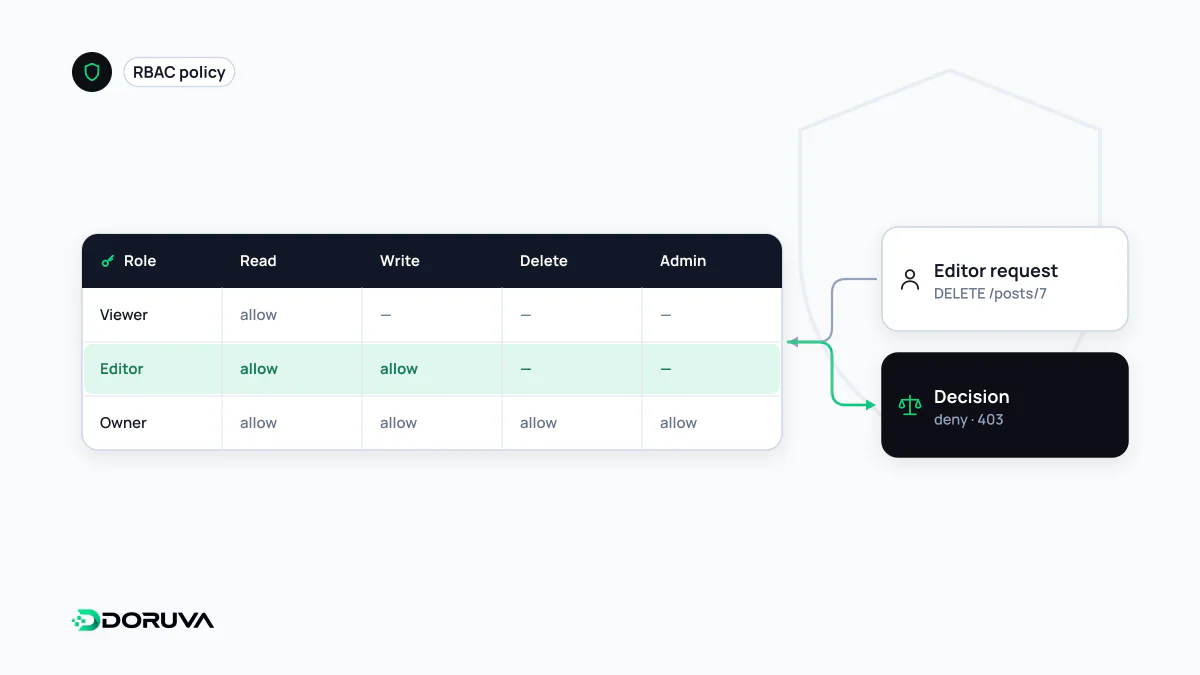
How it differs from authentication
The two are easy to confuse because they sit behind the same login screen, but they answer different questions in a fixed order. Authentication establishes who is making the request; authorization then decides whether that identity may perform the requested action. Showing your ID at a bank is authentication; being able to withdraw only from your own account is authorization.
HTTP expresses the distinction with two different status codes:
| 401 Unauthorized | 403 Forbidden | |
|---|---|---|
| Meaning | No valid credentials were presented | The server knows who you are, but you may not do this |
| Typical cause | Missing, expired or badly signed token | A user with the editor role tries to delete accounts |
| What the client should do | Authenticate and retry | Nothing — logging in again won't change the answer |
The naming is a historical accident: 401 "Unauthorized" really means unauthenticated and comes with a WWW-Authenticate header, while 403 is the code for insufficient permissions (RFC 9110). Some APIs deliberately return 404 instead of 403 when even the existence of a resource should stay hidden.
Access control models
- RBAC (role-based access control): permissions are attached to roles such as admin, editor or viewer, and roles are assigned to users. It is easy to reason about and audit, and a sensible default for most business applications. It degrades into "role explosion" when every exception becomes a new role.
- ABAC (attribute-based access control): decisions use attributes of the user, the resource and the context — department, document classification, time of day, network. More expressive, but the rules take more effort to test.
- ReBAC (relationship-based access control): access follows relationships between objects, e.g. "the owner of a folder can edit the documents inside it". A natural fit for products built around sharing.
- ACLs (access control lists): each resource carries an explicit list of who may do what, the model familiar from file systems.
Delegated access between applications is a related but separate problem: OAuth lets a user grant an app limited, scoped access without handing over their password.
Two checks, not one
This Express.js example enforces a function-level permission and an object-level ownership check:
function requirePermission(permission) {
  return (req, res, next) => {
    if (!req.user) return res.status(401).end();                              // not authenticated
    if (!req.user.permissions.includes(permission)) return res.status(403).end(); // not allowed
    next();
  };
}

app.delete("/api/invoices/:id", requirePermission("invoice:delete"), async (req, res) => {
  const invoice = await findInvoice(req.params.id);
  // Object level: does this invoice belong to the caller's company?
  if (!invoice || invoice.companyId !== req.user.companyId) return res.status(404).end();
  await deleteInvoice(invoice.id);
  res.status(204).end();
});
The second check is the one teams forget. Having the "delete invoice" permission does not mean you may delete another tenant's invoices. When changing an ID in the URL exposes someone else's data, you have an IDOR — also called BOLA (broken object level authorization) — one of the most common API security flaws.
Best practices
- Enforce on the server. Hiding a button in the UI is not authorization; the request can be sent straight to the API.
- Deny by default. Anything not explicitly permitted should be refused.
- Apply least privilege. Give users and service accounts only the permissions their job requires.
- Centralise the rules. Permission logic scattered across endpoints drifts out of sync; use one policy layer or shared helpers.
- Remember token lifetimes. A role baked into a JWT stays usable until the token expires, so revoking a role may not take effect immediately.