

What is SDK (Software Development Kit)?
Definition
An SDK (software development kit) is a bundle of tools that makes it easier to build software for a specific platform, service or device. It typically contains client libraries, API wrappers, documentation and sample code, and sometimes compilers, emulators or command-line tools. A payment provider's SDK, for example, turns raw HTTP requests into ready-made functions with authentication and error handling built in.
Also known as: software development kit, devkit, dev kit, client SDK
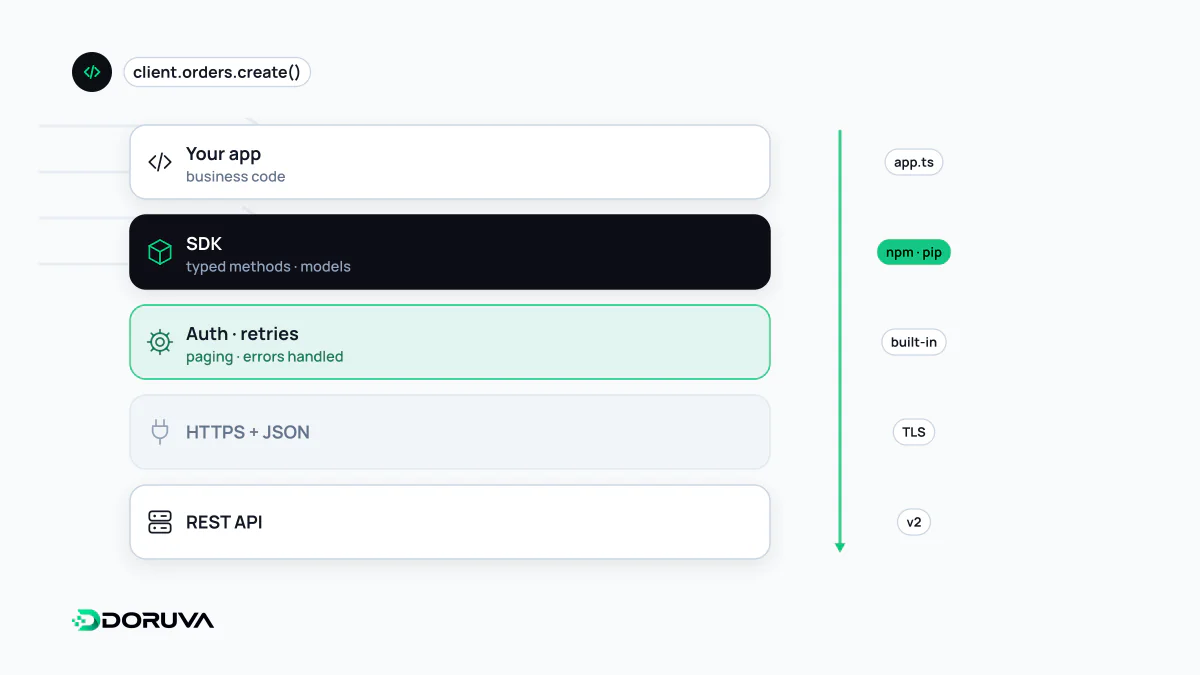
API, SDK, library: who is who
The three terms get mixed up because they usually arrive together. An API is the contract between two pieces of software: which address to call, in which format, and what comes back. A library is reusable code that does a specific job and that your code calls. An SDK is the package that bundles what you need to work with a platform or service: one or more libraries wrapping its API, documentation, examples and, where relevant, development tools.
Put simply, the API defines what can be said and the SDK lets you say it in your own programming language. An SDK is not a framework that runs your application's flow; it does nothing until you call it.
What a good SDK handles for you
Compare the same call made over raw HTTP and through an SDK (the examplepay package is illustrative):
// Raw HTTP
const res = await fetch("https://api.examplepay.com/v1/charges", {
  method: "POST",
  headers: {
    Authorization: `Bearer ${process.env.EXAMPLEPAY_KEY}`,
    "Content-Type": "application/json",
    "Idempotency-Key": orderId,
  },
  body: JSON.stringify({ amount: 4999, currency: "EUR" }),
});
if (!res.ok) { /* status codes, retries, error body... */ }

// With the SDK
const charge = await examplepay.charges.create(
  { amount: 4999, currency: "EUR" },
  { idempotencyKey: orderId },
);
Behind that single call, a well-built SDK usually takes care of:
- Authentication and request signing, including sending your API key in the right header.
- Retries with exponential backoff for transient failures, plus sensible timeouts.
- Pagination, so you can iterate over thousands of records in one loop.
- Typed models, so editors autocomplete fields and languages like TypeScript catch mistakes before runtime.
- Security-sensitive helpers such as verifying webhook signatures.
Platform SDKs and service SDKs
The word covers two scales. Platform SDKs let you build for an operating system or device: the Android SDK, the SDKs that ship with Xcode for Apple platforms, game console kits. They include compilers, emulators, debuggers and system libraries. Service SDKs wrap a cloud or SaaS product's REST API for different programming languages: payments, email delivery, object storage, maps, analytics and AI services all publish them.
Questions before adding one
- Official or community-maintained? Vendor SDKs tend to track API changes faster. Community packages can be excellent but may be abandoned.
- Maintenance and versioning. When was the last release, and how are breaking changes announced? Every SDK is another dependency you have to update and monitor for vulnerabilities.
- Size and runtime. A browser SDK adds page weight, and some SDKs rely on modules unavailable in edge or serverless runtimes.
- Data collection. Mobile analytics, advertising and crash-reporting SDKs in particular may collect device data and user behaviour. Knowing what leaves the device, and where it goes, is your responsibility under privacy law.
- Licence. Is the source available, and does the licence allow commercial use?
When to skip the SDK
If you only use one or two endpoints, the SDK's dependency tree and bundle size can cost more than a few lines of HTTP. You will also call the API directly when you need a feature the SDK does not support yet, or when your runtime is incompatible with it. Just remember that everything the SDK did for you, from retries and timeouts to signature checks, is now your job.